> ## Documentation Index
> Fetch the complete documentation index at: https://docs.abbyy.com/llms.txt
> Use this file to discover all available pages before exploring further.
# Essential testing setup
> Set up ABBYY FlexiCapture performance tests using the SingleEntryPoint project, automated Scanning Stations, a standard 69-page batch, and monitored throughput.
By gradually sending identical batches of images to the Application Server, Automated Scanning Stations help generate a specific workload.
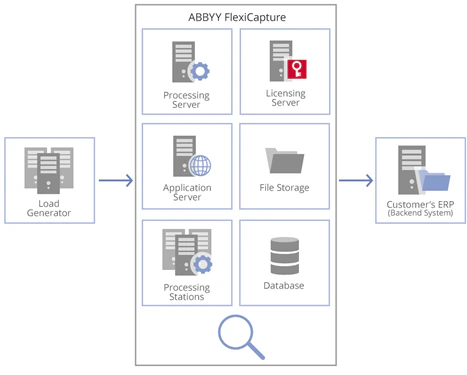 Input images are processed automatically by the System:
**Import from a Scanning Station → Pre-processing → Recognition → Export → Processed stage.**
The SingleEntryPoint shipped with ABBYY FlexiCapture is used for performance testing as standard.
It contains 5 *document definitions*: 4 flexible ones (Letters, Contracts, Prices, Invoices) and 1 fixed (Banking), which includes 3 sections and annex pages.
Input images arrive for processing as separate sets of pages. The batch used in the test as a standard contains 69 pages (27 documents). Depending on the goals of testing, the color mode and the number of images in the batch may vary. At the Recognition stage, they are assembled into documents after the *document definitions* are applied.
Processed documents are received in the shared SMB folder:
* Extracted data exported as CSV files
* Images saved as color TIFF files
The old files and data are automatically cleaned up by a standard procedure at the Application Server: batches older than 1 hour, and logs and statistics older than 24 hours are deleted during the cleanup.
The server configuration and number of processing CPU cores vary depending on the goals of the testing.
The system is constantly monitored during tests. In addition to the counters (see the [System monitoring and bottleneck detection](/flexi-capture/performance-guide/pg-monitoring) section), these parameters are also controlled:
1. The *input flow* rate in pages/second and pages/24hours.
2. The *System performance* in pages/second and pages/24 hours.
3. The *average time* for processing 1 batch.
4. The *automated cleanup performance* in pages/24hours.
Each testing setup should run for at least 8 hours at a constant workload. Typical testing periods are:
* Express testing: 24 hours
* Standard testing: 72 hours
* Stability testing: 1-2 weeks.
With the verification stage, the workflow is as follows:
**Import from a Scanning Station → Pre-processing → Recognition → Verification → Export → Processed stage.**
At the Verification stage, automated clients emulate the verification operators’ job by receiving tasks, saving modified documents and forwarding the processed tasks to the next stage. In this case, the following parameters are also controlled:
1. The number of verifiers
2. The *time for getting a task* and the *time to save verification results* in seconds – key indicators of how easy it is for verification operators to use the System
Input images are processed automatically by the System:
**Import from a Scanning Station → Pre-processing → Recognition → Export → Processed stage.**
The SingleEntryPoint shipped with ABBYY FlexiCapture is used for performance testing as standard.
It contains 5 *document definitions*: 4 flexible ones (Letters, Contracts, Prices, Invoices) and 1 fixed (Banking), which includes 3 sections and annex pages.
Input images arrive for processing as separate sets of pages. The batch used in the test as a standard contains 69 pages (27 documents). Depending on the goals of testing, the color mode and the number of images in the batch may vary. At the Recognition stage, they are assembled into documents after the *document definitions* are applied.
Processed documents are received in the shared SMB folder:
* Extracted data exported as CSV files
* Images saved as color TIFF files
The old files and data are automatically cleaned up by a standard procedure at the Application Server: batches older than 1 hour, and logs and statistics older than 24 hours are deleted during the cleanup.
The server configuration and number of processing CPU cores vary depending on the goals of the testing.
The system is constantly monitored during tests. In addition to the counters (see the [System monitoring and bottleneck detection](/flexi-capture/performance-guide/pg-monitoring) section), these parameters are also controlled:
1. The *input flow* rate in pages/second and pages/24hours.
2. The *System performance* in pages/second and pages/24 hours.
3. The *average time* for processing 1 batch.
4. The *automated cleanup performance* in pages/24hours.
Each testing setup should run for at least 8 hours at a constant workload. Typical testing periods are:
* Express testing: 24 hours
* Standard testing: 72 hours
* Stability testing: 1-2 weeks.
With the verification stage, the workflow is as follows:
**Import from a Scanning Station → Pre-processing → Recognition → Verification → Export → Processed stage.**
At the Verification stage, automated clients emulate the verification operators’ job by receiving tasks, saving modified documents and forwarding the processed tasks to the next stage. In this case, the following parameters are also controlled:
1. The number of verifiers
2. The *time for getting a task* and the *time to save verification results* in seconds – key indicators of how easy it is for verification operators to use the System