> ## Documentation Index
> Fetch the complete documentation index at: https://docs.abbyy.com/llms.txt
> Use this file to discover all available pages before exploring further.
# Configure the FlexiCapture Cloud REST API
> Get started with the FlexiCapture Cloud REST API: create a regional web portal account, explore the demo application, and build a new application.
Before you start using the FlexiCapture Cloud REST API, you need to:
* Create an account on the FlexiCapture Cloud REST web portal for the region where the user tenant was created.
* Familiarize yourself with the web portal and REST API features using the demo application.
**Note:** A demo application is set up automatically after you create an account. It has a license for 500 pages, allowing the client to evaluate the performance of the Cloud REST API.
* Create a new application to use in your project. For more information about creating applications, see [Create applications using the FlexiCapture REST API interface](/flexi-capture/rest-api-apps).
* Verify that your new application processes your documents adequately.
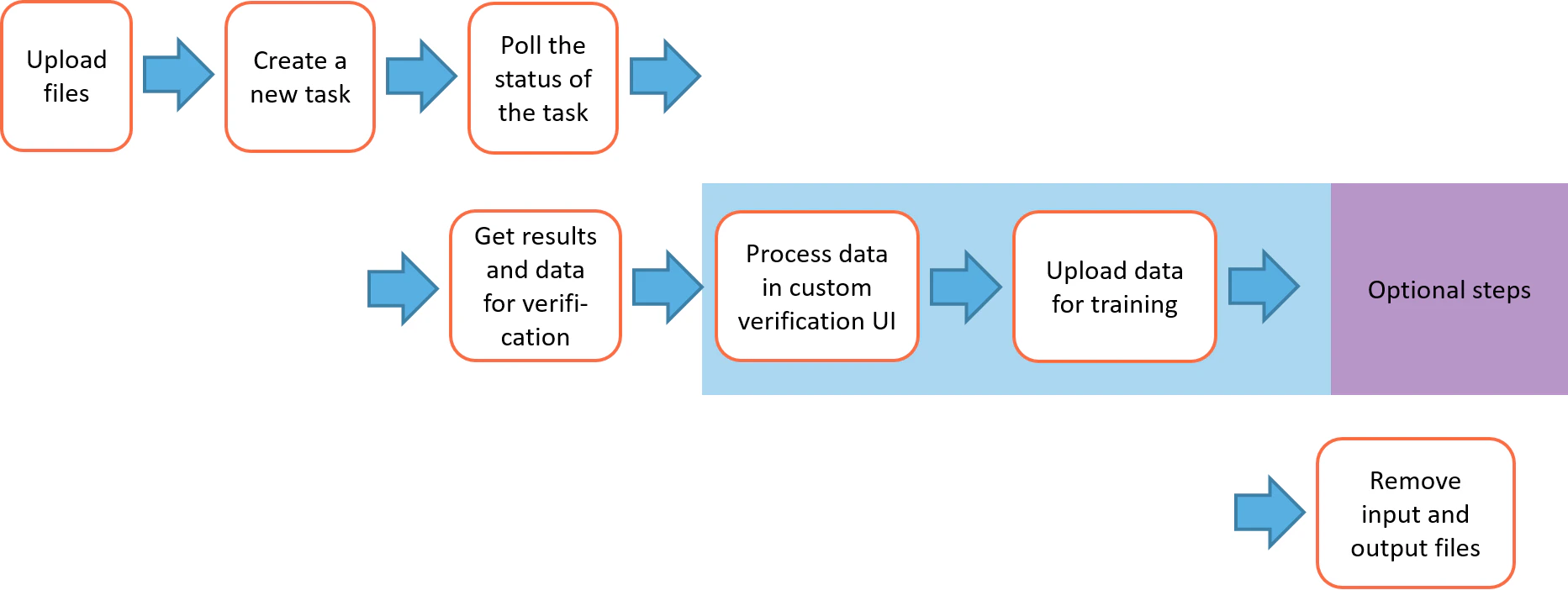
The various stages of the FlexiCapture Cloud REST API processing are shown in the diagram below: