> ## Documentation Index
> Fetch the complete documentation index at: https://docs.abbyy.com/llms.txt
> Use this file to discover all available pages before exploring further.
# FlexiCapture Server Tab of Options dialog box
> FlexiCapture Server tab in the Scanning Station Options dialog box sets the server address, authentication, proxy settings, and batch type update options.
On the **FlexiCapture Server** tab of the **Options** dialog box, you specify the FlexiCapture server that the Scanning Station uses. When you first launch the Scanning Station, you must specify this server.
## Open the FlexiCapture Server tab
Click **Tools → Options...**.
Click the **FlexiCapture Server** tab to configure the connection parameters.
## FlexiCapture Server connection options
The following connection options are available:
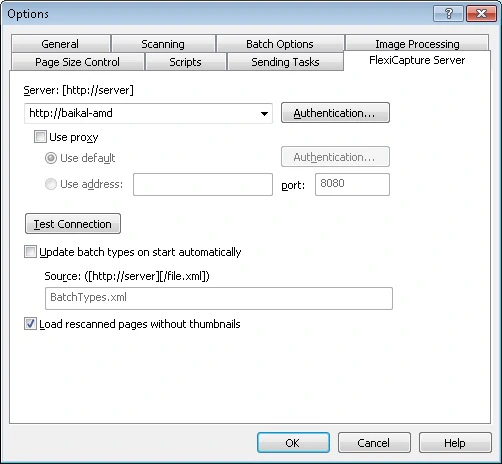 | **Option** | **Description** |
| ---------------------------------------------- | -------------------------------------------------------------------------------------------------------------------------------------------------------------------------------------------------------------------------------------------------------------------------------------------------------------------------------------------------------------------------------------------------------------------------------------------------------------------------------------------------------------------------------------------------------- |
| **Server** | Specify the server path in `https://server` format. **Note:** To work with a tenant's project, add the tenant's name to the server's address, in the form `https://#` (for example, `https://localhost#tenant`). |
| **Authentication...** | In the **Security** dialog box, specify the parameters used to log on to the proxy server or the FlexiCapture server. You can use either **Windows Integrated Security** or specify a user name and password. **Note:** To use a user name and password for authentication, you must set up Internet Information Services on the computer where the Application Server is installed (allow basic authentication for the folder `FlexiCapture\Server`) and grant the user the appropriate permissions in FlexiCapture. Contact your system administrator. |
| **Use proxy** | Enabling this option redirects traffic to the proxy server you specify. **Use default** — Select this option to use the proxy server specified in the system settings in **Start → Control Panel → Internet Options → Connections → LAN Settings**.
| **Option** | **Description** |
| ---------------------------------------------- | -------------------------------------------------------------------------------------------------------------------------------------------------------------------------------------------------------------------------------------------------------------------------------------------------------------------------------------------------------------------------------------------------------------------------------------------------------------------------------------------------------------------------------------------------------- |
| **Server** | Specify the server path in `https://server` format. **Note:** To work with a tenant's project, add the tenant's name to the server's address, in the form `https://#` (for example, `https://localhost#tenant`). |
| **Authentication...** | In the **Security** dialog box, specify the parameters used to log on to the proxy server or the FlexiCapture server. You can use either **Windows Integrated Security** or specify a user name and password. **Note:** To use a user name and password for authentication, you must set up Internet Information Services on the computer where the Application Server is installed (allow basic authentication for the folder `FlexiCapture\Server`) and grant the user the appropriate permissions in FlexiCapture. Contact your system administrator. |
| **Use proxy** | Enabling this option redirects traffic to the proxy server you specify. **Use default** — Select this option to use the proxy server specified in the system settings in **Start → Control Panel → Internet Options → Connections → LAN Settings**.
**Use address** — Select this option to use the proxy server and port specified on this tab. The default port is 8080. |
| **Test Connection** | Checks the connection to the server. |
| **Update batch types on start automatically** | Enable this option to automatically update the list of available batch types each time you start the Scanning Station. In the **Source: (`[https://server][/file.xml]`)** field, specify the file used for updating the list of batch types (for example, `BatchTypes.xml`). |
| **Load rescanned pages with small thumbnails** | Select this option to load pages from rescanning tasks with small thumbnails. |