> ## Documentation Index
> Fetch the complete documentation index at: https://docs.abbyy.com/llms.txt
> Use this file to discover all available pages before exploring further.
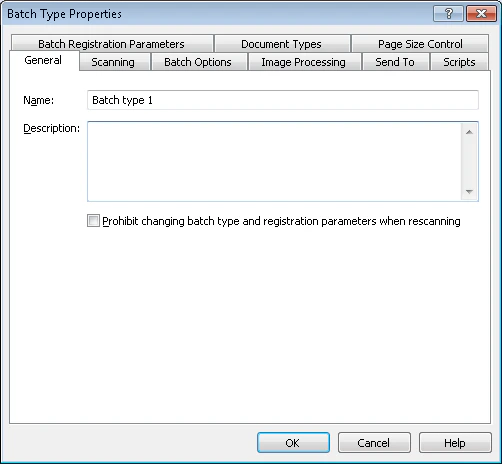
# Batch Type Properties dialog box
> Batch Type Properties dialog box in ABBYY Scanning Station edits scanner, separation, image processing, export, scripts, and registration settings.
In the **Batch Type Properties** dialog box, you can edit the properties of the selected batch type. Each tab configures a different group of settings.
## Batch type properties tabs
| Tab | Configure |
| --------------------------------- | ----------------------------------------------------------------------------------------------------------------------------- |
| **General** | [Batch Type Name and Comment](/flexi-capture/scanning-station/shared/interface/batch-type-general-page) |
| **Scanning** | [Scanner Source](/flexi-capture/scanning-station/shared/interface/scanning-options-page) |
| **Batch Options** | [Document and Batch Separation Options](/flexi-capture/scanning-station/shared/interface/batch-type-separation) |
| **Image Processing** | [Image Processing Parameters](/flexi-capture/scanning-station/shared/interface/image-processing-options) |
| **Send To** | [Export Options](/flexi-capture/scanning-station/interface/batch-type-export) |
| **Scripts** | [Scripts](/flexi-capture/scanning-station/shared/interface/batch-type-scripts) |
| **Page Size Control** | [Page Parameters Control](/flexi-capture/scanning-station/shared/interface/batch-type-size) |
| **Document Types** | [Document Types](/flexi-capture/scanning-station/shared/interface/batch-type-regparams) |
| **Document Types** | [Registration Parameters of Batches and Documents](/flexi-capture/scanning-station/shared/interface/reg-params) for documents |
| **Batch Registration Parameters** | [Registration Parameters of Batches and Documents](/flexi-capture/scanning-station/shared/interface/reg-params) for batches |
## Change batch type properties
Select the batch type from the **Selected batch type** drop-down list on the [Main Window Toolbars](/flexi-capture/scanning-station/interface/toolbars).
Click the **Batch Type Properties** button.