> ## Documentation Index
> Fetch the complete documentation index at: https://docs.abbyy.com/llms.txt
> Use this file to discover all available pages before exploring further.
# Batch Type Scripts
> Configure scripts on the Scripts tab in ABBYY Scanning Station: add, edit, delete, and run scripts for individual batches or a whole batch type.
Scripts can be configured for individual batches or for a group of batches of a certain type.
* **For individual batches**, scripts are configured on the **Scripts** tab of the [options dialog box](/flexi-capture/scanning-station/interface/options).
* **For a certain batch type**, you can add, edit, or delete scripts when creating the batch type with the [Batch Type Wizard](/flexi-capture/scanning-station/shared/interface/batch-type-wizard) or configure them on the **Scripts** tab of the [Batch Type Properties dialog box](/flexi-capture/scanning-station/shared/interface/batch-type-properties).
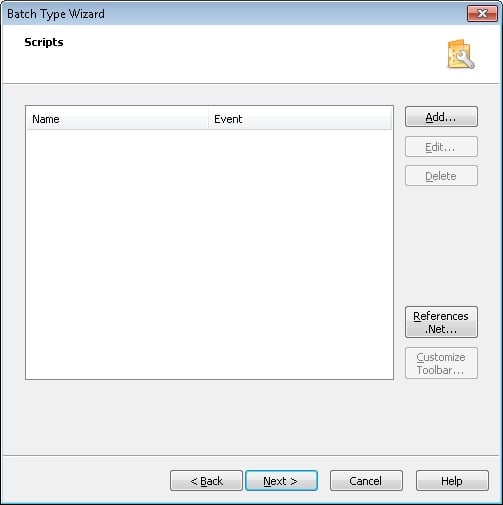 The **Scripts** tab displays the names of the scripts and the events that trigger them.
## Add, edit, and delete scripts
Use the buttons on the **Scripts** tab to manage scripts:
| Button | Action |
| ------------------------ | ------------------------------------------------------------------------------------------------------------------------ |
| **Add...** | Adds a new script. |
| **Edit...** | Opens the [Script Editor](/flexi-capture/scanning-station/shared/interface/script-editor) to modify the selected script. |
| **Delete** | Removes the selected script. |
| **Customize Toolbar...** | Opens the [Toolbar Customization dialog box](/flexi-capture/scanning-station/shared/interface/toolbar-customize). |
The button is grey if there are no scripts in the current batch type.
## Run a script
To run an added script:
Select the **Run Script** command from the **Edit** menu.
In the **Run Script** dialog box, select a script from the list of scripts available for this batch type.
Click **OK**.
You can also run scripts by clicking the corresponding buttons on the **Scripts** toolbar. For more information about the toolbars, see [Main Window Toolbars](/flexi-capture/scanning-station/interface/toolbars).
For more information about using scripts in ABBYY Scanning Station, see [Using scripts in ABBYY Scanning Station](/flexi-capture/scanning-station/scripts-main).
The **Scripts** tab displays the names of the scripts and the events that trigger them.
## Add, edit, and delete scripts
Use the buttons on the **Scripts** tab to manage scripts:
| Button | Action |
| ------------------------ | ------------------------------------------------------------------------------------------------------------------------ |
| **Add...** | Adds a new script. |
| **Edit...** | Opens the [Script Editor](/flexi-capture/scanning-station/shared/interface/script-editor) to modify the selected script. |
| **Delete** | Removes the selected script. |
| **Customize Toolbar...** | Opens the [Toolbar Customization dialog box](/flexi-capture/scanning-station/shared/interface/toolbar-customize). |
The button is grey if there are no scripts in the current batch type.
## Run a script
To run an added script:
Select the **Run Script** command from the **Edit** menu.
In the **Run Script** dialog box, select a script from the list of scripts available for this batch type.
Click **OK**.
You can also run scripts by clicking the corresponding buttons on the **Scripts** toolbar. For more information about the toolbars, see [Main Window Toolbars](/flexi-capture/scanning-station/interface/toolbars).
For more information about using scripts in ABBYY Scanning Station, see [Using scripts in ABBYY Scanning Station](/flexi-capture/scanning-station/scripts-main).