> ## Documentation Index
> Fetch the complete documentation index at: https://docs.abbyy.com/llms.txt
> Use this file to discover all available pages before exploring further.
# Document and Batch Separation Options
> Choose how ABBYY Scanning Station separates and names batches and documents: naming schemes, page-count rules, and blank page or barcode separators.
The naming and separation options for documents and batches can be selected for individual batches or for a group of batches of a certain type:
* **For individual batches** — The options are selected on the **Batch Options** tab of the [Options](/flexi-capture/scanning-station/interface/options) dialog box.
* **For a certain batch type** — The options are selected when creating the batch type with the [Batch Type Wizard](/flexi-capture/scanning-station/shared/interface/batch-type-wizard) and can be adjusted on the **Batch Options** tab of the [Batch Type Properties](/flexi-capture/scanning-station/shared/interface/batch-type-properties) dialog box.
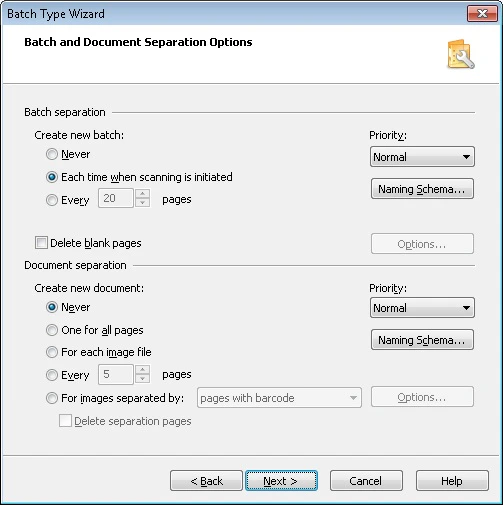 Specify the separation and naming options for batches and documents.
## Batch separation
**Naming Scheme...** — Opens the **Batch Name** dialog box, where you can set up batch naming rules for the selected batch type. Specify a batch naming rule in the **Batch naming scheme** field. This naming template is used when creating new batches.
A batch naming rule may use the following items:
* Current time
* Date
* Batch type
* Automatic numbering
* Registration parameters
To add any of these items to a rule, select the corresponding box. These elements are enclosed in angle brackets (`<>`) in the rule. All other items are entered without angle brackets and are used as they are.
Example: `Batch_` — the name of each new batch includes the prefix "Batch\_" and the current time.
By default, unique batch identifiers are used during automatic numbering. A unique identifier is not reused even after the batch it was assigned to is deleted.
Previous versions of ABBYY FlexiCapture used the total number of batches for automatic numbering. To enable this behavior, set the registry key `[HKEY_CURRENT_USER\Software\ABBYY\ScanStationFC\4.0\Shell] "NextBatchNumber"="-1"`. This key must be set for every user.
**Create new batch** — Specifies when a new batch is created during scanning:
* **Never** — All images are placed into one batch.
* **Each time scanning is initiated** — A new batch is created each time a scanning process starts.
* **Every n pages** — Every batch contains n pages.
## Document separation
**Naming Scheme...** — Opens the **Document Name** dialog box, where you can set up document naming rules for the selected batch type. Specify a document naming rule in the **naming scheme** field. This naming template is used when creating new documents.
A document naming rule may use the following items:
* Current time
* Date
* Barcode value
* Automatic numbering
* Batch name
To add any of these items to a rule, select the corresponding box. These elements are enclosed in angle brackets (`<>`) in the rule. All other items are entered without angle brackets and are used as they are.
Example: `Document_` — the name of each new document includes the prefix "Document\_" and the current time.
**Create new document** — Specifies when a new document is created during scanning:
* **Never** — All scanned images are placed into the batch. No new documents are created.
* **Every n pages** — Each document contains n pages.
* **For images separated by...** — A new document is created when a blank page or a page with a barcode is detected in the batch (select the appropriate option from the drop-down list).
If you separate documents by blank pages, you can specify the parameters of blank page detection in the [Empty Page Detection](/flexi-capture/scanning-station/shared/interface/empty-pages-settings) dialog box, which opens when you click the **Options...** button.
If you separate documents by barcodes, you can:
* Specify the type and value of the barcode in the **Barcode Options** dialog box, which opens when you click the **Options...** button. The barcode value can also be specified with a regular expression, where `*` indicates any string of characters and a question mark (`?`) indicates any single character.
* Select **Any type** for barcodes to create a new document upon detection of any [supported barcode type](/flexi-capture/scanning-station/shared/appendix/barcodes).
* Select **Any type (except post barcodes)** to create a new document when any barcode except a postal barcode is detected. Postal barcodes are not searched for, which speeds up recognition.
The **QR Code**, **Aztec**, **DataMatrix**, and **Code 39 without asterisk** barcode types must be specified explicitly. Barcodes of these types are not detected when **Any type** or **Any type (except post barcodes)** is selected.
**Delete separation pages** — Removes blank pages or pages with barcodes used to separate documents.
Specify the separation and naming options for batches and documents.
## Batch separation
**Naming Scheme...** — Opens the **Batch Name** dialog box, where you can set up batch naming rules for the selected batch type. Specify a batch naming rule in the **Batch naming scheme** field. This naming template is used when creating new batches.
A batch naming rule may use the following items:
* Current time
* Date
* Batch type
* Automatic numbering
* Registration parameters
To add any of these items to a rule, select the corresponding box. These elements are enclosed in angle brackets (`<>`) in the rule. All other items are entered without angle brackets and are used as they are.
Example: `Batch_` — the name of each new batch includes the prefix "Batch\_" and the current time.
By default, unique batch identifiers are used during automatic numbering. A unique identifier is not reused even after the batch it was assigned to is deleted.
Previous versions of ABBYY FlexiCapture used the total number of batches for automatic numbering. To enable this behavior, set the registry key `[HKEY_CURRENT_USER\Software\ABBYY\ScanStationFC\4.0\Shell] "NextBatchNumber"="-1"`. This key must be set for every user.
**Create new batch** — Specifies when a new batch is created during scanning:
* **Never** — All images are placed into one batch.
* **Each time scanning is initiated** — A new batch is created each time a scanning process starts.
* **Every n pages** — Every batch contains n pages.
## Document separation
**Naming Scheme...** — Opens the **Document Name** dialog box, where you can set up document naming rules for the selected batch type. Specify a document naming rule in the **naming scheme** field. This naming template is used when creating new documents.
A document naming rule may use the following items:
* Current time
* Date
* Barcode value
* Automatic numbering
* Batch name
To add any of these items to a rule, select the corresponding box. These elements are enclosed in angle brackets (`<>`) in the rule. All other items are entered without angle brackets and are used as they are.
Example: `Document_` — the name of each new document includes the prefix "Document\_" and the current time.
**Create new document** — Specifies when a new document is created during scanning:
* **Never** — All scanned images are placed into the batch. No new documents are created.
* **Every n pages** — Each document contains n pages.
* **For images separated by...** — A new document is created when a blank page or a page with a barcode is detected in the batch (select the appropriate option from the drop-down list).
If you separate documents by blank pages, you can specify the parameters of blank page detection in the [Empty Page Detection](/flexi-capture/scanning-station/shared/interface/empty-pages-settings) dialog box, which opens when you click the **Options...** button.
If you separate documents by barcodes, you can:
* Specify the type and value of the barcode in the **Barcode Options** dialog box, which opens when you click the **Options...** button. The barcode value can also be specified with a regular expression, where `*` indicates any string of characters and a question mark (`?`) indicates any single character.
* Select **Any type** for barcodes to create a new document upon detection of any [supported barcode type](/flexi-capture/scanning-station/shared/appendix/barcodes).
* Select **Any type (except post barcodes)** to create a new document when any barcode except a postal barcode is detected. Postal barcodes are not searched for, which speeds up recognition.
The **QR Code**, **Aztec**, **DataMatrix**, and **Code 39 without asterisk** barcode types must be specified explicitly. Barcodes of these types are not detected when **Any type** or **Any type (except post barcodes)** is selected.
**Delete separation pages** — Removes blank pages or pages with barcodes used to separate documents.