> ## Documentation Index
> Fetch the complete documentation index at: https://docs.abbyy.com/llms.txt
> Use this file to discover all available pages before exploring further.
# Page Parameters Control
> Define allowed resolution and page dimensions on the Page Size Control tab so the Scanning Station flags pages that fall outside the specified ranges.
On the **Page Size Control** tab, you can configure the resolution and the vertical and horizontal size of pages in the batch. If a page's parameters don't match those specified, the page is marked with a yellow warning triangle in the [Batches Window](/flexi-capture/scanning-station/shared/interface/navigator-win).
To view the warning, open the [Page Properties dialog box](/flexi-capture/scanning-station/shared/interface/page-properties).
## Control page parameters per batch or batch type
You can control page parameters both for individual batches and for a group of batches of the same type:
* **For individual batches**, configure the settings on the **Page Size Control** tab of the [options dialog box](/flexi-capture/scanning-station/interface/options).
* **For a group of batches of the same type**, configure them during batch type creation in the [Batch Type Wizard](/flexi-capture/scanning-station/shared/interface/batch-type-wizard) or afterward on the **Page Size Control** tab of the [Batch Type Properties dialog box](/flexi-capture/scanning-station/shared/interface/batch-type-properties).
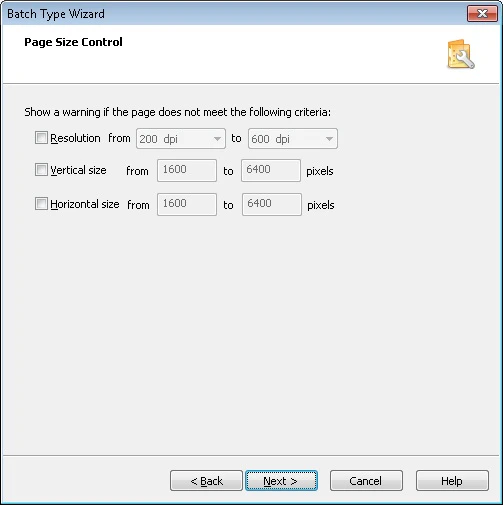 ## Page parameter options
Select each parameter and adjust its value range.
| Option | Description |
| ------------------- | ---------------------------------------------------- |
| **Resolution** | Controls the resolution in dots per inch (dpi). |
| **Vertical size** | Controls the vertical size of the image in pixels. |
| **Horizontal size** | Controls the horizontal size of the image in pixels. |
## Page parameter options
Select each parameter and adjust its value range.
| Option | Description |
| ------------------- | ---------------------------------------------------- |
| **Resolution** | Controls the resolution in dots per inch (dpi). |
| **Vertical size** | Controls the vertical size of the image in pixels. |
| **Horizontal size** | Controls the horizontal size of the image in pixels. |