> ## Documentation Index
> Fetch the complete documentation index at: https://docs.abbyy.com/llms.txt
> Use this file to discover all available pages before exploring further.
# Empty Page Detection Settings dialog box
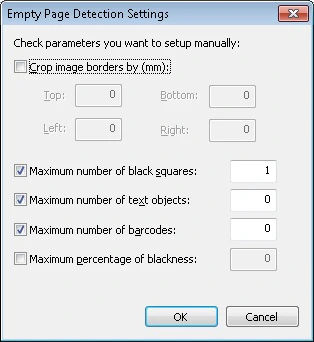
> Empty Page Detection Settings dialog box tunes blank page detection for document separation: border crop, black squares, text objects, and blackness.
In the **Empty Page Detection Settings** dialog box, you can specify additional detection settings for empty pages used for document separation.
To open this dialog box, click **Options...** after selecting separation by empty pages in one of the following:
* On the **Batch Options** tab of the [Batch Type Properties dialog box](/flexi-capture/scanning-station/shared/interface/batch-type-properties).
* When creating a batch type using the [Batch Type Wizard](/flexi-capture/scanning-station/shared/interface/batch-type-wizard).
 ## Empty page detection options
| **Option** | **Description** |
| ----------------------------------- | --------------------------------------------------------------------------------------------------------------------------------------------------------------------------------------------------------------------------------------------------------------------------------------- |
| **Crop image borders by (mm)** | Select this option to automatically crop the page (in millimeters on top, bottom, left, and right) when determining whether the page is empty. After cropping, the resulting page is checked for other parameters. |
| **Maximum number of black squares** | Select this option if you want pages with a certain number of black squares (special form design elements) to be deemed empty. Specify the maximum number of black squares allowed on a page. |
| **Maximum number of text objects** | Select this option if you want pages with a certain number of text objects to be deemed empty. Text objects include any separate text fragments. You can use this option, for example, for pages with headers and footers. Specify the maximum number of text blocks allowed on a page. |
| **Maximum number of barcodes** | Select this option if you want pages with a certain number of barcodes to be deemed empty. Specify the maximum number of barcodes allowed on a page. |
| **Maximum percentage of blackness** | Select this option if you want pages with a certain percentage of black color to be deemed empty. Select the maximum percentage of blackness allowed on a page. The black-to-white ratio is established after image binarization. |
## Empty page detection options
| **Option** | **Description** |
| ----------------------------------- | --------------------------------------------------------------------------------------------------------------------------------------------------------------------------------------------------------------------------------------------------------------------------------------- |
| **Crop image borders by (mm)** | Select this option to automatically crop the page (in millimeters on top, bottom, left, and right) when determining whether the page is empty. After cropping, the resulting page is checked for other parameters. |
| **Maximum number of black squares** | Select this option if you want pages with a certain number of black squares (special form design elements) to be deemed empty. Specify the maximum number of black squares allowed on a page. |
| **Maximum number of text objects** | Select this option if you want pages with a certain number of text objects to be deemed empty. Text objects include any separate text fragments. You can use this option, for example, for pages with headers and footers. Specify the maximum number of text blocks allowed on a page. |
| **Maximum number of barcodes** | Select this option if you want pages with a certain number of barcodes to be deemed empty. Specify the maximum number of barcodes allowed on a page. |
| **Maximum percentage of blackness** | Select this option if you want pages with a certain percentage of black color to be deemed empty. Select the maximum percentage of blackness allowed on a page. The black-to-white ratio is established after image binarization. |