> ## Documentation Index
> Fetch the complete documentation index at: https://docs.abbyy.com/llms.txt
> Use this file to discover all available pages before exploring further.
# Send to FTP options dialog box
> Send to FTP Options dialog box in the Scanning Station sets the FTP folder, login, file format, color mode, and multi-page options for exporting batches.
In the **Send to FTP Options** dialog box, you can specify the options for exporting batches to an FTP folder.
## Send a batch to an FTP folder
Do one of the following:
* Select **File → Sending Options...** and click the **FTP** tab.
* Click the arrow next to the **Send To** button on the [Main Window Toolbars](/flexi-capture/scanning-station/interface/toolbars) and choose **Send to FTP Folder...**.
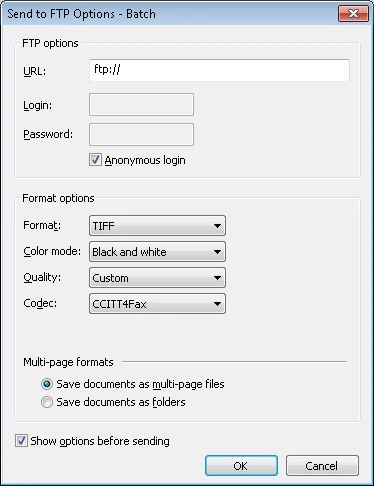 * Specify the name of the FTP folder where document batches will be saved.
* Enter the login and password (or select **Anonymous login**).
* Choose the file format and the other options.
## FTP folder and login
| **Option** | **Description** |
| ------------------- | ------------------------------------------------------------------------ |
| **URL** | Specify the name of the FTP folder where document batches will be saved. |
| **Login** | Enter your login. |
| **Password** | Enter your password. |
| **Anonymous login** | Use this option for anonymous access to the FTP server. |
## File format and color mode
| **Option** | **Description** |
| ----------------------------- | ------------------------------------------------------------------------------------------------------------------------------------------------------------------------------------------------------------------------------------------------------------------------------------------------------------------------------------------------------------------------------------------ |
| **Format** | Select the file format: **BMP**, **TIFF**, **JPEG**, **JPEG2000**, **DCX packbits**, **PCX packbits**, **PNG**, **PDF**, or **PDF/A**. |
| **Standard** | If **PDF/A** is specified in the **Format** field, select one of the following versions of the PDF/A format for output files: **PDF/A-1a**, **PDF/A-1b**, **PDF/A-2a**, **PDF/A-2b**, **PDF/A-2u**, **PDF/A-3a**, **PDF/A-3b**, or **PDF/A-3u**. **Note:** You can use the [IImageSavingOptions](/flexi-capture/scanning-station/shared/scripts/saving-options) object to export to PDF/A. |
| **Color mode** | Select the color mode: **Full color**, **Grayscale**, or **Black and white**. |
| **Quality** | Select the quality of saved images: **Best**, **High**, **Normal**, or **Low**. |
| **Multi-page format options** | Select a method for saving documents in batches: **Save documents as multi-page files** — Available only for **TIFF**, **DCX packbits**, **PDF**, and **PDF/A** formats.
* Specify the name of the FTP folder where document batches will be saved.
* Enter the login and password (or select **Anonymous login**).
* Choose the file format and the other options.
## FTP folder and login
| **Option** | **Description** |
| ------------------- | ------------------------------------------------------------------------ |
| **URL** | Specify the name of the FTP folder where document batches will be saved. |
| **Login** | Enter your login. |
| **Password** | Enter your password. |
| **Anonymous login** | Use this option for anonymous access to the FTP server. |
## File format and color mode
| **Option** | **Description** |
| ----------------------------- | ------------------------------------------------------------------------------------------------------------------------------------------------------------------------------------------------------------------------------------------------------------------------------------------------------------------------------------------------------------------------------------------ |
| **Format** | Select the file format: **BMP**, **TIFF**, **JPEG**, **JPEG2000**, **DCX packbits**, **PCX packbits**, **PNG**, **PDF**, or **PDF/A**. |
| **Standard** | If **PDF/A** is specified in the **Format** field, select one of the following versions of the PDF/A format for output files: **PDF/A-1a**, **PDF/A-1b**, **PDF/A-2a**, **PDF/A-2b**, **PDF/A-2u**, **PDF/A-3a**, **PDF/A-3b**, or **PDF/A-3u**. **Note:** You can use the [IImageSavingOptions](/flexi-capture/scanning-station/shared/scripts/saving-options) object to export to PDF/A. |
| **Color mode** | Select the color mode: **Full color**, **Grayscale**, or **Black and white**. |
| **Quality** | Select the quality of saved images: **Best**, **High**, **Normal**, or **Low**. |
| **Multi-page format options** | Select a method for saving documents in batches: **Save documents as multi-page files** — Available only for **TIFF**, **DCX packbits**, **PDF**, and **PDF/A** formats.
**Save documents as folders** — Document pages are saved as separate files of the selected format. |
## Show options before sending
Disable this option to reuse the same options next time you export to an FTP folder. The dialog box will not appear when the next export starts.