> ## Documentation Index
> Fetch the complete documentation index at: https://docs.abbyy.com/llms.txt
> Use this file to discover all available pages before exploring further.
# Image Format Options dialog box
> Image Format Options dialog box sets the output format for exported batch images: TIFF, PDF, PDF/A and more, plus color mode, quality, and codec.
In the **Image Format Options** dialog box, you can specify options for exporting images for the selected batch type.
You can specify these options in one of the following ways:
* When creating a batch type with the [Batch Type Wizard](/flexi-capture/scanning-station/shared/interface/batch-type-wizard).
* By adjusting them after the batch type has been created.
## Set image export options
In the [Batch Type Properties dialog box](/flexi-capture/scanning-station/shared/interface/batch-type-properties), click the **Send To** tab, select **Use these sending options**, and click the **Format Options...** button under **Export Options**.
Specify the output format and how multi-page documents should be saved.
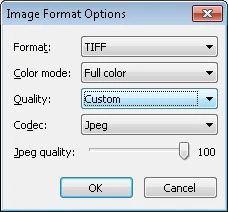 ## Image format and quality settings
| **Option** | **Description** |
| ----------------------------- | ------------------------------------------------------------------------------------------------------------------------------------------------------------------------------------------------------------------------------------------------------------------------------------------------------------------------------------------------------------------------------------------ |
| **Format** | Select the file format: **BMP**, **TIFF**, **JPEG**, **JPEG2000**, **DCX packbits**, **PCX packbits**, **PNG**, **PDF**, or **PDF/A**. |
| **Standard** | If **PDF/A** is specified in the **Format** field, select one of the following versions of the PDF/A format for output files: **PDF/A-1a**, **PDF/A-1b**, **PDF/A-2a**, **PDF/A-2b**, **PDF/A-2u**, **PDF/A-3a**, **PDF/A-3b**, or **PDF/A-3u**. **Note:** You can use the [IImageSavingOptions](/flexi-capture/scanning-station/shared/scripts/saving-options) object to export to PDF/A. |
| **Color mode** | Select the color mode: **Full color**, **Grayscale**, or **Black and white**. |
| **Quality** | Select the quality of saved images: **Best**, **High**, **Normal**, **Low**, or **Custom**. |
| **Codec** | For the **Custom** quality, select the codec type: **Zip**, **Lzw**, **Packbits**, **Jpeg**, or **None**. |
| **JPEG quality** | For the **Jpeg** codec type, adjust the JPEG quality by moving the scroll box. |
| **Multi-page format options** | Select a method for saving documents in batches: **Save documents as multi-page files** — Available only for **TIFF**, **DCX packbits**, **PDF**, and **PDF/A** formats.
## Image format and quality settings
| **Option** | **Description** |
| ----------------------------- | ------------------------------------------------------------------------------------------------------------------------------------------------------------------------------------------------------------------------------------------------------------------------------------------------------------------------------------------------------------------------------------------ |
| **Format** | Select the file format: **BMP**, **TIFF**, **JPEG**, **JPEG2000**, **DCX packbits**, **PCX packbits**, **PNG**, **PDF**, or **PDF/A**. |
| **Standard** | If **PDF/A** is specified in the **Format** field, select one of the following versions of the PDF/A format for output files: **PDF/A-1a**, **PDF/A-1b**, **PDF/A-2a**, **PDF/A-2b**, **PDF/A-2u**, **PDF/A-3a**, **PDF/A-3b**, or **PDF/A-3u**. **Note:** You can use the [IImageSavingOptions](/flexi-capture/scanning-station/shared/scripts/saving-options) object to export to PDF/A. |
| **Color mode** | Select the color mode: **Full color**, **Grayscale**, or **Black and white**. |
| **Quality** | Select the quality of saved images: **Best**, **High**, **Normal**, **Low**, or **Custom**. |
| **Codec** | For the **Custom** quality, select the codec type: **Zip**, **Lzw**, **Packbits**, **Jpeg**, or **None**. |
| **JPEG quality** | For the **Jpeg** codec type, adjust the JPEG quality by moving the scroll box. |
| **Multi-page format options** | Select a method for saving documents in batches: **Save documents as multi-page files** — Available only for **TIFF**, **DCX packbits**, **PDF**, and **PDF/A** formats.
**Save documents as folders** — Document pages are saved as separate files of the selected format. |