> ## Documentation Index
> Fetch the complete documentation index at: https://docs.abbyy.com/llms.txt
> Use this file to discover all available pages before exploring further.
# Rescanning Tasks dialog box
> Manage rescanning tasks in the Rescanning Tasks dialog box: select tasks, send them to verification, reject them, and add Batch info parameters.
In the **Rescanning Tasks** dialog box, you can work with rescanning tasks:
* Select a task
* Send processed tasks to verification
* Reject tasks or send them to Exceptions
* Specify the names of the registration parameters whose values appear in the **Batch info** column
To open the dialog box, do one of the following:
* Select **Tools → Rescanning Tasks...**
* Press [Alt+G](/flexi-capture/scanning-station/shared/appendix/hot-keys)
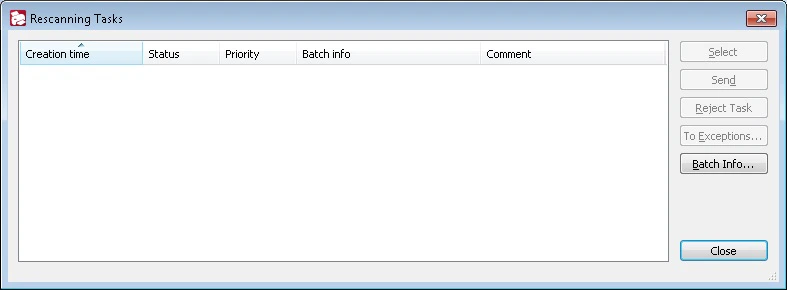 The dialog displays the following information on the task:
* Creation time
* Status
* Priority
* Batch registration parameters (batch info)
* Comment
A Verification Operator can add the comment when sending the task for rescanning.
## Add batch registration parameters
To add the **Batch info**, click the **Batch Info...** button and enter the names of the batch registration parameters. Their values appear in the **Batch info** column, separated by semicolons. If a specified registration parameter is missing, its value will be empty.
Values from the **Batch info** and **Comment** columns help the Operator to distinguish tasks.
## Manage rescanning tasks
Use the buttons on the right to manage tasks:
| Button | Description |
| -------------------- | -------------------------------------------------------------------------------------------- |
| **Select** | Opens a selected task and changes its status to "Selected". |
| **Send** | Sends a processed task to ABBYY Verification Station. |
| **Reject Task** | Rejects selected tasks. |
| **To Exceptions...** | Sends selected tasks to Exceptions. |
| **Batch Info...** | Opens the **Batch info** dialog, where you can add and delete batch registration parameters. |
| **Close** | Closes the dialog box. |
For more information, see [Rescanning tasks](/flexi-capture/scanning-station/shared/scan-station/how-to-rescan).
The dialog displays the following information on the task:
* Creation time
* Status
* Priority
* Batch registration parameters (batch info)
* Comment
A Verification Operator can add the comment when sending the task for rescanning.
## Add batch registration parameters
To add the **Batch info**, click the **Batch Info...** button and enter the names of the batch registration parameters. Their values appear in the **Batch info** column, separated by semicolons. If a specified registration parameter is missing, its value will be empty.
Values from the **Batch info** and **Comment** columns help the Operator to distinguish tasks.
## Manage rescanning tasks
Use the buttons on the right to manage tasks:
| Button | Description |
| -------------------- | -------------------------------------------------------------------------------------------- |
| **Select** | Opens a selected task and changes its status to "Selected". |
| **Send** | Sends a processed task to ABBYY Verification Station. |
| **Reject Task** | Rejects selected tasks. |
| **To Exceptions...** | Sends selected tasks to Exceptions. |
| **Batch Info...** | Opens the **Batch info** dialog, where you can add and delete batch registration parameters. |
| **Close** | Closes the dialog box. |
For more information, see [Rescanning tasks](/flexi-capture/scanning-station/shared/scan-station/how-to-rescan).