> ## Documentation Index
> Fetch the complete documentation index at: https://docs.abbyy.com/llms.txt
> Use this file to discover all available pages before exploring further.
# Select & Scan dialog box
> Select & Scan dialog box in ABBYY Scanning Station lets you pick a hardware or virtual scanner source and set scanning options before each scan.
In the **Select & Scan** dialog box, you can select a scanner source — a hardware or a virtual scanner. The appearance of the dialog box changes depending on which scanner source is selected.
It appears each time scanning starts if you have set up the program to show the scanner source selection dialog box.
## Select and scan
Click the arrow to the left of the **Scan** button on the [Main Window Toolbars](/flexi-capture/scanning-station/interface/toolbars) and select **Select and Scan...**.
From the **Scanner** drop-down list, select one of the available scanners. The available settings depend on the scanner type. See [Hardware scanner](#hardware-scanner) or [Virtual scanner](#virtual-scanner).
Click **Scan** to start scanning, or click **Cancel** to quit the dialog box.
## Hardware scanner
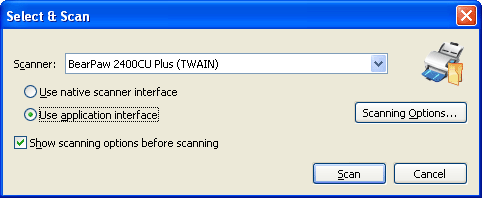 | **Option** | **Description** |
| ----------------------------------------- | ---------------------------------------------------------------------------------------------------------------------------------------------------------------------------------------------------------------------------------------------------------------------------------------------------------------------------- |
| **Use native scanner interface** | Select this option to use the interface provided by the scanner. **Note:** If the native scanner interface is used, the **Show scanning options before scanning** option should also be selected. Otherwise, if scanning settings were not originally specified in the scanner interface, a scanning error occurs. |
| **Use application interface** | Select this option to use the interface provided by the application. |
| **Scanning Options...** | Opens the scanner settings dialog box. If you select the scanner's interface, you see the dialog box provided by the driver of your scanner. If you select the application's interface, you see the [Scanner Settings dialog box](/flexi-capture/scanning-station/shared/interface/scan-dialog) provided by the application. |
| **Show scanning options before scanning** | If this option is selected, the program displays the scanner settings dialog box each time scanning starts. |
## Virtual scanner
| **Option** | **Description** |
| ----------------------------------------- | ---------------------------------------------------------------------------------------------------------------------------------------------------------------------------------------------------------------------------------------------------------------------------------------------------------------------------- |
| **Use native scanner interface** | Select this option to use the interface provided by the scanner. **Note:** If the native scanner interface is used, the **Show scanning options before scanning** option should also be selected. Otherwise, if scanning settings were not originally specified in the scanner interface, a scanning error occurs. |
| **Use application interface** | Select this option to use the interface provided by the application. |
| **Scanning Options...** | Opens the scanner settings dialog box. If you select the scanner's interface, you see the dialog box provided by the driver of your scanner. If you select the application's interface, you see the [Scanner Settings dialog box](/flexi-capture/scanning-station/shared/interface/scan-dialog) provided by the application. |
| **Show scanning options before scanning** | If this option is selected, the program displays the scanner settings dialog box each time scanning starts. |
## Virtual scanner
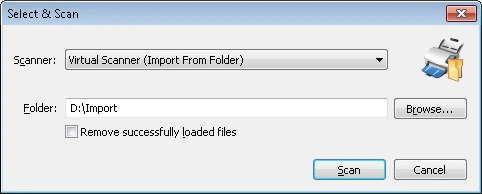 | **Option** | **Description** |
| ------------------------------------ | --------------------------------------------------------------------------------------- |
| **Folder** | Specify the path to the folder to import images from. |
| **Browse...** | Locate a folder with images. |
| **Remove successfully loaded files** | Select this option to remove the images from their source folder after they are loaded. |
| **Option** | **Description** |
| ------------------------------------ | --------------------------------------------------------------------------------------- |
| **Folder** | Specify the path to the folder to import images from. |
| **Browse...** | Locate a folder with images. |
| **Remove successfully loaded files** | Select this option to remove the images from their source folder after they are loaded. |