> ## Documentation Index
> Fetch the complete documentation index at: https://docs.abbyy.com/llms.txt
> Use this file to discover all available pages before exploring further.
# Select Batch Types Storage dialog box
> Pick where the Scanning Station stores XML batch type descriptions—locally or on a remote server—in the Select Batch Types Storage dialog box.
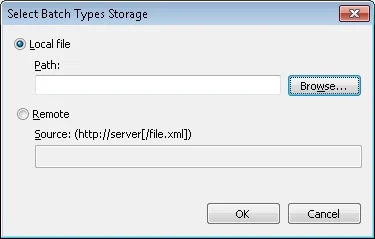
In the **Select Batch Types Storage** dialog box, you select a folder for storing the XML files that contain batch type descriptions.
It opens when you send or import batch types. For more information, see [Batch Types dialog box](/flexi-capture/scanning-station/shared/interface/select-batch-type).
An XML file with a batch type description can be stored locally, on the same computer as the Scanning Station, or on a remote server.
To set the storage location, do one of the following:
* Select **Local file**.
* Select **Remote**.
## Store batch types in a local file
For a local file, specify the path in the **Path** field. Click **Browse...** to find the location.
 ## Store batch types on a remote server
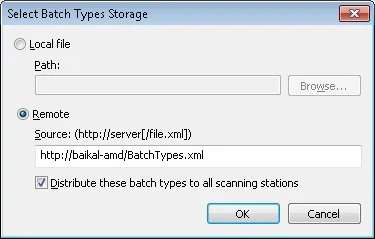
For a remote file, specify the path in `https://server[/file.xml]` format.
## Store batch types on a remote server
For a remote file, specify the path in `https://server[/file.xml]` format.
 To work with a tenant's project, add the tenant's name to the server's address. The address must look like this: `https://#` (for example, `https://localhost#tenant`).
## Distribute batch types to all Scanning Stations
When sending batch types, you can select **Distribute these batch types to all Scanning Stations**:
* **Selected**: all scanning stations bound to the server attempt to load batch types data from the server at startup.
* **Deselected**: the scanning stations do not contact the server to retrieve batch types.
To work with a tenant's project, add the tenant's name to the server's address. The address must look like this: `https://#` (for example, `https://localhost#tenant`).
## Distribute batch types to all Scanning Stations
When sending batch types, you can select **Distribute these batch types to all Scanning Stations**:
* **Selected**: all scanning stations bound to the server attempt to load batch types data from the server at startup.
* **Deselected**: the scanning stations do not contact the server to retrieve batch types.