> ## Documentation Index
> Fetch the complete documentation index at: https://docs.abbyy.com/llms.txt
> Use this file to discover all available pages before exploring further.
# Selecting the right tax system
> Select a tax system project in ABBYY FlexiCapture for Invoices and configure tax rates and tax groups for EU, US, Canadian, and other regional invoices.
ABBYY FlexiCapture for Invoices can process invoices and other financial documents from a variety of tax systems. To detect tax amounts, the search mechanism and verification rules rely heavily on the information about the tax system of the country where a particular invoice was issued.
ABBYY FlexiCapture for Invoices provides six pre-configured projects:
* Invoice Processing (EU) for the European Union
* Invoice Processing (ES) for Spain
* Invoice Processing (US) for the United States
* Invoice Processing (CA) for Canada
* Invoice Processing (Au-NZ) for Australia and New Zealand
* Invoice Processing (JP) for Japan
The tax rates and verification rules in each project have been designed with the specifics of a particular country or countries in mind. For more information, see [Rules](/flexi-capture/invoice-reader/ir-setting-rules).
ABBYY FlexiCapture selects the right detection logic, verification rules, and keywords depending on the countries specified in the project settings.
## Taxes in the EU
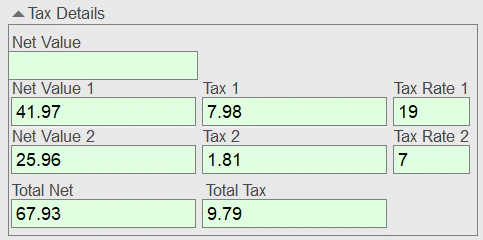
ABBYY FlexiCapture for Invoices uses the following tax principles for invoices from EU countries:
* A full tax rate is applicable to most goods and services.
* Tax is included in the price.
* There may be reduced tax rates for some goods and services. These can vary depending on the type of goods or legal entity (for example, sole proprietors may be entitled to reduced tax).
In Austria, for example, two main tax rates are used: 20% (the base rate) and 10% (for food products, agricultural goods, the entertainment industry, and similar). In Germany, the rates are 7% and 19%. In Poland, three tax rates are possible: 5%, 8%, and 23%.
Additionally, some European countries have regions with their own special tax rates. For example, in Portugal, depending on the type of products, the tax rates are 23%, 13%, or 6% on the continent; 18%, 9%, or 4% in the Azores; and 22%, 12%, and 5% in Madeira.
Only one tax can be levied on a particular type of goods or services. The only exception is Spain (see [Taxes in Spain](#es) below).
A document may contain multiple items, each with its own tax rate.
Settings for an ABBYY FlexiCapture project contain not only the information about VAT rates for various countries, but also various system-specific [rule](/flexi-capture/invoice-reader/ir-setting-rules) checks. The data form also looks different for each project:
 ## Taxes in Spain
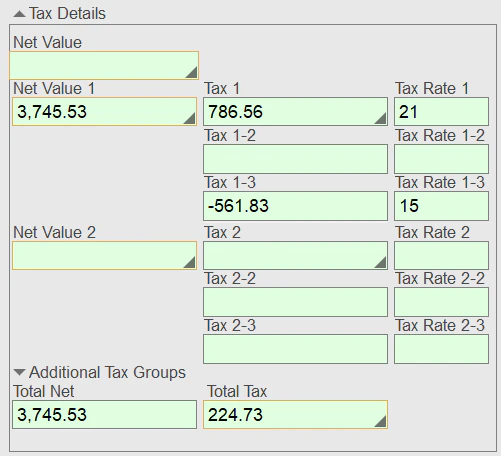
The Spanish tax system differs in some important respects from the tax systems in place in other EU countries. In Spain, a product or service may be subject to multiple taxes, and some tax amounts may be negative when income tax is refunded.
Tax rates may vary depending on the region (in the Canaries, for example, a product may be subject both to a base VAT and an indirect tax).
In ABBYY FlexiCapture for Invoices, you can create tax groups for the multiple taxes that may be levied on a particular type of product or service. For more information, see [Tax groups](#tax).
Since the Spanish tax system differs significantly from that of other EU countries, the rule checks are also different. The Spanish data form looks as follows:
## Taxes in Spain
The Spanish tax system differs in some important respects from the tax systems in place in other EU countries. In Spain, a product or service may be subject to multiple taxes, and some tax amounts may be negative when income tax is refunded.
Tax rates may vary depending on the region (in the Canaries, for example, a product may be subject both to a base VAT and an indirect tax).
In ABBYY FlexiCapture for Invoices, you can create tax groups for the multiple taxes that may be levied on a particular type of product or service. For more information, see [Tax groups](#tax).
Since the Spanish tax system differs significantly from that of other EU countries, the rule checks are also different. The Spanish data form looks as follows:
 ## Taxes in the US
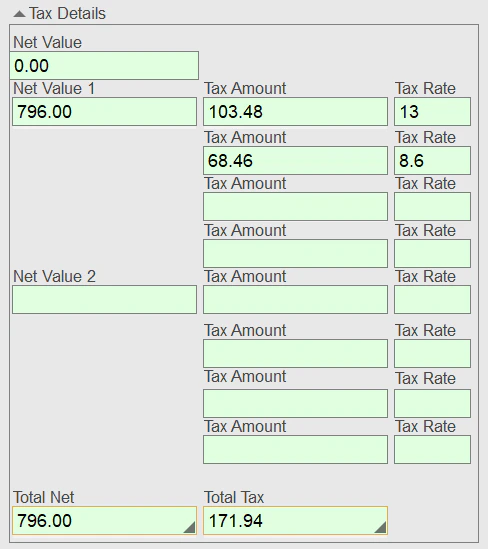
In the US, the federal government, state governments, and municipal governments all collect their own taxes. In addition, some state districts levy an additional "local surtax" on goods and services. For this reason, the total VAT is not always known in advance.
Unlike in the EU, US documents cannot contain goods and services that are subject to different tax rates.
ABBYY FlexiCapture for Invoices includes pre-configured tax groups for US documents, allowing keywords to be combined to search for tax amounts that may apply to the same item. For more information, see [Tax groups](#tax).
Settings for an ABBYY FlexiCapture project contain information about VAT rates for various countries, system-specific [rule](/flexi-capture/invoice-reader/ir-setting-rules) checks, and keywords that are used to search for the tax amounts. To correctly display all the tax amounts, the data form looks as follows:
## Taxes in the US
In the US, the federal government, state governments, and municipal governments all collect their own taxes. In addition, some state districts levy an additional "local surtax" on goods and services. For this reason, the total VAT is not always known in advance.
Unlike in the EU, US documents cannot contain goods and services that are subject to different tax rates.
ABBYY FlexiCapture for Invoices includes pre-configured tax groups for US documents, allowing keywords to be combined to search for tax amounts that may apply to the same item. For more information, see [Tax groups](#tax).
Settings for an ABBYY FlexiCapture project contain information about VAT rates for various countries, system-specific [rule](/flexi-capture/invoice-reader/ir-setting-rules) checks, and keywords that are used to search for the tax amounts. To correctly display all the tax amounts, the data form looks as follows:
 ## Taxes in Canada
In Canada, taxes differ from province to province. In some provinces, only federal tax is levied on goods and services, while in others both a federal tax and a provincial tax must be paid. Some provinces also impose an additional tax on liquor.
Depending on the province, the following taxes may be imposed on goods and services:
* GST only (goods and services tax) – 5%
* HST only (harmonized sales tax) – 15% or 13%
* GST + provincial tax:
* PST (provincial sales tax) – 7% or 6%
* QST (Quebec sales tax) – 9.975%
* RST (retail sales tax) – 7% (only in Manitoba)
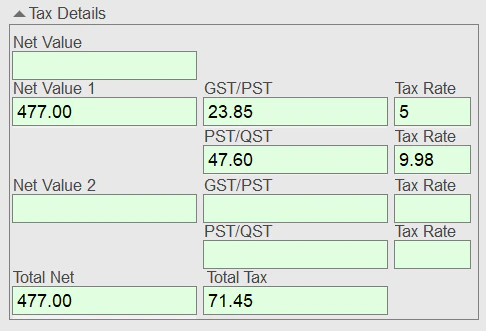
If more than one tax is levied (for example, GST + PST), use the corresponding pre-configured tax groups, which allow you to combine multiple taxes. For more information, see [Tax groups](#tax).
The settings for an ABBYY FlexiCapture project account for all particular aspects of the Canadian tax system, which includes the various provincial VAT rates. This is reflected in the data form, which looks as follows:
## Taxes in Canada
In Canada, taxes differ from province to province. In some provinces, only federal tax is levied on goods and services, while in others both a federal tax and a provincial tax must be paid. Some provinces also impose an additional tax on liquor.
Depending on the province, the following taxes may be imposed on goods and services:
* GST only (goods and services tax) – 5%
* HST only (harmonized sales tax) – 15% or 13%
* GST + provincial tax:
* PST (provincial sales tax) – 7% or 6%
* QST (Quebec sales tax) – 9.975%
* RST (retail sales tax) – 7% (only in Manitoba)
If more than one tax is levied (for example, GST + PST), use the corresponding pre-configured tax groups, which allow you to combine multiple taxes. For more information, see [Tax groups](#tax).
The settings for an ABBYY FlexiCapture project account for all particular aspects of the Canadian tax system, which includes the various provincial VAT rates. This is reflected in the data form, which looks as follows:
 ## Taxes in Japan, Australia, and New Zealand
In these countries, only one tax is imposed on goods and services. The rates are as follows:
* Japan – 10%
* Australia – 10%
* New Zealand – 15%
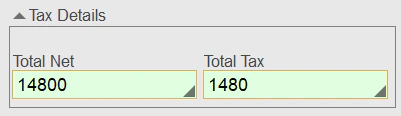
The data form for these projects looks as follows:
## Taxes in Japan, Australia, and New Zealand
In these countries, only one tax is imposed on goods and services. The rates are as follows:
* Japan – 10%
* Australia – 10%
* New Zealand – 15%
The data form for these projects looks as follows:
 ## 0% tax rate
In some cases, the applicable tax rate can be 0% for the entire invoice. For example, no VAT is typically imposed on international sales of goods and services (that is, when the vendor's and business unit's countries are different).
Additionally, some goods and services may be exempt from tax. For example, shipping may be exempt from VAT. If this is the case, the invoice contains both taxable and non-taxable items.
A 0% tax rate for international invoices is already included in the settings for all countries, so you do not need to add it manually.
## Configure taxes in your project
Before you begin:
Create a new project.
Select the project type based on the region of the business unit. If the business unit is located in one region while invoices come mostly from another region, select the country where the majority of invoices are issued. You can add more countries later.
Specify a name for your project and a storage location.
Set up your project.
For more information about creating and setting up a project, see [How to set up an invoice capture project](/flexi-capture/invoice-reader/ir-how-to-adjust-project).
Now you can select the appropriate countries for your invoices:
In the **Document Definition Properties** dialog box, click the **Document Definition Settings** tab.
In the **Countries and Languages** section, click **Edit...**.
Select the countries from which you expect to receive invoices.
You can add more countries later.
ABBYY FlexiCapture for Invoices checks amounts on invoices using the tax rates of the selected countries. By default, the following countries are selected in the pre-configured projects:
* Invoice Processing (EU) – [Austria](#eu), [France](#eu), [Germany](#eu), [United Kingdom](#eu), and [Switzerland](#eu)
* Invoice Processing (ES) – [Spain](#es)
* Invoice Processing (US) – [USA](#us)
* Invoice Processing (CA) – [Canada](#ca)
* Invoice Processing (Au-NZ) – [Australia](#jp-aunz) and [New Zealand](#jp-aunz)
* Invoice Processing (JP) – [Japan](#jp-aunz)
To review or edit the settings for a particular country, select the country in the list and click **Edit...**. The following settings are displayed for the selected country:
* Invoice languages
* Tax rates
* Tax groups
* Currency
* Keywords and formats (required for detecting elements such as IBAN and VATID)
For more information about detecting the main document fields, see [Detecting the main fields](/flexi-capture/invoice-reader/ir-search-fields).
Exported goods are typically exempt from VAT. A 0% tax rate for international invoices is already included in the settings for all countries, so you do not need to add it manually.
## Change a tax rate
Sometimes, a country may introduce new tax legislation to change its tax rates, with changes taking effect from a certain date, meaning that invoices posted before and invoices posted after that specific date contain items that are taxed at different rates.
To enable the program to handle invoices compliant with both old and new tax laws:
Select the country from the list.
Click **Edit...**.
In the dialog box that opens, click the **Tax Rates** tab.
Select the modified tax rate from the list and click **Edit...**. Alternatively, click **Add...** to add a new tax rate.
In the **Tax Rate Settings** dialog box, specify the value, time period, and keywords for the tax rate.
## Tax groups
If multiple taxes may be levied on a particular type of goods or services, a tax group should be created. For example, this can be useful for Spanish system invoices, where in a particular region, VAT and a regional tax can both be levied on an item at the same time in a particular combination. Grouping taxes together makes the program look for a specific tax combination.
You do not need to create tax groups for countries where different rates apply to different types of goods or services (for example, Austria).
To edit a tax group:
In the **Document Definition Properties** dialog box, click the **Document Definition Settings** tab.
In the **Countries and Languages** section, click **Edit...**.
Select the country you want to edit and click **Edit...**.
Edit an existing tax group by clicking **Edit...**, or add a new one by clicking **Add...**.
A tax group can be created from any of the taxes listed on the **Tax Rates** tab.
There are pre-configured tax groups for the following countries:
* Canada
* Spain
* USA
The pre-configured settings for three representative countries are described below.
### Netherlands
The following tax rates are pre-configured for the Netherlands: 21%, 19%, 6%, and 9%. A time period is also specified for each, because the tax rates have changed over time:
* A full tax rate of 19% was charged before September 30, 2012, which became 21% on October 1, 2012.
* A reduced rate of 6% was charged before December 31, 2019, which became 9% on January 1, 2019.
No tax groups are set for the Netherlands, because only one type of tax can be imposed on a product or service in this country.
### Canada
The following tax rates are pre-configured for Canada: 13%, 14%, 15%, 5% (GST), 5% (PST), 7% (PST), 8% (PST), and 9.975% (QST). No time periods are specified.
In Canada, multiple taxes may be imposed on the same product or service (the names of the taxes and the tax rates vary from province to province), so ABBYY FlexiCapture for Invoices offers the following pre-configured tax groups: GST+PST(5%), GST+PST(7%), GST+PST(8%), and GST+QST.
### USA
There are no pre-configured tax rates for the USA, because they cannot be known in advance. However, ABBYY FlexiCapture for Invoices includes pre-configured keywords to facilitate tax detection.
For the USA, pre-configured tax groups are provided, but no values are specified. In the case of US invoices, groups are used for combining keywords.
## 0% tax rate
In some cases, the applicable tax rate can be 0% for the entire invoice. For example, no VAT is typically imposed on international sales of goods and services (that is, when the vendor's and business unit's countries are different).
Additionally, some goods and services may be exempt from tax. For example, shipping may be exempt from VAT. If this is the case, the invoice contains both taxable and non-taxable items.
A 0% tax rate for international invoices is already included in the settings for all countries, so you do not need to add it manually.
## Configure taxes in your project
Before you begin:
Create a new project.
Select the project type based on the region of the business unit. If the business unit is located in one region while invoices come mostly from another region, select the country where the majority of invoices are issued. You can add more countries later.
Specify a name for your project and a storage location.
Set up your project.
For more information about creating and setting up a project, see [How to set up an invoice capture project](/flexi-capture/invoice-reader/ir-how-to-adjust-project).
Now you can select the appropriate countries for your invoices:
In the **Document Definition Properties** dialog box, click the **Document Definition Settings** tab.
In the **Countries and Languages** section, click **Edit...**.
Select the countries from which you expect to receive invoices.
You can add more countries later.
ABBYY FlexiCapture for Invoices checks amounts on invoices using the tax rates of the selected countries. By default, the following countries are selected in the pre-configured projects:
* Invoice Processing (EU) – [Austria](#eu), [France](#eu), [Germany](#eu), [United Kingdom](#eu), and [Switzerland](#eu)
* Invoice Processing (ES) – [Spain](#es)
* Invoice Processing (US) – [USA](#us)
* Invoice Processing (CA) – [Canada](#ca)
* Invoice Processing (Au-NZ) – [Australia](#jp-aunz) and [New Zealand](#jp-aunz)
* Invoice Processing (JP) – [Japan](#jp-aunz)
To review or edit the settings for a particular country, select the country in the list and click **Edit...**. The following settings are displayed for the selected country:
* Invoice languages
* Tax rates
* Tax groups
* Currency
* Keywords and formats (required for detecting elements such as IBAN and VATID)
For more information about detecting the main document fields, see [Detecting the main fields](/flexi-capture/invoice-reader/ir-search-fields).
Exported goods are typically exempt from VAT. A 0% tax rate for international invoices is already included in the settings for all countries, so you do not need to add it manually.
## Change a tax rate
Sometimes, a country may introduce new tax legislation to change its tax rates, with changes taking effect from a certain date, meaning that invoices posted before and invoices posted after that specific date contain items that are taxed at different rates.
To enable the program to handle invoices compliant with both old and new tax laws:
Select the country from the list.
Click **Edit...**.
In the dialog box that opens, click the **Tax Rates** tab.
Select the modified tax rate from the list and click **Edit...**. Alternatively, click **Add...** to add a new tax rate.
In the **Tax Rate Settings** dialog box, specify the value, time period, and keywords for the tax rate.
## Tax groups
If multiple taxes may be levied on a particular type of goods or services, a tax group should be created. For example, this can be useful for Spanish system invoices, where in a particular region, VAT and a regional tax can both be levied on an item at the same time in a particular combination. Grouping taxes together makes the program look for a specific tax combination.
You do not need to create tax groups for countries where different rates apply to different types of goods or services (for example, Austria).
To edit a tax group:
In the **Document Definition Properties** dialog box, click the **Document Definition Settings** tab.
In the **Countries and Languages** section, click **Edit...**.
Select the country you want to edit and click **Edit...**.
Edit an existing tax group by clicking **Edit...**, or add a new one by clicking **Add...**.
A tax group can be created from any of the taxes listed on the **Tax Rates** tab.
There are pre-configured tax groups for the following countries:
* Canada
* Spain
* USA
The pre-configured settings for three representative countries are described below.
### Netherlands
The following tax rates are pre-configured for the Netherlands: 21%, 19%, 6%, and 9%. A time period is also specified for each, because the tax rates have changed over time:
* A full tax rate of 19% was charged before September 30, 2012, which became 21% on October 1, 2012.
* A reduced rate of 6% was charged before December 31, 2019, which became 9% on January 1, 2019.
No tax groups are set for the Netherlands, because only one type of tax can be imposed on a product or service in this country.
### Canada
The following tax rates are pre-configured for Canada: 13%, 14%, 15%, 5% (GST), 5% (PST), 7% (PST), 8% (PST), and 9.975% (QST). No time periods are specified.
In Canada, multiple taxes may be imposed on the same product or service (the names of the taxes and the tax rates vary from province to province), so ABBYY FlexiCapture for Invoices offers the following pre-configured tax groups: GST+PST(5%), GST+PST(7%), GST+PST(8%), and GST+QST.
### USA
There are no pre-configured tax rates for the USA, because they cannot be known in advance. However, ABBYY FlexiCapture for Invoices includes pre-configured keywords to facilitate tax detection.
For the USA, pre-configured tax groups are provided, but no values are specified. In the case of US invoices, groups are used for combining keywords.