> ## Documentation Index
> Fetch the complete documentation index at: https://docs.abbyy.com/llms.txt
> Use this file to discover all available pages before exploring further.
# HTTP Error 413 when processing a batch
> Fix the HTTP 413 error on a FlexiCapture Web Station by raising the IIS request-filtering content-length limit beyond the default 30 MB in IIS Manager.
The IIS has a built-in filter that limits the size of HTTP requests. By default, the filter is set to 30 MB. If a "**Cannot connect to 'AppServer' (error code: (HTTP 413, 19, 0))**" error appears as a result of some action taken on a Web Station, this means that the size of the HTTP request is greater than the specified limit. To change the default limit of 30 MB:
1. Click **Control Panel → System and Security → Administrative Tools → Internet Information Services (IIS) Manager**.
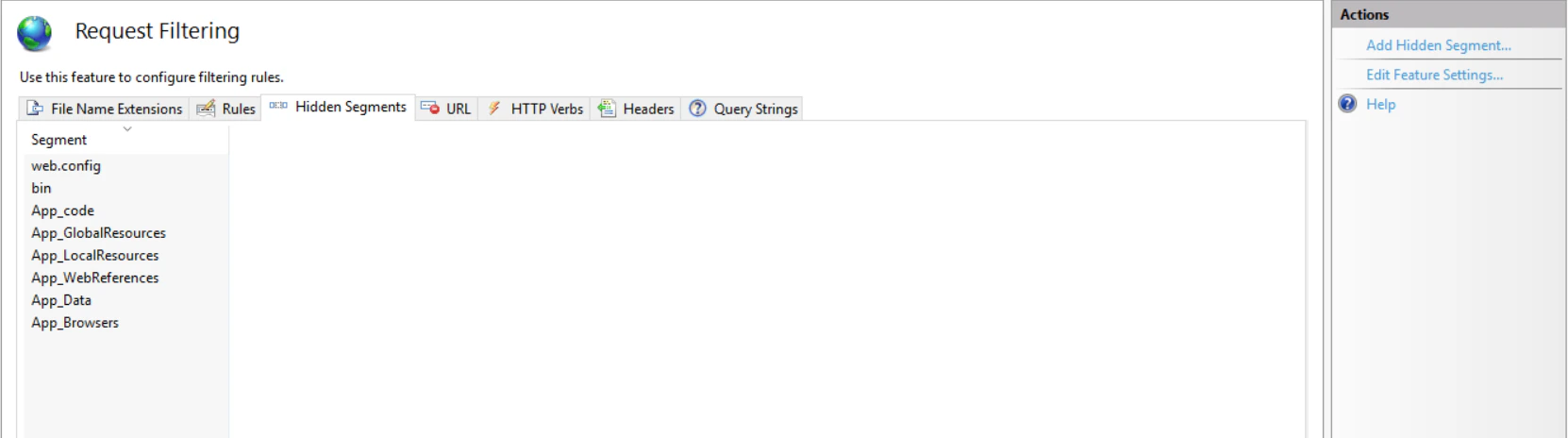
2. In IIS Manager, navigate to the filtering settings: **Sites → Default Web Site → FlexiCapture12 → Server → Request Filtering**.
 3. On the **Hidden Segments** tab, click **Edit Feature Settings...**
 4. In the **Edit Request Filtering Settings** dialog box, enter a value in the **Maximum allowed content length (Bytes)** field.
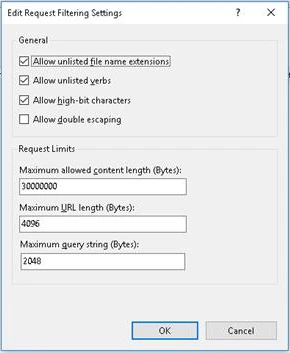 5. Click **OK**.