> ## Documentation Index
> Fetch the complete documentation index at: https://docs.abbyy.com/llms.txt
> Use this file to discover all available pages before exploring further.
# Licensing Server problems
> Troubleshoot the ABBYY FlexiCapture Licensing Service, including manual launch for diagnostics and fixing the RPC Service is not available error on 3020.
The ABBYY FlexiCapture Licensing Service is responsible for making sure that the server is running correctly. Begin by verifying that the service is running:
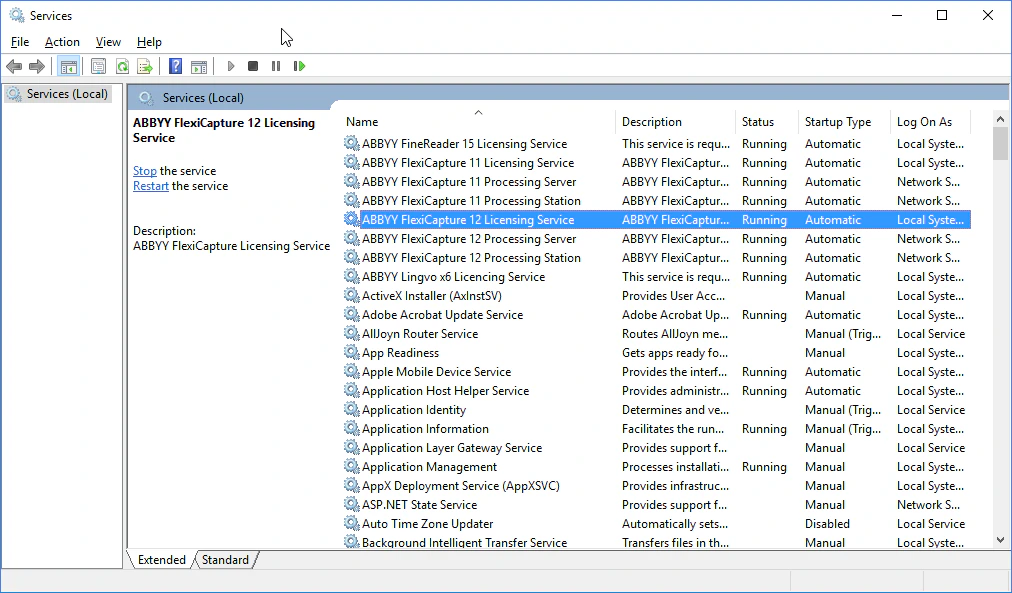 If the service cannot be launched, try launching it manually with the following command:
```
"C:\Program Files (x86)\Common Files\ABBYY\FlexiCapture\12.0\Licensing\LicensingService.exe" /standalone
```
The command shows extended diagnostics. Copy these diagnostics and the log files found in `C:\ProgramData\ABBYY\FlexiCapture\12.0\Licenses`, and send them to ABBYY's technical support together with a description of your problem.
## The "RPC Service is not available" error
If you see an "RPC Service is not available" message when the program tries to access the Licensing Server, verify that port `3020` is not blocked by your firewall and is not used by any other application (this port is often used by the Common Internet File System, for example). If port `3020` is used by another application, specify a different port:
1. On the computer where the Licensing Server is installed, open the `LicensingSettings.xml` file. By default, this file is located in `C:\Program Files (x86)\Common Files\ABBYY\FlexiCapture\12.0\Licensing`.
2. In the `LicensingSettings.xml` file, locate `EndPointName="3020"` and specify a different port inside the quotes.
3. Restart the ABBYY FlexiCapture Licensing Service.
After completing steps 1–3, change the port on every computer that accesses the Licensing Server (such as your Processing Server, Processing Stations, Verification Stations, and Project Setup Station). On each computer, open the `LicensingSettings.xml` file, locate `EndPointName`, and change its value to the port you selected in step 2.
If the service cannot be launched, try launching it manually with the following command:
```
"C:\Program Files (x86)\Common Files\ABBYY\FlexiCapture\12.0\Licensing\LicensingService.exe" /standalone
```
The command shows extended diagnostics. Copy these diagnostics and the log files found in `C:\ProgramData\ABBYY\FlexiCapture\12.0\Licenses`, and send them to ABBYY's technical support together with a description of your problem.
## The "RPC Service is not available" error
If you see an "RPC Service is not available" message when the program tries to access the Licensing Server, verify that port `3020` is not blocked by your firewall and is not used by any other application (this port is often used by the Common Internet File System, for example). If port `3020` is used by another application, specify a different port:
1. On the computer where the Licensing Server is installed, open the `LicensingSettings.xml` file. By default, this file is located in `C:\Program Files (x86)\Common Files\ABBYY\FlexiCapture\12.0\Licensing`.
2. In the `LicensingSettings.xml` file, locate `EndPointName="3020"` and specify a different port inside the quotes.
3. Restart the ABBYY FlexiCapture Licensing Service.
After completing steps 1–3, change the port on every computer that accesses the Licensing Server (such as your Processing Server, Processing Stations, Verification Stations, and Project Setup Station). On each computer, open the `LicensingSettings.xml` file, locate `EndPointName`, and change its value to the port you selected in step 2.