> ## Documentation Index
> Fetch the complete documentation index at: https://docs.abbyy.com/llms.txt
> Use this file to discover all available pages before exploring further.
# Processing Server problems
> Diagnose ABBYY FlexiCapture Processing Server issues, including launch failures and periodic stops, by checking the service, system log, roles, and crash dumps.
The Processing Server is responsible for distributing jobs among Processing Stations, interacting with the Licensing Server, and sending email notifications. The corresponding Windows task manager service is called `ABBYY.ProcServer.FlexiCapture.12.0`, and the process is called `FlexiBrSvc.exe` (it is launched using the `-stationType:server` key).
Before you start collecting diagnostic information, make sure that the machine where the Processing Server is installed has enough CPU power, RAM, and free disk space.
## If the Processing Server cannot be launched
* Try opening the Processing Server Monitor and using it to launch the Processing Server.
* If you are unable to connect to the Processing Server using the Processing Server Monitor, check that the Processing Server service (ABBYY.ProcServer.FlexiCapture.12.0) is running.
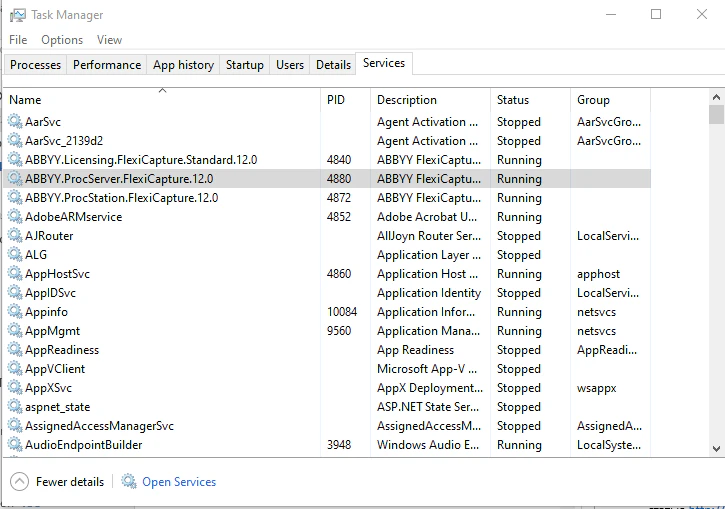 * If the Processing Server cannot be launched using the Processing Server Monitor, check the system log of the machine where the Processing Server is installed.
* Use the Administration and Monitoring Console to verify that the account that was used to launch the Processing Server has the Processing Server role.
If you are still unable to launch the Processing Server, collect the processing logs for the server (for more information, see [Processing logging for the Processing Server and Processing Stations](/flexi-capture/troubleshooting-guide/tg-logs-proccessing)) and contact ABBYY's technical support.
## If the Processing Server stops periodically
* Check the system log of the machine where the Processing Server is installed.
* If there are any server crash logs, set up crash dump collection. Wait for the next crash and send the crash dump to ABBYY's technical support.
* If other errors occur, get processing logs for the server (see [Processing logging for the Processing Server and Processing Stations](/flexi-capture/troubleshooting-guide/tg-logs-proccessing)) and send them to ABBYY's technical support.
* If the Processing Server cannot be launched using the Processing Server Monitor, check the system log of the machine where the Processing Server is installed.
* Use the Administration and Monitoring Console to verify that the account that was used to launch the Processing Server has the Processing Server role.
If you are still unable to launch the Processing Server, collect the processing logs for the server (for more information, see [Processing logging for the Processing Server and Processing Stations](/flexi-capture/troubleshooting-guide/tg-logs-proccessing)) and contact ABBYY's technical support.
## If the Processing Server stops periodically
* Check the system log of the machine where the Processing Server is installed.
* If there are any server crash logs, set up crash dump collection. Wait for the next crash and send the crash dump to ABBYY's technical support.
* If other errors occur, get processing logs for the server (see [Processing logging for the Processing Server and Processing Stations](/flexi-capture/troubleshooting-guide/tg-logs-proccessing)) and send them to ABBYY's technical support.