> ## Documentation Index
> Fetch the complete documentation index at: https://docs.abbyy.com/llms.txt
> Use this file to discover all available pages before exploring further.
# Fiddler logging
> Capture FlexiCapture requests to the Application Server in Fiddler by editing web.config proxy settings for Web Stations, desktop stations, and servers.
## Fiddler logging for Web Stations
To see Web Station requests to the Application Server in Fiddler logs:
1. Open the Web Station's `web.config` file. For example, for a Verification Web Station installed together with the Application Server, this file is located in `C:\inetpub\wwwroot\FlexiCapture12\Verification`.
2. In the `ApplicationServer` key, replace `localhost` with the name of the machine where the Application Server is installed.
3. In the Web Station's and Application Server's `web.config` files (located in `C:\inetpub\wwwroot\FlexiCapture12\Server`), add a `system.net\defaultProxy` section containing the following code:
```xml theme={null}
```
4. Launch Fiddler on the machine that is used to launch the Web Station.
If everything has been set up correctly, the Fiddler log displays `/FlexiCapture12/Server/API/Soap` requests.
## Fiddler logging for desktop stations
To have the Fiddler log display requests sent from a desktop station to the Application Server:
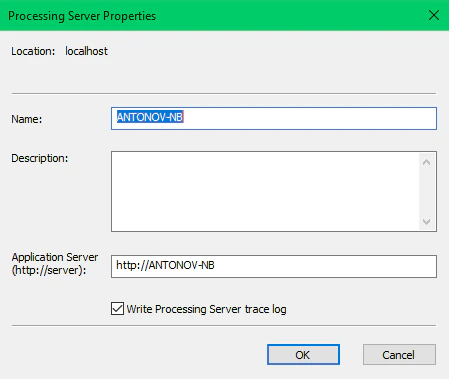
1. When connecting to the Application Server, specify the name of the machine where the Application Server is installed (specify the name in the **Processing Server Properties** dialog box). If it is installed on the same machine as the station, you can use `localhost` instead of the machine name. In this case, Fiddler cannot intercept requests, and no records about them are available in the Fiddler log.
 2. Launch Fiddler on the machine that is used to launch the desktop station.
If everything has been set up correctly, `/FlexiCapture12/Server/API/Soap` requests are displayed in the Fiddler log.
## Fiddler logging for server components
To have the Fiddler log display requests sent between server components (for example, from a Processing Station to the Application Server, or from an executor to the Application Server):
1. Launch the Processing Server using an account other than NetworkService. By default, the Processing Server is launched using the NetworkService system account, so Fiddler cannot intercept its requests.
2. Launch the required Processing Station using an account other than NetworkService (for example, a user account that has administrator rights on the machine hosting the Processing Server). By default, Processing Stations are launched using the NetworkService system account, so Fiddler cannot intercept their requests.
3. Launch Fiddler on the machine where the Processing Station is installed.
2. Launch Fiddler on the machine that is used to launch the desktop station.
If everything has been set up correctly, `/FlexiCapture12/Server/API/Soap` requests are displayed in the Fiddler log.
## Fiddler logging for server components
To have the Fiddler log display requests sent between server components (for example, from a Processing Station to the Application Server, or from an executor to the Application Server):
1. Launch the Processing Server using an account other than NetworkService. By default, the Processing Server is launched using the NetworkService system account, so Fiddler cannot intercept its requests.
2. Launch the required Processing Station using an account other than NetworkService (for example, a user account that has administrator rights on the machine hosting the Processing Server). By default, Processing Stations are launched using the NetworkService system account, so Fiddler cannot intercept their requests.
3. Launch Fiddler on the machine where the Processing Station is installed.