> ## Documentation Index
> Fetch the complete documentation index at: https://docs.abbyy.com/llms.txt
> Use this file to discover all available pages before exploring further.
# Processing logging
> Enable trace logging for the FlexiCapture Processing Server and Processing Stations in Processing Server Monitor, and tune log size, count, and level.
Enable trace logging for the Processing Server and Processing Stations in the Processing Server Monitor, and then fine-tune the log files through the registry.
By default, processing logs are saved in `%ProgramData%\ABBYY\FlexiCapture\12.0\FlexiBr[Svc]\Logs`.
## Enable Processing Server logging
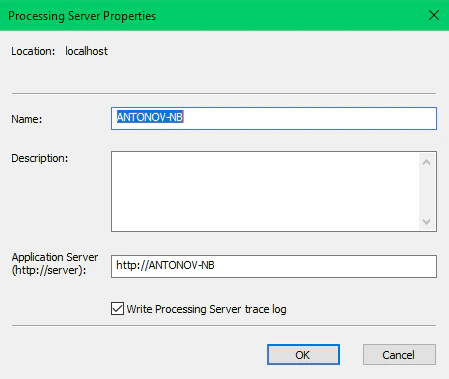
In the Processing Server Monitor, click **Processing Server Properties** on the shortcut menu and select **Write Processing Server trace log**.
 ## Enable Processing Station logging
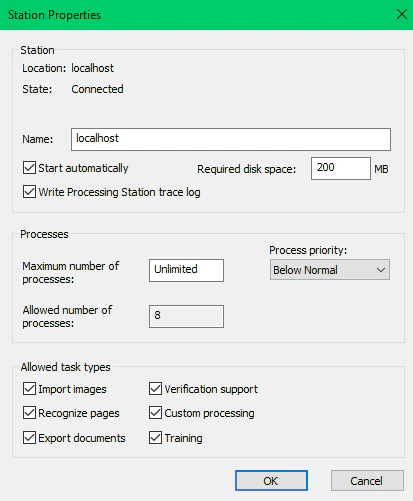
In the Processing Server Monitor, click **Station Properties** on the shortcut menu and select **Write Processing Station trace log**.
## Enable Processing Station logging
In the Processing Server Monitor, click **Station Properties** on the shortcut menu and select **Write Processing Station trace log**.
 ## Set up logging using the registry
Adjust Processing Server and Processing Station logging through the registry key `HKEY_LOCAL_MACHINE\SOFTWARE\ABBYY\FlexiCapture\12.0\FlexiBr`.
| Parameter | Description | Default |
| ------------------------------------ | --------------------------------------------------------------- | ------- |
| `LoggingManagerMaxLogFileSize` | Maximum size of one log file, in bytes | 1 MB |
| `LoggingManagerMaxOldLogsFilesCount` | Maximum number of log files | 10 |
| `LoggingManagerMaxOldLogsFilesSize` | Maximum total size of all log files, in bytes | 10 MB |
| `LoggingLevel` | Level of logging detail, from 1 for the least to 9 for the most | 5 |
| `LoggingFilter` | The types of events to log | |
A filter string switches individual logs on and off. For example, `+Licensing;+AppState;-*;+Monitoring` enables the Licensing and AppState logs, while the `-*` mask disables the Monitoring log.
## Set up logging using the registry
Adjust Processing Server and Processing Station logging through the registry key `HKEY_LOCAL_MACHINE\SOFTWARE\ABBYY\FlexiCapture\12.0\FlexiBr`.
| Parameter | Description | Default |
| ------------------------------------ | --------------------------------------------------------------- | ------- |
| `LoggingManagerMaxLogFileSize` | Maximum size of one log file, in bytes | 1 MB |
| `LoggingManagerMaxOldLogsFilesCount` | Maximum number of log files | 10 |
| `LoggingManagerMaxOldLogsFilesSize` | Maximum total size of all log files, in bytes | 10 MB |
| `LoggingLevel` | Level of logging detail, from 1 for the least to 9 for the most | 5 |
| `LoggingFilter` | The types of events to log | |
A filter string switches individual logs on and off. For example, `+Licensing;+AppState;-*;+Monitoring` enables the Licensing and AppState logs, while the `-*` mask disables the Monitoring log.