> ## Documentation Index
> Fetch the complete documentation index at: https://docs.abbyy.com/llms.txt
> Use this file to discover all available pages before exploring further.
# Configurer ABBYY FlexiCapture en tant que service sans surveillance
> Basculez un projet ABBYY FlexiCapture vers le schéma de workflow Unattended dans Propriétés du projet et laissez vide le chemin racine d’exportation pour l’utiliser avec le connecteur Pega.
Pour configurer ABBYY FlexiCapture en tant que service sans surveillance :
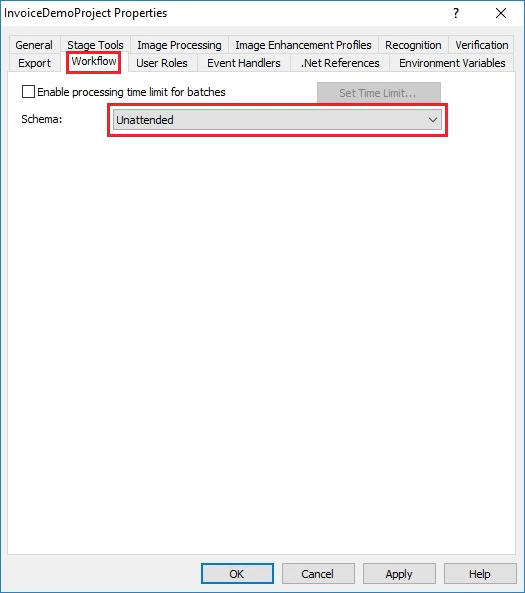
1. Dans la station **Project Setup Station**, cliquez sur **Project → Project Properties...**, puis sur l’onglet **Workflow**.
2. Dans la liste déroulante **Schema**, sélectionnez **Unattended**.
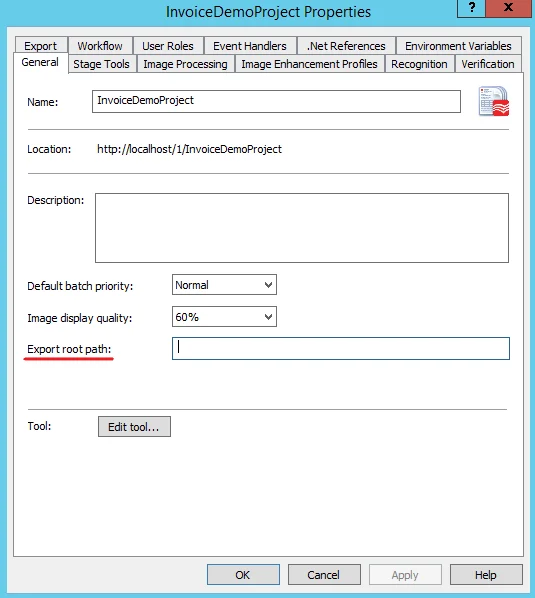
 3. Assurez-vous que le champ **Export root path** de l’onglet **General** reste vide.
 4. Cliquez sur **OK**.