> ## Documentation Index
> Fetch the complete documentation index at: https://docs.abbyy.com/llms.txt
> Use this file to discover all available pages before exploring further.
# SendForProcessing
> Configurer l’activité Pega SendForProcessing pour un dossier multidocument : créer un lot, ajouter chaque pièce jointe, lancer le traitement et enregistrer le BatchId.
Pour plus d’informations sur la création d’activités, consultez [Création d’une activité Pega](/fr/flexi-capture/connectors/pega/pega-activity-create).
## Pages et classes
| **Nom de page** | **Classe** |
| --------------- | -------------------- |
| dossier | Work- |
| Attachment | Data-WorkAttach-File |
| AttachmentInfo | Data-WorkAttach-File |
## Paramètres
| **Nom** | **Type de données** | **Obligatoire** |
| ------- | ------------------- | --------------- |
| CaseId | String | Oui |
## Variables locales
| **Nom** | **Type de données** |
| ----------- | ------------------- |
| LinkedRefTo | String |
| Id | String |
| BatchId | String |
## Étapes
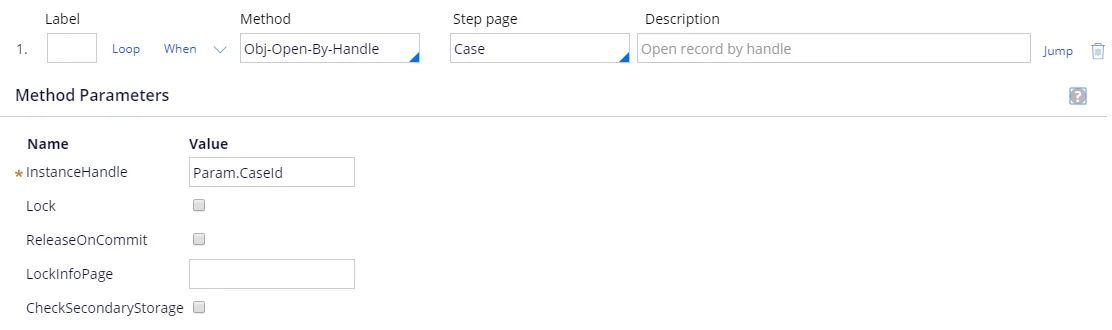
Étape 1 :
**Méthode** : Obj-Open-By-Handle.
**Page d’étape** : Dossier.
**InstanceHandle** : Param.CaseId.
 Étape 2 :
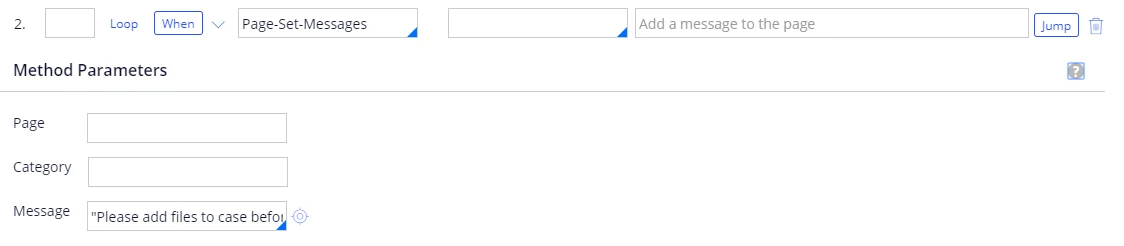
**Method**: Page-Set-Messages
**Message** : "Veuillez ajouter des fichiers au dossier avant de continuer."
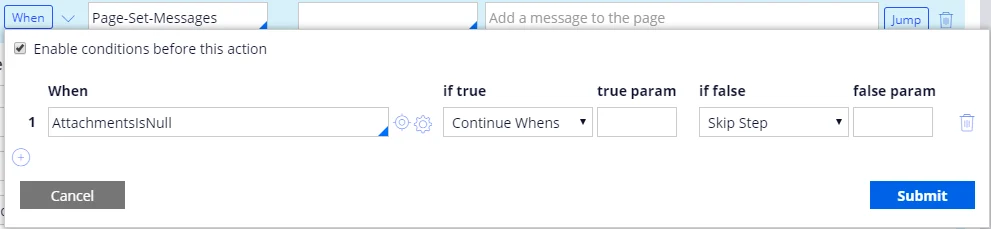
**When** :
| **When** | **si la condition est vraie** | **paramètre si vrai** | **si faux** | **paramètre si faux** |
| ----------------- | ----------------------------- | --------------------- | --------------- | --------------------- |
| AttachmentsIsNull | Conditions de poursuite | | Ignorer l’étape | |
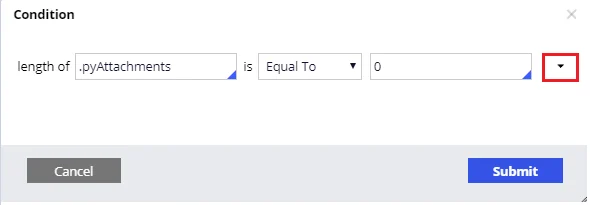
Pour créer une condition, spécifiez *AttachmentsIsNull* dans le champ **When**, puis cliquez sur le bouton de configuration. Si une telle condition n’existe pas encore, une fenêtre s’ouvrira dans laquelle vous pourrez créer une nouvelle condition. Assurez-vous que le nom complet du dossier est indiqué dans le champ **Apply to**, puis cliquez sur **Create and open**. Dans l’onglet **Conditions**, créez la condition suivante : *length of .pyAttachments is Equal To 0*. Pour ajouter la condition, cliquez sur **Configure advanced conditions here…** et sélectionnez *length of \[a pagelist property] Is \[comparison operator] \[value]* comme type de condition.
Étape 2 :
**Method**: Page-Set-Messages
**Message** : "Veuillez ajouter des fichiers au dossier avant de continuer."
**When** :
| **When** | **si la condition est vraie** | **paramètre si vrai** | **si faux** | **paramètre si faux** |
| ----------------- | ----------------------------- | --------------------- | --------------- | --------------------- |
| AttachmentsIsNull | Conditions de poursuite | | Ignorer l’étape | |
Pour créer une condition, spécifiez *AttachmentsIsNull* dans le champ **When**, puis cliquez sur le bouton de configuration. Si une telle condition n’existe pas encore, une fenêtre s’ouvrira dans laquelle vous pourrez créer une nouvelle condition. Assurez-vous que le nom complet du dossier est indiqué dans le champ **Apply to**, puis cliquez sur **Create and open**. Dans l’onglet **Conditions**, créez la condition suivante : *length of .pyAttachments is Equal To 0*. Pour ajouter la condition, cliquez sur **Configure advanced conditions here…** et sélectionnez *length of \[a pagelist property] Is \[comparison operator] \[value]* comme type de condition.
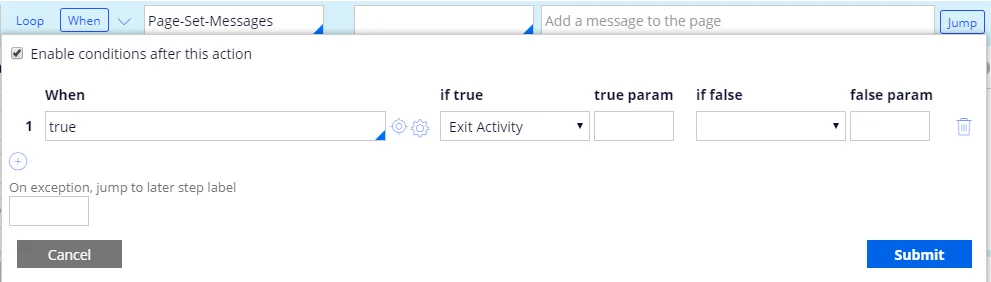
 **Aller à** :
| **When** | **si la condition est vraie** | **paramètre si vrai** | **si la condition est fausse** | **paramètre si faux** |
| -------- | ----------------------------- | --------------------- | ------------------------------ | --------------------- |
| vrai | Quitter l’activité | | | |
**Aller à** :
| **When** | **si la condition est vraie** | **paramètre si vrai** | **si la condition est fausse** | **paramètre si faux** |
| -------- | ----------------------------- | --------------------- | ------------------------------ | --------------------- |
| vrai | Quitter l’activité | | | |
 Étape 3 :
**Méthode** : Call-Function
| **Fonction** | **Valeur de retour** |
| ----------------------- | -------------------- |
| @ABBYY.CreateNewBatch() | Local.BatchId |
Pour plus d'informations, voir [CreateNewBatch](/fr/flexi-capture/connectors/pega/pega-func-multiple-docs#createnewbatch).
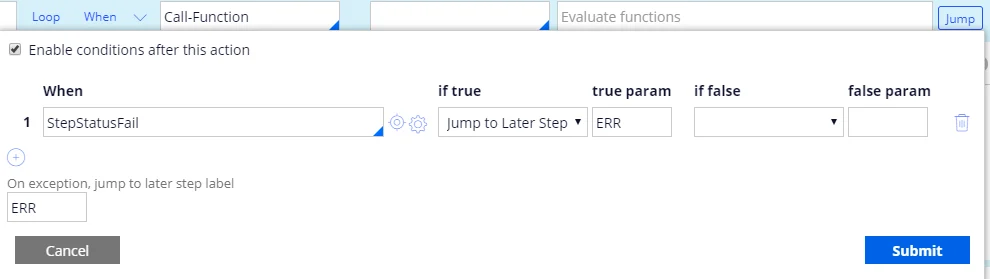
**Aller à** :
| **When** | **si vrai** | **paramètre si vrai** | **si la condition est fausse** | **paramètre si faux** |
| -------------- | --------------------------- | --------------------- | ------------------------------ | --------------------- |
| StepStatusFail | passer à l’étape ultérieure | ERR | | |
**En cas d'exception, passer à l'étiquette d'étape suivante** : ERR.
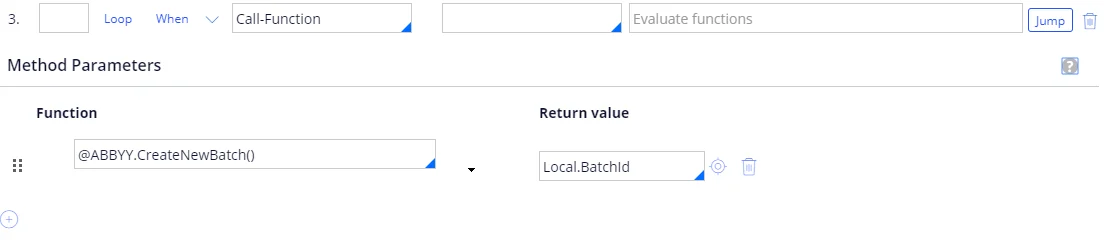
Étape 3 :
**Méthode** : Call-Function
| **Fonction** | **Valeur de retour** |
| ----------------------- | -------------------- |
| @ABBYY.CreateNewBatch() | Local.BatchId |
Pour plus d'informations, voir [CreateNewBatch](/fr/flexi-capture/connectors/pega/pega-func-multiple-docs#createnewbatch).
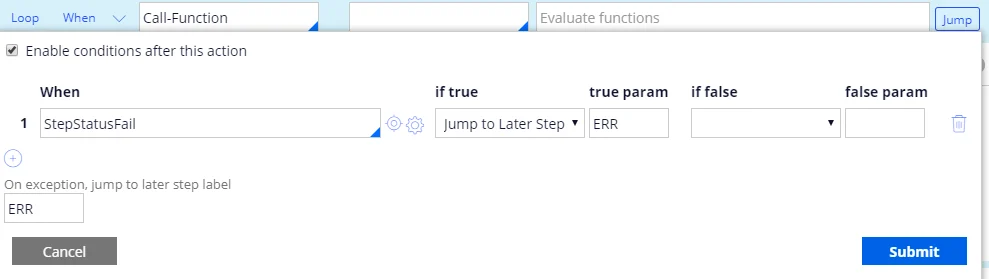
**Aller à** :
| **When** | **si vrai** | **paramètre si vrai** | **si la condition est fausse** | **paramètre si faux** |
| -------------- | --------------------------- | --------------------- | ------------------------------ | --------------------- |
| StepStatusFail | passer à l’étape ultérieure | ERR | | |
**En cas d'exception, passer à l'étiquette d'étape suivante** : ERR.
 Étape 4 :
**Method**: Property-Set
| **PropertiesName** | **PropertiesValue** |
| ------------------ | -------------------------------------------- |
| Local.LinkedRefTo | Case.pyAttachments(\).pxLinkedRefTo |
| Local.Id | Case.pyAttachments(\).pzInsKey |
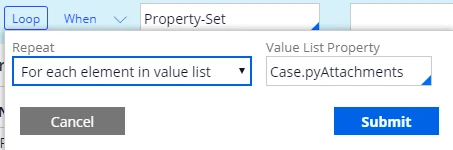
**Boucle** :
| **Répéter** | **Propriété de la liste de valeurs** |
| ------------------------------------------ | ------------------------------------ |
| Pour chaque élément de la liste de valeurs | Case.pyAttachments |
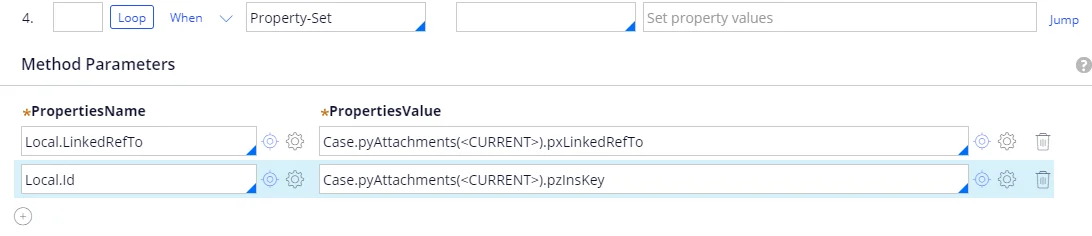
Étape 4 :
**Method**: Property-Set
| **PropertiesName** | **PropertiesValue** |
| ------------------ | -------------------------------------------- |
| Local.LinkedRefTo | Case.pyAttachments(\).pxLinkedRefTo |
| Local.Id | Case.pyAttachments(\).pzInsKey |
**Boucle** :
| **Répéter** | **Propriété de la liste de valeurs** |
| ------------------------------------------ | ------------------------------------ |
| Pour chaque élément de la liste de valeurs | Case.pyAttachments |
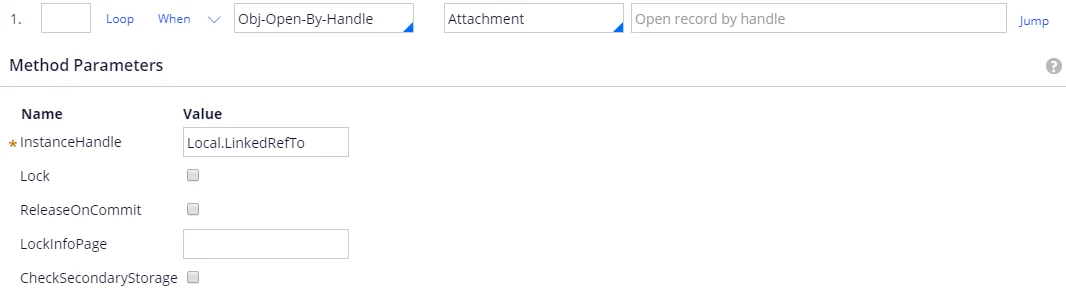
 Sous-étape 1 :
**Méthode**: Obj-Open-By-Handle.
**Page d’étape**: Attachment.
**InstanceHandle**: Local.LinkedRefTo.
Sous-étape 1 :
**Méthode**: Obj-Open-By-Handle.
**Page d’étape**: Attachment.
**InstanceHandle**: Local.LinkedRefTo.
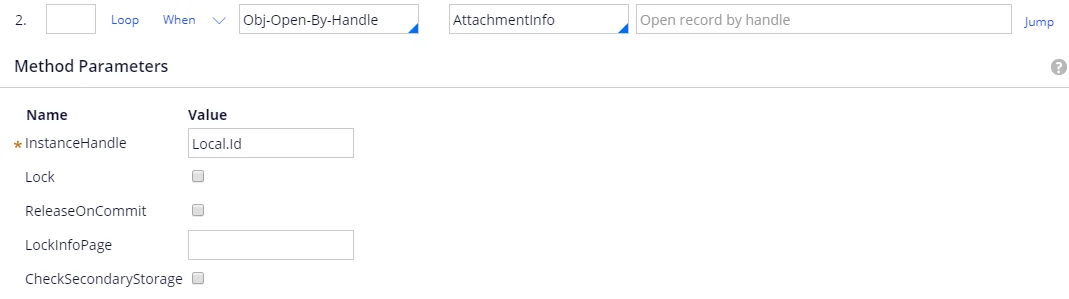
 Sous-étape 2 :
**Méthode**: Obj-Open-By-Handle.
**Page d’étape**: AttachmentInfo.
**InstanceHandle**: Local.Id.
Sous-étape 2 :
**Méthode**: Obj-Open-By-Handle.
**Page d’étape**: AttachmentInfo.
**InstanceHandle**: Local.Id.
 Sous-étape 3 :
**Méthode**: Call-Function
| **Fonction** | **Valeur de retour** |
| ------------------------------------------------------------------------------------------ | -------------------- |
| @ABBYY.AddDocumentToBatch(Local.BatchId, AttachmentInfo.pyMemo, Attachment.pyAttachStream) | |
Pour plus d’informations, voir [AddDocumentToBatch](/fr/flexi-capture/connectors/pega/pega-func-multiple-docs#adddocumenttobatch).
**Saut**:
| **When** | **si vrai** | **paramètre vrai** | **si faux** | **paramètre faux** |
| -------------- | --------------------------- | ------------------ | ----------- | ------------------ |
| StepStatusFail | passer à l’étape ultérieure | ERR | | |
**En cas d’exception, passer au libellé d’étape ultérieure**: ERR.
Sous-étape 3 :
**Méthode**: Call-Function
| **Fonction** | **Valeur de retour** |
| ------------------------------------------------------------------------------------------ | -------------------- |
| @ABBYY.AddDocumentToBatch(Local.BatchId, AttachmentInfo.pyMemo, Attachment.pyAttachStream) | |
Pour plus d’informations, voir [AddDocumentToBatch](/fr/flexi-capture/connectors/pega/pega-func-multiple-docs#adddocumenttobatch).
**Saut**:
| **When** | **si vrai** | **paramètre vrai** | **si faux** | **paramètre faux** |
| -------------- | --------------------------- | ------------------ | ----------- | ------------------ |
| StepStatusFail | passer à l’étape ultérieure | ERR | | |
**En cas d’exception, passer au libellé d’étape ultérieure**: ERR.

 Étape 5 :
**Méthode**: Call-Function
| **Fonction** | **Valeur de retour** |
| ---------------------------------------- | -------------------- |
| @ABBYY.RunBatchProcessing(Local.BatchId) | |
Pour plus d’informations, voir [RunBatchProcessing](/fr/flexi-capture/connectors/pega/pega-func-multiple-docs#runbatchprocessing).
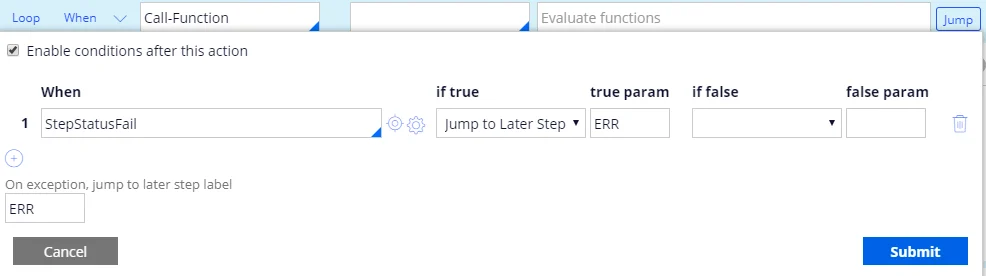
**Saut**:
| **When** | **si vrai** | **paramètre vrai** | **si faux** | **paramètre faux** |
| -------------- | --------------------------- | ------------------ | ----------- | ------------------ |
| StepStatusFail | passer à l’étape ultérieure | ERR | | |
**En cas d’exception, passer au libellé d’étape ultérieure**: ERR.
Étape 5 :
**Méthode**: Call-Function
| **Fonction** | **Valeur de retour** |
| ---------------------------------------- | -------------------- |
| @ABBYY.RunBatchProcessing(Local.BatchId) | |
Pour plus d’informations, voir [RunBatchProcessing](/fr/flexi-capture/connectors/pega/pega-func-multiple-docs#runbatchprocessing).
**Saut**:
| **When** | **si vrai** | **paramètre vrai** | **si faux** | **paramètre faux** |
| -------------- | --------------------------- | ------------------ | ----------- | ------------------ |
| StepStatusFail | passer à l’étape ultérieure | ERR | | |
**En cas d’exception, passer au libellé d’étape ultérieure**: ERR.

 Étape 6 :
**Méthode**: Call-Function
| **Fonction** | **Valeur de retour** |
| ------------------------------------------------------------------------- | -------------------- |
| @ABBYY.WaitFirstVerificationOrProcessedForMultiFileInvoice(Local.BatchId) | .VerificationUrl |
Pour plus d’informations, voir [WaitFirstVerificationOrProcessedForMultiFileInvoice](/fr/flexi-capture/connectors/pega/pega-func-multiple-docs#waitfirstverificationorprocessedformultifileinvoice).
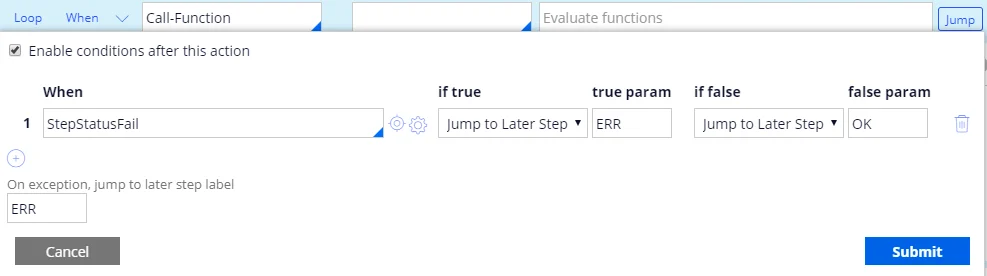
**Saut**:
| **When** | **si vrai** | **paramètre true** | **si faux** | **paramètre false** |
| -------------- | --------------------------- | ------------------ | --------------------------- | ------------------- |
| StepStatusFail | passer à l’étape ultérieure | ERR | passer à l’étape ultérieure | OK |
**En cas d’exception, passer au libellé de l’étape ultérieure** : ERR.
Étape 6 :
**Méthode**: Call-Function
| **Fonction** | **Valeur de retour** |
| ------------------------------------------------------------------------- | -------------------- |
| @ABBYY.WaitFirstVerificationOrProcessedForMultiFileInvoice(Local.BatchId) | .VerificationUrl |
Pour plus d’informations, voir [WaitFirstVerificationOrProcessedForMultiFileInvoice](/fr/flexi-capture/connectors/pega/pega-func-multiple-docs#waitfirstverificationorprocessedformultifileinvoice).
**Saut**:
| **When** | **si vrai** | **paramètre true** | **si faux** | **paramètre false** |
| -------------- | --------------------------- | ------------------ | --------------------------- | ------------------- |
| StepStatusFail | passer à l’étape ultérieure | ERR | passer à l’étape ultérieure | OK |
**En cas d’exception, passer au libellé de l’étape ultérieure** : ERR.

 Étape 7 :
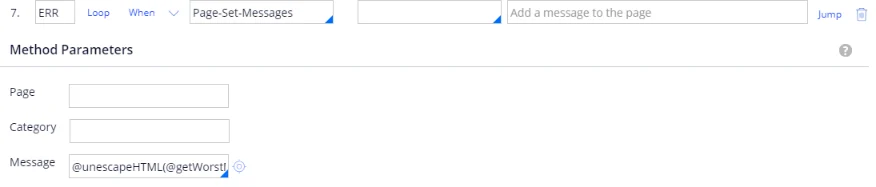
**Libellé** : ERR.
**Méthode** : Page-Set-Messages.
**Message** : @unescapeHTML(@getWorstMessageName(tools)).
Pour plus d’informations, voir [unescapeHTML](/fr/flexi-capture/connectors/pega/pega-func-other).
Étape 7 :
**Libellé** : ERR.
**Méthode** : Page-Set-Messages.
**Message** : @unescapeHTML(@getWorstMessageName(tools)).
Pour plus d’informations, voir [unescapeHTML](/fr/flexi-capture/connectors/pega/pega-func-other).
 Étape 8 :
**Libellé** : OK.
**Méthode** : Property-Set.
| **PropertiesName** | **PropertiesValue** |
| ------------------ | ------------------- |
| .BatchId | Local.BatchId |
Étape 8 :
**Libellé** : OK.
**Méthode** : Property-Set.
| **PropertiesName** | **PropertiesValue** |
| ------------------ | ------------------- |
| .BatchId | Local.BatchId |
