> ## Documentation Index
> Fetch the complete documentation index at: https://docs.abbyy.com/llms.txt
> Use this file to discover all available pages before exploring further.
# 文字プロパティ ダイアログ
> ABBYY FineReader Engine API の文字プロパティ ダイアログ — ユーザーパターン の学習時に、学習済み文字のキャプション、効果、斜体/太字/上付きの設定、およびその他の文字プロパティを編集するための Windows ダイアログ。
このトピックは Windows 版 FRE に適用されます。
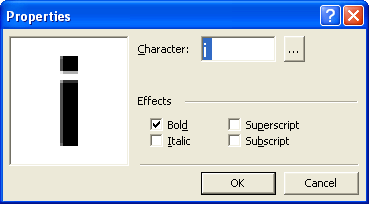 左側のダイアログには、「平均的な」文字画像が表示されます (類似する画像はすべて上下に重ねて表示されます) 。Character field には文字のキャプションが表示されます。
キャプションが正しくない場合は、正しいキャプションを入力してください。入力できない文字を認識するように ABBYY FineReader に学習させる場合は、キャプションとして 2 文字の組み合わせを使用するか、文字テーブルから必要な文字をコピーできます。テーブルを開くには、
左側のダイアログには、「平均的な」文字画像が表示されます (類似する画像はすべて上下に重ねて表示されます) 。Character field には文字のキャプションが表示されます。
キャプションが正しくない場合は、正しいキャプションを入力してください。入力できない文字を認識するように ABBYY FineReader に学習させる場合は、キャプションとして 2 文字の組み合わせを使用するか、文字テーブルから必要な文字をコピーできます。テーブルを開くには、 ボタンをクリックします。
## Effects グループ
* 学習する文字が斜体または太字に設定されていて、認識されたテキストでもその書式を保持したい場合は、[パターン学習ダイアログ](/ja/fine-reader/engine/guided-tour/advanced-techniques/using-gui-elements/training-user-patterns/pattern-training-dialog-box)で Italic および/または Bold の項目を忘れずに設定してください。
* 学習する文字が上付き文字 (または下付き文字) の場合は、Effects グループで Superscript (Subscript) 項目を設定します。
## 関連項目
[IEngine::EditUserPattern](/ja/fine-reader/engine/api-reference/engine-object-iengine-interface/supplementary-methods/edituserpattern-method)
[ユーザーパターン ダイアログ](/ja/fine-reader/engine/api-reference/engine-object-iengine-interface/supplementary-methods/edituserpattern-method/user-pattern-dialog-box)