> ## Documentation Index
> Fetch the complete documentation index at: https://docs.abbyy.com/llms.txt
> Use this file to discover all available pages before exploring further.
# ユーザーパターン ダイアログ
> ABBYY FineReader Engine API のユーザーパターン ダイアログ。学習済みの文字とキャプションを画像モードまたは一覧モードで表示し、ユーザーパターン ファイルを管理するための Windows ダイアログです。
このトピックは Windows 版 FRE に適用されます。
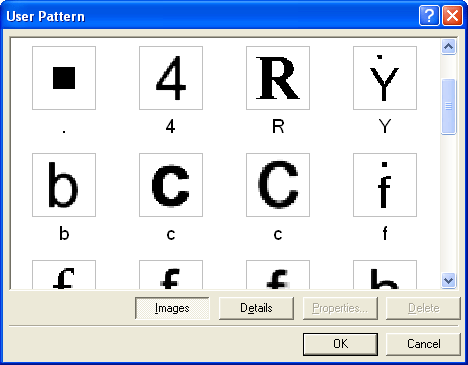
トレーニングされたすべての文字が、対応するキャプションとともにこのダイアログに表示されます。同じキャプションを持つ画像は、上下に並べて表示されます。
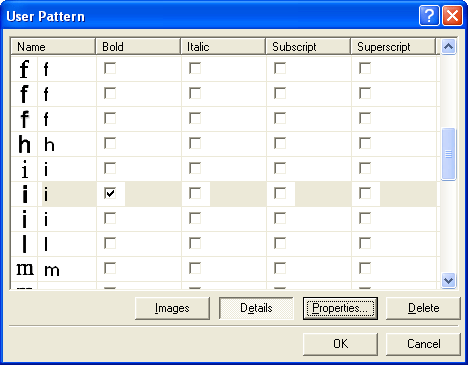
トレーニングされた文字は、2 つのモードで表示されます。
"画像 — キャプション" の組を表示します。
 文字画像、キャプション、プロパティの各列を含む表を表示します。この表では、文字のキャプションとプロパティを直接編集できます。
 画像ボタンまたは詳細ボタンをクリックして、モードを切り替えます。
プロパティボタンをクリックすると、[文字プロパティ ダイアログ](/ja/fine-reader/engine/api-reference/engine-object-iengine-interface/supplementary-methods/edituserpattern-method/character-properties-dialog-box)が開きます。このダイアログで、文字のキャプションとプロパティを変更できます。
削除ボタンをクリックすると、選択した文字がパターンから削除されます。
画像ボタンまたは詳細ボタンをクリックして、モードを切り替えます。
プロパティボタンをクリックすると、[文字プロパティ ダイアログ](/ja/fine-reader/engine/api-reference/engine-object-iengine-interface/supplementary-methods/edituserpattern-method/character-properties-dialog-box)が開きます。このダイアログで、文字のキャプションとプロパティを変更できます。
削除ボタンをクリックすると、選択した文字がパターンから削除されます。
## 関連項目
[IEngine::EditUserPattern](/ja/fine-reader/engine/api-reference/engine-object-iengine-interface/supplementary-methods/edituserpattern-method)
[文字プロパティ ダイアログ](/ja/fine-reader/engine/api-reference/engine-object-iengine-interface/supplementary-methods/edituserpattern-method/character-properties-dialog-box)