> ## Documentation Index
> Fetch the complete documentation index at: https://docs.abbyy.com/llms.txt
> Use this file to discover all available pages before exploring further.

# パターントレーニング ダイアログ

> Windows の ABBYY FineReader Engine パターン学習ダイアログのリファレンス。文字の入力、学習/スキップ ボタン、斜体/太字/上付き文字の影響、合字の処理について説明します。

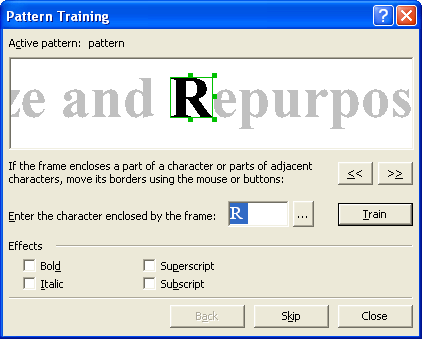
このダイアログは、[IRecognizerParams::TrainUserPatterns](/ja/fine-reader/engine/api-reference/parameter-objects/preprocessing-analysis-recognition-and-synthesis-parameters/recognizerparams#trainuserpatterns) プロパティが TRUE で、かつ [IRecognizerParams::UserPatternsFile](/ja/fine-reader/engine/api-reference/parameter-objects/preprocessing-analysis-recognition-and-synthesis-parameters/recognizerparams#userpatternsfile) プロパティにユーザーパターンファイルが指定されている場合に、認識処理中に表示されます。

ダイアログ上部のウィンドウには、トレーニング対象の文字が表示されます。文字を囲むフレームは、その文字全体、または複数の文字 ([合字](/ja/fine-reader/engine/guided-tour/advanced-techniques/using-gui-elements/training-user-patterns#ligature)をトレーニングする場合) を完全に囲むようにしてください。

<img src="https://mintcdn.com/abbyy/i-EfCQVmseNiPQcp/images/fine-reader/engine/patterntrainingdialog.gif?s=34bb024c1f5437beb9ff217feeae2664" alt="PatternTrainingDialog" width="422" height="339" data-path="images/fine-reader/engine/patterntrainingdialog.gif" />

<table><thead><tr><th><p><strong>オプション</strong></p></th><th><p><strong>オプションの説明</strong></p></th></tr></thead><tbody><tr><td><p><strong>アクティブパターン</strong></p></td><td><p><strong><a href="/ja/fine-reader/engine/api-reference/parameter-objects/preprocessing-analysis-recognition-and-synthesis-parameters/recognizerparams#userpatternsfile">IRecognizerParams::UserPatternsFile</a></strong> プロパティで指定する必要があるアクティブなユーザーパターンファイルを表示します。</p></td></tr><tr><td><p><img alt="MoveBodyLeft" src="https://mintcdn.com/abbyy/lsETHFYUFiongXSm/images/fine-reader/engine/movebodyleft.gif?s=003dc6f9b8a6095c07dd932951b3eebc" width="35" height="23" data-path="images/fine-reader/engine/movebodyleft.gif" /> <strong>ボタン</strong></p></td><td><p>囲みフレームを左に移動します。文字全体が囲まれるようにフレームを移動してください。</p></td></tr><tr><td><p><img alt="MoveBodyRight" src="https://mintcdn.com/abbyy/lsETHFYUFiongXSm/images/fine-reader/engine/movebodyright.gif?s=1d996c2ec650a677e7e33849b2c5faf0" width="35" height="23" data-path="images/fine-reader/engine/movebodyright.gif" /> <strong>ボタン</strong></p></td><td><p>囲みフレームを右に移動します。文字全体が囲まれるようにフレームを移動してください。</p></td></tr><tr><td><p><strong>文字の入力</strong></p></td><td><p>上部ウィンドウのフレームで囲まれた文字の名前を指定します。入力できない文字を認識するように ABBYY FineReader をトレーニングする場合は、2文字の組み合わせをキャプションとして使用するか、<strong>文字テーブル</strong>から必要な文字をコピーすることができます。<img alt="DotButton" src="https://mintcdn.com/abbyy/lsETHFYUFiongXSm/images/fine-reader/engine/dotbutton.gif?s=b0d60b4a0a196fa6a0cfaed2c69996f9" width="20" height="20" data-path="images/fine-reader/engine/dotbutton.gif" /> ボタンをクリックしてテーブルを開きます。</p></td></tr><tr><td><p><img alt="DotButton" src="https://mintcdn.com/abbyy/lsETHFYUFiongXSm/images/fine-reader/engine/dotbutton.gif?s=b0d60b4a0a196fa6a0cfaed2c69996f9" width="20" height="20" data-path="images/fine-reader/engine/dotbutton.gif" /> <strong>ボタン</strong></p></td><td><p><strong>文字テーブル</strong>を開きます。テーブルから必要な文字を選択して、<strong>文字の入力</strong> fieldにコピーできます。</p></td></tr><tr><td><p><strong>トレーニング (ボタン) </strong></p></td><td><p>文字をトレーニングします。つまり、新しい「文字画像 — 文字キャプション」のペアをアクティブパターンに追加します。</p></td></tr><tr><td colspan="2"><p><strong>エフェクト Group</strong></p></td></tr><tr><td><p><strong>斜体</strong></p></td><td><p>現在の文字が斜体であることを指定します。</p></td></tr><tr><td><p><strong>太字</strong></p></td><td><p>現在の文字が太字であることを指定します。</p></td></tr><tr><td><p><strong>上付き文字</strong></p></td><td><p>現在の文字が上付き文字であることを指定します。</p></td></tr><tr><td><p><strong>下付き文字</strong></p></td><td><p>現在の文字が下付き文字であることを指定します。</p></td></tr><tr><td><p><strong>戻る (ボタン) </strong></p></td><td><p>トレーニング中に誤りがあった場合は、<strong>戻る</strong>ボタンをクリックすると、フレームが前の位置に戻り、最新の「画像 — 文字」のペアがパターンから削除されます。この「元に戻す」操作には制限があり、直前の単語のトレーニングのみ元に戻すことができます。</p></td></tr><tr><td><p><strong>スキップ (ボタン) </strong></p></td><td><p>現在の文字をスキップします。フレームで囲まれているものが文字でない場合、または文字や文字グループを完全に囲めなかった場合に使用します。</p><Note>スキップボタンをクリックすると、スキップした文字の位置の認識されたテキストに、認識できないシンボルの代替として使用される ^ 文字が表示されます。</Note></td></tr></tbody></table>

<div id="see-also">
  ## 関連項目
</div>

[RecognizerParams](/ja/fine-reader/engine/api-reference/parameter-objects/preprocessing-analysis-recognition-and-synthesis-parameters/recognizerparams)

[トレーニングによる認識](/ja/fine-reader/engine/guided-tour/advanced-techniques/using-gui-elements/recognizing-with-training)

[User Patterns のトレーニング](/ja/fine-reader/engine/guided-tour/advanced-techniques/using-gui-elements/training-user-patterns)
