> ## Documentation Index
> Fetch the complete documentation index at: https://docs.abbyy.com/llms.txt
> Use this file to discover all available pages before exploring further.
# 名刺認識
> ABBYY FineReader Engine を使用して名刺データを取り込み、vCard などの電子形式にエクスポートします。氏名、会社名、電話番号、メール、Web サイトを抽出できます。
名刺には、企業や個人に関するビジネス情報が記載されています。名刺には、氏名、会社名、電話番号、ファクス番号、メール アドレス、Web サイトのアドレスなどの情報が含まれることがあります。こうした情報を紙の名刺から取り込み、電子形式で保存する必要が生じることがあります。保存先としては、携帯電話のアドレス帳、メール クライアント、その他のデータ保存システムなどが考えられます。たとえば、名刺はメールやネットワークを通じて vCard 形式でやり取りされることがよくあります。
このシナリオで実行する主な手順は次のとおりです。
1. 名刺のデジタル コピーを取得する
名刺をスキャンするか、写真を撮影します。モバイル端末のデジタル カメラで撮影した写真は、解像度や画質が低い場合があります。そのため、画像に追加の前処理が必要になることがあります。
2. 名刺を認識する
スキャンしたページには、1ページに複数の名刺が含まれている場合があります。高精度で認識し、すべての情報を正確に抽出する必要があります。
3. 認識したデータを適切な形式で保存する
認識したデータは、さまざまなデータ保存システムに保存したり、vCard 形式にエクスポートしてメールで送信したりできます。
## シナリオの実装
このトピックで紹介しているコードサンプルは、Windows 固有です。
以下では、このシナリオで ABBYY FineReader Engine を使用する推奨の方法について詳しく説明します。
ABBYY FineReader Engine を使い始めるには、[Engine](/ja/fine-reader/engine/api-reference/engine-object-iengine-interface) オブジェクトを作成する必要があります。Engine オブジェクトは、ABBYY FineReader Engine のオブジェクト階層の最上位に位置するオブジェクトで、さまざまなグローバル設定、一部の処理メソッド、およびほかのオブジェクトを作成するためのメソッドを提供します。
Engine オブジェクトを作成するには、[InitializeEngine](/ja/fine-reader/engine/api-reference/functions/initializeengine-function) 関数を使用できます。[Engine オブジェクトを読み込むその他の方法](/ja/fine-reader/engine/guided-tour/advanced-techniques/programming-aspects/different-ways-to-load-engine) (Win) も参照してください。
### C\#
```csharp theme={null}
public class EngineLoader : IDisposable
{
public EngineLoader()
{
// これらの変数を、FREngine.dll へのフル パス、Customer Project ID、
// および該当する場合は、Online License トークン ファイルへのパスと Online License パスワードで初期化します
string enginePath = "";
string customerProjectId = "";
string licensePath = "";
string licensePassword = "";
// FREngine.dll ライブラリを読み込みます
dllHandle = LoadLibraryEx(enginePath, IntPtr.Zero, LOAD_WITH_ALTERED_SEARCH_PATH);
try
{
if (dllHandle == IntPtr.Zero)
{
throw new Exception("Can't load " + enginePath);
}
IntPtr initializeEnginePtr = GetProcAddress(dllHandle, "InitializeEngine");
if (initializeEnginePtr == IntPtr.Zero)
{
throw new Exception("Can't find InitializeEngine function");
}
IntPtr deinitializeEnginePtr = GetProcAddress(dllHandle, "DeinitializeEngine");
if (deinitializeEnginePtr == IntPtr.Zero)
{
throw new Exception("Can't find DeinitializeEngine function");
}
IntPtr dllCanUnloadNowPtr = GetProcAddress(dllHandle, "DllCanUnloadNow");
if (dllCanUnloadNowPtr == IntPtr.Zero)
{
throw new Exception("Can't find DllCanUnloadNow function");
}
// ポインターをデリゲートに変換します
initializeEngine = (InitializeEngine)Marshal.GetDelegateForFunctionPointer(
initializeEnginePtr, typeof(InitializeEngine));
deinitializeEngine = (DeinitializeEngine)Marshal.GetDelegateForFunctionPointer(
deinitializeEnginePtr, typeof(DeinitializeEngine));
dllCanUnloadNow = (DllCanUnloadNow)Marshal.GetDelegateForFunctionPointer(
dllCanUnloadNowPtr, typeof(DllCanUnloadNow));
// InitializeEngine 関数を呼び出し、
// Online License ファイルへのパスと Online License パスワードを渡します
int hresult = initializeEngine(customerProjectId, licensePath, licensePassword,
"", "", false, ref engine);
Marshal.ThrowExceptionForHR(hresult);
}
catch (Exception)
{
// FREngine.dll ライブラリを解放します
engine = null;
// FreeLibrary の呼び出し前にすべてのオブジェクトを削除します
GC.Collect();
GC.WaitForPendingFinalizers();
GC.Collect();
FreeLibrary(dllHandle);
dllHandle = IntPtr.Zero;
initializeEngine = null;
deinitializeEngine = null;
dllCanUnloadNow = null;
throw;
}
}
// Kernel32.dll functions
[DllImport("kernel32.dll")]
private static extern IntPtr LoadLibraryEx(string dllToLoad, IntPtr reserved, uint flags);
private const uint LOAD_WITH_ALTERED_SEARCH_PATH = 0x00000008;
[DllImport("kernel32.dll")]
private static extern IntPtr GetProcAddress(IntPtr hModule, string procedureName);
[DllImport("kernel32.dll")]
private static extern bool FreeLibrary(IntPtr hModule);
// FREngine.dll functions
[UnmanagedFunctionPointer(CallingConvention.StdCall, CharSet = CharSet.Unicode)]
private delegate int InitializeEngine(string customerProjectId, string licensePath,
string licensePassword, string tempFolder, string dataFolder, bool isSharedCPUCoresMode,
ref FREngine.IEngine engine);
[UnmanagedFunctionPointer(CallingConvention.StdCall)]
private delegate int DeinitializeEngine();
[UnmanagedFunctionPointer(CallingConvention.StdCall)]
private delegate int DllCanUnloadNow();
// private 変数
private FREngine.IEngine engine = null;
// FREngine.dll へのハンドル
private IntPtr dllHandle = IntPtr.Zero;
private InitializeEngine initializeEngine = null;
private DeinitializeEngine deinitializeEngine = null;
private DllCanUnloadNow dllCanUnloadNow = null;
}
```
このシナリオに適した処理設定は、Engine オブジェクトの [LoadPredefinedProfile](/ja/fine-reader/engine/api-reference/engine-object-iengine-interface/supplementary-methods/loadpredefinedprofile-method) メソッドを使用して読み込めます。このメソッドは、設定プロファイル名を入力パラメーターとして使用します。詳細については、[プロファイルの操作](/ja/fine-reader/engine/guided-tour/advanced-techniques/working-with-profiles)を参照してください。
このシナリオ用の設定は、定義済みプロファイル [BusinessCardsProcessing](/ja/fine-reader/engine/guided-tour/advanced-techniques/working-with-profiles#businesscardsprocessing) で利用できます。
* 名刺のみを検出します (SynthesisParamsForPage オブジェクトの [SynthesizeBusinessCards](/ja/fine-reader/engine/api-reference/parameter-objects/preprocessing-analysis-recognition-and-synthesis-parameters/synthesisparamsforpage#synthesizebusinesscards) プロパティを TRUE に設定します) 。
* 品質の低い小さなテキスト領域も含めて、画像内のすべてのテキストを検出します (画像および表は検出されません) 。
* 解像度補正が実行されます。
* Document の論理構造の完全な合成は実行されません。
### C\#
```csharp theme={null}
// 定義済みプロファイルを読み込む
engine.LoadPredefinedProfile("BusinessCardsProcessing");
```
処理設定を変更する場合は、適切な Parameter オブジェクトを使用してください。詳細については、下記の[特定のタスク向けの追加の最適化](/ja/fine-reader/engine/guided-tour/basic-usage-scenarios-implementation/business-card-recognition#optimization)を参照してください。
FineReader Engine に画像を読み込むには、次のオブジェクトのメソッドを使用できます。
* [FRDocument](/ja/fine-reader/engine/api-reference/document-related-objects/frdocument)
* Linux および Windows では [BatchProcessor](/ja/fine-reader/engine/api-reference/batch-processor/batchprocessor)
Linux および Windows のユーザーは、各アプローチの長所と短所について [ABBYY FineReader Engine での並列処理](/ja/fine-reader/engine/guided-tour/advanced-techniques/parallel-processing) で確認できます。このトピックでは FRDocument に焦点を当てます。
FRDocument オブジェクトに画像を読み込むには、次のいずれかを行います。
* FRDocument オブジェクトの作成時に、[Engine](/ja/fine-reader/engine/api-reference/engine-object-iengine-interface) オブジェクトの [CreateFRDocumentFromImage](/ja/fine-reader/engine/api-reference/engine-object-iengine-interface/creation-methods/createfrdocumentfromimage-method) メソッドを使用します。
* 作成した FRDocument オブジェクトにファイルから画像を追加します ([AddImageFile](/ja/fine-reader/engine/api-reference/document-related-objects/frdocument/addimagefile-method)、[AddImageFileWithPassword](/ja/fine-reader/engine/api-reference/document-related-objects/frdocument/addimagefilewithpassword-method)、または [AddImageFileWithPasswordCallback](/ja/fine-reader/engine/api-reference/document-related-objects/frdocument/addimagefilewithpasswordcallback-method) メソッドを使用します) 。
これらのメソッドはすべて、画像の前処理に関するさまざまなパラメーターを指定できる [PrepareImageMode](/ja/fine-reader/engine/api-reference/image-related-objects/prepareimagemode) オブジェクトをパラメーターとして使用します。このオブジェクトは [IEngine::CreatePrepareImageMode](/ja/fine-reader/engine/api-reference/engine-object-iengine-interface/creation-methods/createlessobjectgreater-methods) 関数を呼び出して作成し、必要に応じてそのプロパティを変更した後、そのオブジェクトを必要とする関数に渡します。
### C\#
```csharp theme={null}
FREngine.IEngine engine;
string imagePath;
FREngine.IPrepareImageMode pim = engine.CreatePrepareImageMode();
pim.DocumentType = FREngine.DocumentTypeEnum.DT_BusinessCard;
FREngine.IFRDocument frDoc = engine.CreateFRDocument();
frDoc.AddImageFile(imagePath, pim, null);
```
名刺を認識するには、次の手順を実行します。
1. RecognizerParams object の [SetPredefinedTextLanguage](/ja/fine-reader/engine/api-reference/parameter-objects/preprocessing-analysis-recognition-and-synthesis-parameters/recognizerparams/setpredefinedtextlanguage-method) メソッドを使用して、名刺の言語を指定します。名刺認識で使用できる[定義済み言語の一覧](/ja/fine-reader/engine/specifications/predefined-languages)を参照してください。
2. 必要に応じて、その他の処理パラメーターを設定します。[ページの前処理、解析、認識、および合成のパラメーターの調整](/ja/fine-reader/engine/guided-tour/advanced-techniques/tuning-parameters-of-preprocessing-analysis-recognition-and-synthesis)を参照してください。
3. パラメーターをいずれかの処理メソッド (たとえば、FRDocument object の [Process](/ja/fine-reader/engine/api-reference/document-related-objects/frdocument/process-method) メソッド) に渡します。このメソッドにより、Document およびそのページの名刺コレクション ([IFRDocument::BusinessCards](/ja/fine-reader/engine/api-reference/document-related-objects/frdocument#businesscards)、[IFRPage::BusinessCards](/ja/fine-reader/engine/api-reference/document-related-objects/frpage#businesscards)) が設定されます。
FRPage object の [SynthesizeBusinessCard](/ja/fine-reader/engine/api-reference/document-related-objects/frpage/synthesizebusinesscard-method) メソッドまたは [SynthesizeBusinessCardEx](/ja/fine-reader/engine/api-reference/document-related-objects/frpage/synthesizebusinesscardex-method) メソッドを使用して、ページ全体または各ページ内の領域から名刺を合成することもできます。このメソッドは [BusinessCard](/ja/fine-reader/engine/api-reference/document-related-objects/businesscard) object を返します。この場合、名刺はページの名刺コレクションには追加されない点に注意してください。この方法は、Batch Processor を使用する処理方法を選択した場合に特に便利です。
### C\#
```csharp theme={null}
// Document処理パラメーターを作成する
FREngine.IDocumentProcessingParams dpp = engine.CreateDocumentProcessingParams();
// 指定したパラメーターで認識を実行する
frDoc.Process( dpp );
// 名刺にアクセスする
FREngine.IBusinessCard card = frDoc.BusinessCards[0];
```
認識された名刺 ([BusinessCard](/ja/fine-reader/engine/api-reference/document-related-objects/businesscard) オブジェクト) には、次の field を含めることができます。
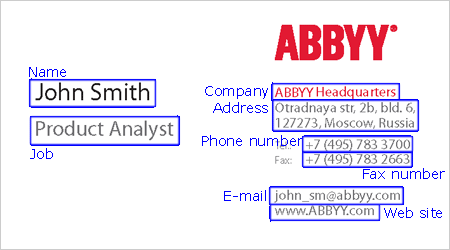
- 氏名
- 会社名
- 会社での役職
- 会社の住所
- 電話番号
- Fax
- 携帯電話番号
- 電子メール
- Web サイト
各 field には、そのタイプ ([FieldByType](/ja/fine-reader/engine/api-reference/document-related-objects/businesscard/fieldbytype-property) プロパティ) または fields コレクション内のインデックス ([Field](/ja/fine-reader/engine/api-reference/document-related-objects/businesscard/field-property) プロパティ) でアクセスできます。各 field には [Value](/ja/fine-reader/engine/api-reference/document-related-objects/businesscardfield#value) プロパティがあり、field の値を string 形式で取得できます。field 内の各文字については、その認識候補を利用できます ([GetCharParams](/ja/fine-reader/engine/api-reference/document-related-objects/businesscardfield/getcharparams-method) メソッド) 。
一部の field は複数の構成要素から成る場合があります。たとえば、住所 field には郵便番号、国、USA の州、市区町村、番地を含めることができます。field の構成要素にアクセスするには、[Component](/ja/fine-reader/engine/api-reference/document-related-objects/businesscardfield/component-property) プロパティまたは [FindComponent](/ja/fine-reader/engine/api-reference/document-related-objects/businesscardfield/findcomponent-method) メソッドを使用できます。前者ではインデックスで構成要素にアクセスでき、後者ではタイプで構成要素を検索できます。各構成要素について、そのタイプと値を確認し、各文字のパラメーターと認識候補を取得できます ([GetCharParams](/ja/fine-reader/engine/api-reference/document-related-objects/businesscardfieldcomponent/getcharparams-method) メソッド) 。
### C\#
```csharp theme={null}
// 名前fieldを取得します
FREngine.IBusinessCardField nameField = card.FieldByType( FREngine.BusinessCardFieldTypeEnum.BCFT_Name, 0 );
// 名を含む構成要素を取得します
FREngine.IBusinessCardFieldComponent firstNameComponent =
nameField.FindComponent( FREngine.BusinessCardFieldComponentTypeEnum.BCFCT_FirstName );
// 認識された名
string firstName = firstNameComponent.Value;
```
BusinessCard オブジェクトには、名刺を vCard 形式で保存するための専用の [ExportToVCard](/ja/fine-reader/engine/api-reference/document-related-objects/businesscard/exporttovcard-method) メソッドがあります。ファイルへのパスはパラメーターとして渡します。
名刺は、たとえば XML など、利用可能な他のエクスポート形式でも保存できます。
### C\#
```csharp theme={null}
// 認識されたデータを vCard 形式で保存します
card.ExportToVCard("D:\\sample.vcf");
// XML で保存します
frDoc.Export("D:\\Demo.xml", FREngine.FileExportFormatEnum.FEF_XML, null);
```
ABBYY FineReader Engine での作業が完了したら、[Engine](/ja/fine-reader/engine/api-reference/engine-object-iengine-interface) オブジェクトをアンロードする必要があります。そのためには、エクスポートされた [DeinitializeEngine](/ja/fine-reader/engine/api-reference/functions/deinitializeengine-function) 関数を使用します。
### C\#
```csharp theme={null}
public class EngineLoader : IDisposable
{
// FineReader Engine をアンロードする
public void Dispose()
{
if (engine == null)
{
// Engine はロードされていない
return;
}
engine = null;
// FreeLibrary を呼び出す前にすべてのオブジェクトを削除する
GC.Collect();
GC.WaitForPendingFinalizers();
GC.Collect();
int hresult = deinitializeEngine();
hresult = dllCanUnloadNow();
if (hresult == 0)
{
FreeLibrary(dllHandle);
}
dllHandle = IntPtr.Zero;
initializeEngine = null;
deinitializeEngine = null;
dllCanUnloadNow = null;
// クリーンアップ後に例外をスローする
Marshal.ThrowExceptionForHR(hresult);
}
// Kernel32.dll の関数
[DllImport("kernel32.dll")]
private static extern IntPtr LoadLibraryEx(string dllToLoad, IntPtr reserved, uint flags);
private const uint LOAD_WITH_ALTERED_SEARCH_PATH = 0x00000008;
[DllImport("kernel32.dll")]
private static extern IntPtr GetProcAddress(IntPtr hModule, string procedureName);
[DllImport("kernel32.dll")]
private static extern bool FreeLibrary(IntPtr hModule);
// FREngine.dll の関数
[UnmanagedFunctionPointer(CallingConvention.StdCall, CharSet = CharSet.Unicode)]
private delegate int InitializeEngine( string customerProjectId, string LicensePath, string LicensePassword, , , , ref FREngine.IEngine engine);
[UnmanagedFunctionPointer(CallingConvention.StdCall)]
private delegate int DeinitializeEngine();
[UnmanagedFunctionPointer(CallingConvention.StdCall)]
private delegate int DllCanUnloadNow();
// プライベート変数
private FREngine.IEngine engine = null;
// FREngine.dll へのハンドル
private IntPtr dllHandle = IntPtr.Zero;
private InitializeEngine initializeEngine = null;
private DeinitializeEngine deinitializeEngine = null;
private DllCanUnloadNow dllCanUnloadNow = null;
}
```
## 必要なリソース
[FREngineDistribution.csv](/ja/fine-reader/engine/distribution/distribution-windows/distribution-kit/working-with-the-frenginedistributioncsv-file) ファイルを使用すると、アプリケーションの動作に必要なファイルの一覧を自動的に作成できます。このシナリオで処理を行うには、列 5 (RequiredByModule) で次の値を選択します。
Core
Core.Resources
Opening
Opening, Processing
Processing
Processing.BCR
Processing.OCR
Processing.OCR, Processing.ICR
Processing.OCR.NaturalLanguages
Processing.OCR.NaturalLanguages, Processing.ICR.NaturalLanguages
Export
Export, Processing
標準シナリオを変更する場合は、それに応じて必要なモジュールも変更してください。また、インターフェイス言語、認識言語、およびアプリケーションで使用する追加機能も指定する必要があります (たとえば、PDF ファイルを開く必要がある場合は Opening.PDF、[CJK 言語](/ja/fine-reader/engine/guided-tour/advanced-techniques/recognizing-cjk-languages#cjk) のテキストを認識する必要がある場合は Processing.OCR.CJK など) 。詳細については、[Working with the FREngineDistribution.csv File](/ja/fine-reader/engine/distribution/distribution-windows/distribution-kit/working-with-the-frenginedistributioncsv-file) を参照してください。
## 追加の最適化
さまざまな処理段階のパラメーター設定に関する追加情報は、ヘルプファイルの以下のセクションを参照してください。
* Engine の読み込み
* [Engine オブジェクトのさまざまな読み込み方法](/ja/fine-reader/engine/guided-tour/advanced-techniques/programming-aspects/different-ways-to-load-engine) for Windows
Engine オブジェクトの読み込み方法を詳しく説明しています。
* [マルチスレッドのサーバーアプリケーションで ABBYY FineReader Engine を使用する](/ja/fine-reader/engine/guided-tour/advanced-techniques/programming-aspects/using-in-server-applications) for Windows
サーバーアプリケーションで FineReader Engine を使用する際の特有の注意点について説明しています。
* [プロファイルの操作](/ja/fine-reader/engine/guided-tour/advanced-techniques/working-with-profiles)
定義済みプロファイルとユーザープロファイルについて詳しく説明しています。
* 認識
* [前処理、解析、認識、および合成のパラメーターの調整](/ja/fine-reader/engine/guided-tour/advanced-techniques/tuning-parameters-of-preprocessing-analysis-recognition-and-synthesis)
前処理、解析、認識、および合成のパラメーターオブジェクトを使用して、Document処理をカスタマイズする方法を説明しています。
* [ABBYY FineReader Engine による並列処理](/ja/fine-reader/engine/guided-tour/advanced-techniques/parallel-processing) for Linux and Windows
Batch Processor を使用する、別のDocument処理方法を利用できます。
* エクスポート
* [エクスポートパラメーターの調整](/ja/fine-reader/engine/guided-tour/advanced-techniques/tuning-export-parameters)
エクスポートパラメーターオブジェクトを使用したエクスポート設定について説明しています。
* [XMLExportParams オブジェクト](/ja/fine-reader/engine/api-reference/parameter-objects/export-parameters/xmlexportparams)
このオブジェクトを使用すると、認識結果を XML に保存するための設定を行えます。
## 関連項目
[基本的な利用シナリオの実装](/ja/fine-reader/engine/guided-tour/basic-usage-scenarios-implementation)