> ## Documentation Index
> Fetch the complete documentation index at: https://docs.abbyy.com/llms.txt
> Use this file to discover all available pages before exploring further.

# XML スキーマの説明

> ABBYY FineReader Engine の認識されたテキストのエクスポート用 XML スキーマ (ABBYY_Scheme_XML.xsd) — 文書構造、属性、認識バリアントのタグ。

XML ファイルには認識されたテキストが含まれており、その構造、属性、認識バリアントに関する追加情報は XML タグを使って記述されます。使用可能なタグについては、以下の表を参照してください。認識パラメーターの値によっては、一部のタグが含まれない場合があります。たとえば、単語または文字の認識バリアントは、[XMLExportParams](/ja/fine-reader/engine/api-reference/parameter-objects/export-parameters/xmlexportparams) オブジェクトの対応するプロパティが TRUE に設定されている場合にのみ保存されます。

XML スキーマは ABBYY\_Scheme\_XML.xsd ファイルにあります。

このファイルは、macOS では [Headers](/ja/fine-reader/engine/distribution/distribution-macos/distribution-kit-macos) フォルダーに、[Linux](/ja/fine-reader/engine/distribution/distribution-linux/distribution-kit-linux#inc) および [Windows](/ja/fine-reader/engine/distribution/distribution-windows/distribution-kit#inc) では Inc フォルダーにあります (Start > Programs > ABBYY FineReader Engine 12 > Installation Folders > Include Files Folder) 。

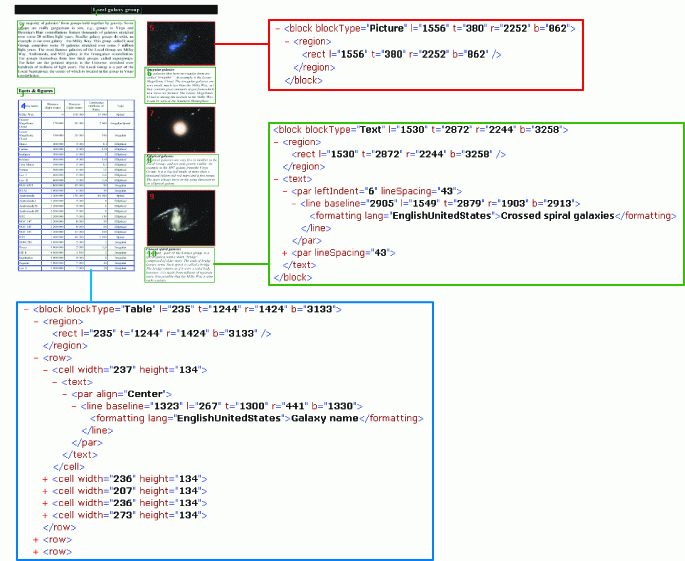
以下の図は、出力 XML ファイル内の Picture、Text、Table ブロックの例を示しています。

<img src="https://mintcdn.com/abbyy/B_SRGbkkbQ9YH40E/images/fine-reader/engine/xmlscheme.gif?s=05ae1c35f17bf061ff3ebfb07bfe480e" alt="XMLScheme" width="685" height="561" data-path="images/fine-reader/engine/xmlscheme.gif" />

<div id="description-of-document-tags">
  ## 文書タグの説明
</div>

<table>
  <tbody>
    <tr>
      <td>
        <p>
          <strong>名前</strong>
        </p>
      </td>

      <td>
        <p>
          <strong>型</strong>
        </p>
      </td>

      <td>
        <p>
          <strong>多重度</strong>
        </p>
      </td>

      <td>
        <p>
          <strong>親タグ</strong>
        </p>
      </td>

      <td>
        <p>
          <strong>説明</strong>
        </p>
      </td>
    </tr>

    <tr>
      <td>
        <p>
          <a name="document" />

          <strong>document</strong>
        </p>
      </td>

      <td>
        <p>複合型</p>

        <details>
          <summary>型の要素</summary>

          <p>
            <strong>page</strong>
          </p>

          <p>
            <strong>documentData</strong>
          </p>
        </details>

        <details>
          <summary>型の属性</summary>

          <p>
            <em>version</em> — XMLのバージョン
          </p>

          <p>
            <em>producer</em> — XMLファイルの生成元
          </p>

          <p>
            <em>pagesCount</em> —  (省略可) ドキュメントのページ数
          </p>

          <p>
            <em>mainLanguage</em> —  (省略可) ドキュメントの主要言語
          </p>

          <p>
            <em>languages</em> —  (省略可) ドキュメントで使用されているすべての言語
          </p>
        </details>
      </td>

      <td>
        <p>1</p>
      </td>

      <td>
        <p>no</p>
      </td>

      <td>
        <p>ドキュメント。</p>
      </td>
    </tr>

    <tr>
      <td>
        <p>
          <a name="page" />

          <strong>page</strong>
        </p>
      </td>

      <td>
        <p>複合型、blockタグのシーケンス</p>

        <details>
          <summary>型の要素</summary>

          <p>
            <strong>block</strong>
          </p>
        </details>

        <details>
          <summary>型の属性</summary>

          <p>
            <em>width</em> — 画像の幅 (ピクセル単位)
          </p>

          <p>
            <em>height</em> — 画像の高さ (ピクセル単位)
          </p>

          <p>
            <em>resolution </em>— 画像の解像度 (ピクセル/インチ)
          </p>

          <p>
            <em>originalCoords</em> —  (省略可) trueの場合、すべての座標はファイルを開く前の元の画像を基準とします。falseの場合は、開いた後の (傾き補正済み) 画像を基準とします
          </p>

          <p>
            <em>rotation</em> —  (省略可) 処理前に元のページ画像に適用された回転の種類。次のいずれかの値を指定できます: Normal、RotatedClockwise、RotatedUpsideDown、RotatedCounterclockwise
          </p>
        </details>
      </td>

      <td>
        <p>0...unbounded</p>
      </td>

      <td>
        <p>document</p>
      </td>

      <td>
        <p>認識されたページ。</p>
      </td>
    </tr>

    <tr>
      <td>
        <p>
          <a name="block" />

          <strong>block</strong>
        </p>
      </td>

      <td>
        <p>BlockType</p>

        <details>
          <summary>BlockTypeの要素</summary>

          <p>
            各要素が使用可能かどうかは、ブロックの種類 (<em>blockType </em>属性を参照) によって異なります。
          </p>

          <p>
            <strong>region </strong>— 常に使用可能
          </p>

          <p>
            <strong>text</strong> — blockType属性が"Text"の場合のみ使用可能
          </p>

          <p>
            <strong>row</strong>
            <em> </em>— blockType属性が"Table"の場合のみ使用可能
          </p>

          <p>
            <strong>separatorsBox</strong>
            <em> </em>— blockType属性が"SeparatorsBox"の場合のみ使用可能
          </p>

          <p>
            <strong>separator</strong>
            <em> </em>— blockType属性が"Separator"の場合のみ使用可能
          </p>

          <p>
            <strong>checkmark</strong>
            <em> </em>— blockType属性が"Checkmark"の場合のみ使用可能
          </p>

          <p>
            <strong>groupCheckmark</strong>
            <em> </em>— blockType属性が"GroupCheckmark"の場合のみ使用可能
          </p>
        </details>

        <details>
          <summary>BlockTypeの属性</summary>

          <p>
            <em>blockType </em>— ブロックの種類。次のいずれかの値を指定できます: Text、Table、Picture、Barcode、Separator、SeparatorsBox、Checkmark、GroupCheckmark
          </p>

          <p>
            <em>blockName — </em> (省略可) ブロックの名前
          </p>

          <p>
            <em>isHidden</em> —  (省略可) ブロックを非表示にするかどうかを指定します (デフォルト値はfalse)
          </p>

          <p>
            <em>l</em> —  (省略可) ブロックの左端の座標
          </p>

          <p>
            <em>t</em> —  (省略可) ブロックの上端の座標
          </p>

          <p>
            <em>r</em> —  (省略可) ブロックの右端の座標
          </p>

          <p>
            <em>b</em> —  (省略可) ブロックの下端の座標
          </p>
        </details>
      </td>

      <td>
        <p>0...unbounded</p>
      </td>

      <td>
        <p>page</p>
      </td>

      <td>
        <p>認識されたブロック。</p>
      </td>
    </tr>

    <tr>
      <td>
        <p>
          <a name="region" />

          <strong>region</strong>
        </p>
      </td>

      <td>
        <p>複合型、rectタグのシーケンス</p>

        <details>
          <summary>型の要素</summary>

          <p>
            <strong>rect</strong>
          </p>
        </details>

        <p>型の属性はありません</p>
      </td>

      <td>
        <p>1</p>
      </td>

      <td>
        <p>block</p>
      </td>

      <td>
        <p>ブロック領域 (矩形の集合) 。</p>
      </td>
    </tr>

    <tr>
      <td>
        <p>
          <a name="rect" />

          <strong>rect</strong>
        </p>
      </td>

      <td>
        <p>Complex Type</p>

        <details>
          <summary>型の属性</summary>

          <p>
            <em>l</em> — 矩形の左端の座標
          </p>

          <p>
            <em>t</em> — 矩形の上端の座標
          </p>

          <p>
            <em>r</em> — 矩形の右端の座標
          </p>

          <p>
            <em>b</em> — 矩形の下端の座標
          </p>
        </details>
      </td>

      <td>
        <p>1...unbounded</p>
      </td>

      <td>
        <p>region</p>
      </td>

      <td>
        <p>ブロック領域の Rectangle。</p>
      </td>
    </tr>

    <tr>
      <td rowspan="2">
        <p>
          <a name="text" />

          <strong>text</strong>
        </p>
      </td>

      <td rowspan="2">
        <p>TextType</p>

        <details>
          <summary>TextType の要素</summary>

          <p>
            <strong>par</strong>
          </p>
        </details>

        <details>
          <summary>TextType の属性</summary>

          <p>
            <em>orientation</em> —  (省略可) テキストの向き。次のいずれかの値を指定できます: Normal、RotatedClockwise、RotatedUpsidedown、RotatedCounterclockwise (デフォルト値は Normal)
          </p>

          <p>
            <em>backgroundColor</em> —  (省略可) テキストの背景色 (デフォルト値は -1。透明を意味します)
          </p>

          <p>
            <em>mirrored</em> —  (省略可) テキストが左右反転されているかどうかを指定します (デフォルト値は false)
          </p>

          <p>
            <em>inverted</em> —  (省略可) テキストが色反転されているかどうかを指定します (デフォルト値は false)
          </p>
        </details>
      </td>

      <td>
        <p>0...unbounded</p>
      </td>

      <td>
        <p>block</p>
      </td>

      <td>
        <p>
          認識されたテキストブロックのテキスト (blockType 属性が "Text" の場合、block タグの要素として現れます) 。
        </p>
      </td>
    </tr>

    <tr>
      <td>
        <p>0...unbounded</p>
      </td>

      <td>
        <p>cell</p>
      </td>

      <td>
        <p>表のセルのテキスト。</p>
      </td>
    </tr>

    <tr>
      <td>
        <p>
          <a name="par" />

          <strong>par</strong>
        </p>
      </td>

      <td>
        <p>ParagraphType</p>

        <details>
          <summary>ParagraphType の要素</summary>

          <p>
            <strong>line</strong>
          </p>
        </details>

        <details>
          <summary>ParagraphType の属性</summary>

          <p>
            <em>dropCapCharsCount</em> —  (省略可) 段落内のドロップキャップの数 (デフォルト値は 0)
          </p>

          <p>
            <em>dropCap-l</em> —  (省略可) ドロップキャップの Rectangle の左座標
          </p>

          <p>
            <em>dropCap-t</em> —  (省略可) ドロップキャップの Rectangle の上座標
          </p>

          <p>
            <em>dropCap-r</em> —  (省略可) ドロップキャップの Rectangle の右座標
          </p>

          <p>
            <em>dropCap-b</em> —  (省略可) ドロップキャップの Rectangle の下座標
          </p>

          <p>
            <em>align</em> —  (省略可) 段落の配置。次のいずれかの値を指定できます: Left、Center、Right、Justified (デフォルト値は Left)
          </p>

          <p>
            <em>leftIndent</em> —  (省略可) 段落の左インデント (デフォルト値は 0)
          </p>

          <p>
            <em>rightIndent</em> —  (省略可) 段落の右インデント (デフォルト値は 0)
          </p>

          <p>
            <em>startIndent</em> —  (省略可) 段落の先頭行のインデント (デフォルト値は 0)
          </p>

          <p>
            <em>lineSpacing</em> —  (省略可) 行間隔 (デフォルト値は 0)
          </p>

          <p>
            <em>isListItem</em> —  (省略可) 段落がリストの一部であることを示します (デフォルト値は false)
          </p>

          <p>
            <em>lstLvl</em> —  (省略可) リストのレベル
          </p>

          <p>
            <em>lstNum</em> —  (省略可) リスト内の段落番号
          </p>
        </details>
      </td>

      <td>
        <p>0...unbounded</p>
      </td>

      <td>
        <p>text</p>
      </td>

      <td>
        <p>認識されたテキストの段落。</p>
      </td>
    </tr>

    <tr>
      <td>
        <p>
          <a name="line" />

          <strong>line</strong>
        </p>
      </td>

      <td>
        <p>LineType</p>

        <details>
          <summary>LineType の要素</summary>

          <p>
            <strong>formatting</strong>
          </p>
        </details>

        <details>
          <summary>LineType の属性</summary>

          <p>
            <em>baseline</em> — ベースラインからページ上端までの距離
          </p>

          <p>
            <em>l</em> — 外接 Rectangle の左辺の座標
          </p>

          <p>
            <em>t</em> — 外接 Rectangle の上辺の座標
          </p>

          <p>
            <em>r</em> — 外接 Rectangle の右辺の座標
          </p>

          <p>
            <em>b</em> — 外接 Rectangle の下辺の座標
          </p>
        </details>
      </td>

      <td>
        <p>0...unbounded</p>
      </td>

      <td>
        <p>par</p>
      </td>

      <td>
        <p>段落の行。</p>
      </td>
    </tr>

    <tr>
      <td>
        <p>
          <a name="formatting" />

          <strong>formatting</strong>
        </p>
      </td>

      <td>
        <p>FormattingType</p>

        <details>
          <summary>FormattingType のグループ</summary>

          <p>
            <strong>charParams</strong>
          </p>

          <p>または</p>

          <p>
            <strong>wordRecVariants</strong>
          </p>
        </details>

        <details>
          <summary>FormattingType の属性</summary>

          <p>
            <em>lang</em> — 言語名
          </p>

          <p>
            <em>ff</em> —  (省略可) フォント名
          </p>

          <p>
            <em>fs</em> —  (省略可) フォントサイズ
          </p>

          <p>
            <em>bold</em> —  (省略可) 太字のフォントスタイル (デフォルト値は false)
          </p>

          <p>
            <em>italic</em> —  (省略可) 斜体のフォントスタイル (デフォルト値は false)
          </p>

          <p>
            <em>subscript</em> —  (省略可) 下付き文字のフォント効果 (デフォルト値は false)
          </p>

          <p>
            <em>superscript</em> —  (省略可) 上付き文字のフォント効果 (デフォルト値は false)
          </p>

          <p>
            <em>smallcaps</em> —  (省略可) スモールキャップスのフォント効果 (デフォルト値は false)
          </p>

          <p>
            <em>underline</em> —  (省略可) 下線のフォント効果 (
            default value is false)
          </p>

          <p>
            <em>strikeout</em> — (省略可能) 取り消し線のフォント効果 (デフォルト値はfalse)
          </p>

          <p>
            <em>color</em> — (省略可能) フォントの色 (デフォルト値は0)
          </p>

          <p>
            <em>scaling</em> — (省略可能) フォントの拡大縮小率 (デフォルト値は1000)
          </p>

          <p>
            <em>spacing</em> — (省略可能) 文字間隔 (デフォルト値は0)
          </p>
        </details>
      </td>

      <td>
        <p>0...unbounded</p>
      </td>

      <td>
        <p>line</p>
      </td>

      <td>
        <p>
          均一な書式設定を持つ文字のグループ。文字の属性は単語の認識バリアントと交互に配置されます。単語の認識バリアントは、対象の単語の前に記述されます。
        </p>
      </td>
    </tr>

    <tr>
      <td>
        <p>
          <a name="charparams" />

          <strong>charParams</strong>
        </p>
      </td>

      <td>
        <p>CharParamsType</p>

        <details>
          <summary>CharParamsType の要素</summary>

          <p>
            <strong>charRecVariants</strong>
          </p>
        </details>

        <details>
          <summary>CharParamsType の属性</summary>

          <p>
            <em>l</em> — 文字の矩形の左端の座標
          </p>

          <p>
            <em>t</em> — 文字の矩形の上端の座標
          </p>

          <p>
            <em>r</em> — 文字の矩形の右端の座標
          </p>

          <p>
            <em>b</em> — 文字の矩形の下端の座標
          </p>

          <p>
            <em>suspicious</em> — (省略可能) このプロパティをTRUEに設定すると、文字の認識結果が不確実であることを示します (デフォルト値はfalse)
          </p>

          <p>
            <em>proofed</em> — (省略可能) この文字に対してスペルチェックが実行されたかどうかを示します (デフォルト値はfalse)
          </p>

          <p>
            <em>wordStart</em> — 非推奨; (省略可能) このプロパティをTRUEに設定すると、単語内の最も左にある文字をマークします
          </p>

          <p>
            <em>wordFirst</em> — (省略可能) このプロパティをTRUEに設定すると、単語内の最初の文字をマークします
          </p>

          <p>
            <em>wordLeftmost</em> — (省略可能) このプロパティをTRUEに設定すると、単語内の最も左にある文字をマークします
          </p>

          <p>
            <em>wordFromDictionary</em> — (省略可能) 単語が辞書に存在するかどうかを示します
          </p>

          <p>
            <em>wordNormal</em> — (省略可能) 単語が標準言語またはユーザー定義言語で認識されたかどうか、および数値や識別子ではないかどうかを示します
          </p>

          <p>
            <em>wordNumeric</em> — (省略可能) 単語が数値かどうかを示します
          </p>

          <p>
            <em>wordIdentifier</em> — (省略可能) 単語が識別子 (略語、URLなど) かどうかを示します
          </p>

          <p>
            <em>wordPenalty</em> — (省略可能) 単語内の文字の不一致に対するペナルティ値
          </p>

          <p>
            <em>meanStrokeWidth</em> — (省略可能) 単語画像のRLE表現におけるストロークの平均幅。ピクセル値に10を乗じた値で表されます
          </p>

          <p>
            <em>charConfidence</em> — (省略可能) 文字の信頼度の値を格納します。認識が正確である確率を数値で推定したものです。ただし、この値が正になることは保証されておらず、信頼度の実質的な用途は同じ文字の異なる認識バリアントを比較することに限られます
          </p>

          <p>
            <em>serifProbability</em> — (省略可能) 文字がセリフフォントで記述されている確率を示します
          </p>

          <p>
            <em>isTab</em> — (省略可能) 文字がタブ文字かどうかを示します
          </p>

          <p>
            <a name="tableadercount" />

            <em>tabLeaderCount</em> — (省略可能) タブリーダー内の記号の数を指定します。この数量は、フォントとタブ幅を考慮して合成段階で計算されます。この属性は{" "}
            <em>isTab</em>=TRUE の場合に使用されます
          </p>
        </details>
      </td>

      <td>
        <p>0...unbounded</p>
      </td>

      <td>
        <p>formatting</p>
      </td>

      <td>
        <p>単一文字の属性。</p>
      </td>
    </tr>

    <tr>
      <td>
        <p>
          <a name="charrecvariants" />

          <strong>charRecVariants</strong>
        </p>
      </td>

      <td>
        <p>複合型。charRecVariant タグのシーケンス</p>

        <details>
          <summary>型の要素</summary>

          <p>
            <strong>charRecVariant</strong>
          </p>
        </details>

        <p>型属性はありません</p>
      </td>

      <td>
        <br />
      </td>

      <td>
        <p>charParams</p>
      </td>

      <td>
        <p>文字認識のバリアント。</p>
      </td>
    </tr>

    <tr>
      <td>
        <p>
          <a name="charrecvariant" />

          <strong>charRecVariant</strong>
        </p>
      </td>

      <td>
        <p>CharRecognitionVariant</p>

        <details>
          <summary>型の属性</summary>

          <p>
            <em>charConfidence</em> — (省略可能) 認識が正確である確率の数値的な推定値
          </p>

          <p>
            <em>serifProbability</em> — (省略可能) 文字がセリフフォントで記述されている確率
          </p>
        </details>
      </td>

      <td>
        <p>0...unbounded</p>
      </td>

      <td>
        <p>charRecVariants</p>
      </td>

      <td>
        <p>文字認識のバリアント (単一) 。</p>
      </td>
    </tr>

    <tr>
      <td>
        <p>
          <a name="wordrecvariants" />

          <strong>wordRecVariants</strong>
        </p>
      </td>

      <td>
        <p>複合型。wordRecVariant タグのシーケンス</p>

        <details>
          <summary>型の要素</summary>

          <p>
            <strong>wordRecVariant</strong>
          </p>
        </details>

        <p>型属性はありません</p>
      </td>

      <td>
        <br />
      </td>

      <td>
        <p>formatting</p>
      </td>

      <td>
        <p>次の単語の認識バリアント。</p>
      </td>
    </tr>

    <tr>
      <td>
        <p>
          <a name="wordrecvariant" />

          <strong>wordRecVariant</strong>
        </p>
      </td>

      <td>
        <p>WordRecognitionVariant 型</p>

        <details>
          <summary>WordRecognitionVariant の要素</summary>

          <p>
            <strong>variantText</strong>
          </p>
        </details>

        <details>
          <summary>WordRecognitionVariant の属性</summary>

          <p>
            <em>wordFromDictionary</em> —  (オプション) 単語が辞書に存在するかどうかを指定します
          </p>

          <p>
            <em>wordNormal</em> —  (オプション) 単語が標準またはユーザー定義の言語で認識されたかどうか、および数値や識別子でないかどうかを指定します
          </p>

          <p>
            <em>wordNumeric</em> —  (オプション) 単語が数値かどうかを指定します
          </p>

          <p>
            <em>wordIdentifier</em> —  (オプション) 単語が識別子 (略語、URLなど) かどうかを指定します
          </p>

          <p>
            <em>wordPenalty</em> —  (オプション) 単語内の文字の不一致に対するペナルティ
          </p>

          <p>
            <em>meanStrokeWidth</em> —  (オプション) 単語画像のRLE表現におけるストロークの平均幅。ピクセル値に10を乗じた値で表されます
          </p>
        </details>
      </td>

      <td>
        <p>0...unbounded</p>
      </td>

      <td>
        <p>wordRecVariants</p>
      </td>

      <td>
        <p>次の単語の認識バリアント。</p>
      </td>
    </tr>

    <tr>
      <td>
        <p>
          <a name="varianttext" />

          <strong>variantText</strong>
        </p>
      </td>

      <td>
        <p>複合型 (charParams タグのシーケンス) </p>

        <details>
          <summary>型の要素</summary>

          <p>
            <strong>charParams</strong>
          </p>
        </details>

        <p>型属性なし</p>
      </td>

      <td>
        <p>1</p>
      </td>

      <td>
        <p>wordRecVariant</p>
      </td>

      <td>
        <p>単語。</p>
      </td>
    </tr>

    <tr>
      <td>
        <p>
          <a name="row" />

          <strong>row</strong>
        </p>
      </td>

      <td>
        <p>TableRowType</p>

        <details>
          <summary>TableRowType の要素</summary>

          <p>
            <strong>cell</strong>
          </p>
        </details>

        <p>Has no type attributes</p>
      </td>

      <td>
        <p>0...unbounded</p>
      </td>

      <td>
        <p>block</p>
      </td>

      <td>
        <p>テーブルの行 (blockType 属性が Table の場合に存在します) 。</p>
      </td>
    </tr>

    <tr>
      <td>
        <p>
          <a name="cell" />

          <strong>cell</strong>
        </p>
      </td>

      <td>
        <p>複合型 (TextType タグのシーケンス) </p>

        <details>
          <summary>型の要素</summary>

          <p>
            <strong>text</strong>
          </p>
        </details>

        <details>
          <summary>型の属性</summary>

          <p>
            <em>colSpan</em> —  (オプション) セルの列スパン (デフォルト値は 1)
          </p>

          <p>
            <em>rowSpan</em> —  (オプション) セルの行スパン (デフォルト値は 1)
          </p>

          <p>
            <em>align</em> —  (オプション) タブストップの配置を指定します。Top、Center、Bottom のいずれかの値を指定できます (デフォルト値は Top)
          </p>

          <p>
            <em>picture</em> —  (オプション) セルに画像のみが含まれるかどうかを指定します (デフォルト値は false)
          </p>

          <p>
            <em>leftBorder</em> —  (オプション) テーブルセルの左罫線の種類。Absent、Unknown、White、Black のいずれかの値を指定できます (デフォルト値は Black)
          </p>

          <p>
            <em>topBorder</em> —  (オプション) テーブルセルの上罫線の種類。Absent、Unknown、White、Black のいずれかの値を指定できます (デフォルト値は Black)
          </p>

          <p>
            <em>rightBorder</em> —  (オプション) テーブルセルの右罫線の種類。Absent、Unknown、White、Black のいずれかの値を指定できます (デフォルト値は Black)
          </p>

          <p>
            <em>bottomBorder</em> —  (オプション) テーブルセルの下罫線の種類。Absent、Unknown、White、Black のいずれかの値を指定できます (デフォルト値は Black)
          </p>

          <p>
            <em>width</em> — セルの幅
          </p>

          <p>
            <em>height</em> — セルの高さ
          </p>
        </details>
      </td>

      <td>
        <p>0...unbounded</p>
      </td>

      <td>
        <p>row</p>
      </td>

      <td>
        <p>テーブルのセル (blockType 属性が Table の場合に存在します) 。</p>
      </td>
    </tr>

    <tr>
      <td>
        <p>
          <a name="separatorsbox" />

          <strong>separatorsBox</strong>
        </p>
      </td>

      <td>
        <p>複合型 (separator タグのシーケンス) </p>

        <details>
          <summary>型の要素</summary>

          <p>
            <strong>separator</strong>
          </p>
        </details>

        <p>型属性なし</p>
      </td>

      <td>
        <p>0...1</p>
      </td>

      <td>
        <p>block</p>
      </td>

      <td>
        <p>
          区切り線のグループ。blockType 属性が "SeparatorsBox" の場合に存在します
        </p>
      </td>
    </tr>

    <tr>
      <td rowspan="2">
        <p>
          <a name="separator" />

          <strong>separator</strong>
        </p>
      </td>

      <td rowspan="2">
        <p>SeparatorBlockType 型</p>

        <details>
          <summary>SeparatorBlockType の要素</summary>

          <p>
            <strong>start</strong>
          </p>

          <p>
            <strong>end</strong>
          </p>
        </details>

        <details>
          <summary>SeparatorBlockType の属性</summary>

          <p>
            <em>thickness</em> — 区切り線の正確な幅をピクセル単位で指定します
          </p>

          <p>
            <em>type</em> — 区切り線の種類を指定します。Unknown、Black、Dotted のいずれかの値を指定できます
          </p>
        </details>
      </td>

      <td>
        <p>0...1</p>
      </td>

      <td>
        <p>block</p>
      </td>

      <td>
        <p>
          単一の区切り線。blockType 属性が "Separator" の場合に存在します。
        </p>
      </td>
    </tr>

    <tr>
      <td>
        <p>0...unbounded</p>
      </td>

      <td>
        <p>separatorsBox</p>
      </td>

      <td>
        <p>区切り線グループ内の区切り線。</p>
      </td>
    </tr>

    <tr>
      <td>
        <p>
          <a name="groupcheckmark" />

          <strong>groupCheckmark</strong>
        </p>
      </td>

      <td>
        <p>複合型 (checkmark タグのシーケンス) </p>

        <details>
          <summary>型の要素</summary>

          <p>
            <strong>checkmark</strong>
          </p>
        </details>

        <p>型の属性はありません</p>
      </td>

      <td>
        <p>0...1</p>
      </td>

      <td>
        <p>block</p>
      </td>

      <td>
        <p>
          チェックマークのグループ。blockType 属性が
          "GroupCheckmark" の場合に存在します。
        </p>
      </td>
    </tr>

    <tr>
      <td rowspan="2">
        <p>
          <a name="checkmark" />

          <strong>checkmark</strong>
        </p>
      </td>

      <td rowspan="2">
        <p>CheckmarkBlockType 型</p>

        <details>
          <summary>CheckmarkBlockType の属性</summary>

          <p>
            <em>confidence</em> — チェックマーク認識の信頼度を指定します。
          </p>

          <p>
            <em>value</em> — チェックマークの状態を指定します。次のいずれかの値を指定できます: Unknown、Checked、Unchecked、Corrected
          </p>
        </details>
      </td>

      <td>
        <p>0...1</p>
      </td>

      <td>
        <p>block</p>
      </td>

      <td>
        <p>
          単一のチェックマーク。blockType 属性が "Checkmark" の場合に存在します。
        </p>
      </td>
    </tr>

    <tr>
      <td>
        <p>0...unbounded</p>
      </td>

      <td>
        <p>checkmarkGroup</p>
      </td>

      <td>
        <p>チェックマークグループ内のチェックマーク。</p>
      </td>
    </tr>

    <tr>
      <td>
        <p>
          <a name="barcodeinfo" />

          <strong>barcodeInfo</strong>
        </p>
      </td>

      <td>
        <p>BarcodeInfoType 型</p>

        <details>
          <summary>BarcodeInfoType の属性</summary>

          <p>
            <em>type</em> — バーコードの種類を指定します。次のいずれかの値を指定できます:
          </p>

          <ul>
            <li>CODE39</li>
            <li>INTERLEAVED25</li>
            <li>EAN13</li>
            <li>CODE128</li>
            <li>EAN8</li>
            <li>PDF417</li>
            <li>CODABAR</li>
            <li>UPCE</li>
            <li>INDUSTRIAL25</li>
            <li>IATA25</li>
            <li>MATRIX25</li>
            <li>CODE93</li>
            <li>POSTNET</li>
            <li>UCC128</li>
            <li>PATCH</li>
            <li>AZTEC</li>
            <li>DATAMATRIX</li>
            <li>QRCODE</li>
            <li>UPCA</li>
            <li>MAXICODE</li>
            <li>CODE32</li>
            <li>FULLASCII</li>
            <li>ROYAL</li>
            <li>KIX</li>
            <li>INTELLIGENT</li>
            <li>AUSTRALIA\_POST</li>
            <li>Unknown</li>
          </ul>

          <p>
            <em>supplement </em>—  (省略可能) 補助バーコードの種類を指定します。次のいずれかの値を指定できます: void、2dig、5dig
          </p>
        </details>
      </td>

      <td>
        <p>0...1</p>
      </td>

      <td>
        <p>block</p>
      </td>

      <td>
        <p>
          バーコードに関する情報。blockType 属性が "Barcode" の場合に存在します。
        </p>
      </td>
    </tr>

    <tr>
      <td>
        <p>
          <a name="start" />

          <strong>start</strong>
        </p>
      </td>

      <td>
        <p>Point 型</p>

        <details>
          <summary>Point の属性</summary>

          <p>
            <em>x</em> — 区切り線の始点の水平座標を指定します。
          </p>

          <p>
            <em>y</em> — 区切り線の始点の垂直座標を指定します。
          </p>
        </details>
      </td>

      <td>
        <p>1</p>
      </td>

      <td>
        <p>separator</p>
      </td>

      <td>
        <p>区切り線の始点。</p>
      </td>
    </tr>

    <tr>
      <td>
        <p>
          <a name="end" />

          <strong>end</strong>
        </p>
      </td>

      <td>
        <p>Point 型</p>

        <details>
          <summary>Point の属性</summary>

          <p>
            <em>x</em> — 区切り線の終点の水平座標を指定します。
          </p>

          <p>
            <em>y</em> — 区切り線の終点の垂直座標を指定します。
          </p>
        </details>
      </td>

      <td>
        <p>1</p>
      </td>

      <td>
        <p>separator</p>
      </td>

      <td>
        <p>区切り線の終点。</p>
      </td>
    </tr>

    <tr>
      <td>
        <p>
          <a name="documentdata" />

          <strong>documentData</strong>
        </p>
      </td>

      <td>
        <p>複合型</p>

        <details>
          <summary>型の要素</summary>

          <p>
            <strong>paragraphStyles</strong>
          </p>

          <p>
            <strong>sections</strong>
          </p>
        </details>

        <p>型の属性はありません</p>
      </td>

      <td>
        <p>0...1</p>
      </td>

      <td>
        <p>document</p>
      </td>

      <td>
        <p>ドキュメントの段落スタイルおよびフォントスタイルのパラメーター。</p>
      </td>
    </tr>

    <tr>
      <td>
        <p>
          <a name="paragraphstyles" />

          <strong>paragraphStyles</strong>
        </p>
      </td>

      <td>
        <p>複合型。paragraphStyle タグのシーケンス。</p>

        <details>
          <summary>型の要素</summary>

          <p>
            <strong>paragraphStyle</strong>
          </p>
        </details>

        <p>型の属性はありません</p>
      </td>

      <td>
        <p>0...1</p>
      </td>

      <td>
        <p>documentData</p>
      </td>

      <td>
        <p>段落書式スタイルのコレクション。</p>
      </td>
    </tr>

    <tr>
      <td>
        <p>
          <a name="paragraphstyle" />

          <strong>paragraphStyle</strong>
        </p>
      </td>

      <td>
        <p>ParagraphStyleType 型</p>

        <details>
          <summary>ParagraphStyleType の要素</summary>

          <p>
            <strong>fontStyle</strong>
          </p>
        </details>

        <details>
          <summary>ParagraphStyleType の属性</summary>

          <p>
            <em>id</em> — 段落の識別子。
          </p>

          <p>
            <em>name</em> — 段落スタイルの名前。
          </p>

          <p>
            <em>mainFontStyleId</em> — 段落のメインフォントスタイル
          </p>

          <p>
            <em>role</em> — 段落のロール。次のいずれかの値を指定できます：
          </p>

          <ul>
            <li>text</li>
            <li>tableText</li>
            <li>heading</li>
            <li>tableHeading</li>
            <li>pictureCaption</li>
            <li>tableCaption</li>
            <li>contents — 目次</li>
            <li>footnote</li>
            <li>endnote</li>
            <li>rt — 柱 (ランニングタイトル) </li>
            <li>garb — ノイズ (不要データ) </li>
            <li>other</li>
            <li>barcode</li>
            <li>headingNumber</li>
          </ul>

          <p>
            <em>roleLevel</em> —  (省略可)  (デフォルト値は -1。このロールではレベルが利用できないことを示します)
          </p>

          <p>
            <em>align</em> — 段落の配置。次のいずれかの値を指定できます：Left、Center、Right、Justified、CjkJustified、ThaiJustified
          </p>

          <p>
            <em>before</em> —  (省略可) このスタイルの段落前のスペース (デフォルト値は 0)
          </p>

          <p>
            <em>after</em> —  (省略可) このスタイルの段落後のスペース (デフォルト値は 0)
          </p>

          <p>
            <em>startIndent </em>—  (省略可) 段落の先頭行のインデント
          </p>

          <p>
            <em>leftIndent </em>—  (省略可) 段落全体の左インデント
          </p>

          <p>
            <em>rightIndent </em>—  (省略可) 段落全体の右インデント
          </p>

          <p>
            <em>lineSpacing </em>—  (省略可) 行間隔
          </p>

          <p>
            <em>lineSpacingRatio </em>—  (省略可) 行間隔 (文字の高さに対する比率)
          </p>

          <p>
            <em>fixedLineSpacing </em>—  (省略可) true の場合、段落内の行間隔は固定されます
          </p>
        </details>
      </td>

      <td>
        <p>0...unbounded</p>
      </td>

      <td>
        <p>paragraphStyles</p>
      </td>

      <td>
        <p>段落の書式スタイル。</p>
      </td>
    </tr>

    <tr>
      <td>
        <p>
          <a name="fontstyle" />

          <strong>fontStyle</strong>
        </p>
      </td>

      <td>
        <p>FontStyleType Type</p>

        <details>
          <summary>FontStyleType の属性</summary>

          <p>
            <em>id</em> — フォントスタイルの識別子
          </p>

          <p>
            <em>baseFont</em> —  (省略可)
          </p>

          <p>
            <em>italic</em> —  (省略可) true の場合、フォントはイタリック体
          </p>

          <p>
            <em>bold</em> —  (省略可) true の場合、フォントは太字
          </p>

          <p>
            <em>underline</em> —  (省略可) true の場合、フォントに下線が付きます
          </p>

          <p>
            <em>strikeout</em> —  (省略可) true の場合、フォントに取り消し線が付きます
          </p>

          <p>
            <em>smallcaps</em> —  (省略可) true の場合、フォントはスモールキャップス
          </p>

          <p>
            <em>scaling</em> —  (省略可) フォントのスケーリング (デフォルト値は 1000)
          </p>

          <p>
            <em>spacing</em> —  (省略可) 文字間隔 (デフォルト値は 0)
          </p>

          <p>
            <em>color</em> —  (省略可) フォントの色 (デフォルト値は 0)
          </p>

          <p>
            <em>backgroundColor</em> —  (省略可) 背景色 (デフォルト値は 0)
          </p>

          <p>
            <em>ff</em> — フォント名
          </p>

          <p>
            <em>fs</em> — フォントサイズ
          </p>
        </details>
      </td>

      <td>
        <p>0...unbounded</p>
      </td>

      <td>
        <p>paragraphStyle</p>
      </td>

      <td>
        <p>フォントスタイル。</p>
      </td>
    </tr>

    <tr>
      <td>
        <p>
          <a name="sections" />

          <strong>sections</strong>
        </p>
      </td>

      <td>
        <p>複合型、section タグのシーケンス</p>

        <details>
          <summary>型の要素</summary>

          <p>
            <strong>section</strong>
          </p>
        </details>

        <p>型の属性はありません</p>
      </td>

      <td>
        <p>0...1</p>
      </td>

      <td>
        <p>documentData</p>
      </td>

      <td>
        <p>ドキュメントセクションのコレクション。</p>
      </td>
    </tr>

    <tr>
      <td>
        <p>
          <a name="section" />

          <strong>section</strong>
        </p>
      </td>

      <td>
        <p>SectionType 型</p>

        <details>
          <summary>SectionType の要素</summary>

          <p>
            <strong>stream</strong>
          </p>
        </details>

        <p>型の属性はありません</p>
      </td>

      <td>
        <p>0...unbounded</p>
      </td>

      <td>
        <p>sections</p>
      </td>

      <td>
        <p>ドキュメントのセクション。</p>
      </td>
    </tr>

    <tr>
      <td>
        <p>
          <a name="stream" />

          <strong>stream</strong>
        </p>
      </td>

      <td>
        <p>TextStreamType 型</p>

        <details>
          <summary>TextStreamType の要素</summary>

          <p>
            <strong>mainText</strong>
          </p>

          <p>
            <strong>elemId</strong>
          </p>
        </details>

        <details>
          <summary>TextStreamType の属性</summary>

          <p>
            <em>role</em> —  (省略可) ストリームのロール。次のいずれかの値を指定できます：garb、text、footnote、incut (デフォルト値は text)
          </p>

          <p>
            <em>vertCjk</em> —  (省略可) true の場合、ストリームには縦書き CJK テキストが含まれます
          </p>

          <p>
            <em>beginPage</em> — ストリームが始まるページ番号
          </p>

          <p>
            <em>endPage</em> —  (省略可) ストリームが終わるページ番号
          </p>
        </details>
      </td>

      <td>
        <p>0...unbounded</p>
      </td>

      <td>
        <p>section</p>
      </td>

      <td>
        <p>段落とブロックのシーケンス。</p>
      </td>
    </tr>

    <tr>
      <td>
        <p>
          <a name="maintext" />

          <strong>mainText</strong>
        </p>
      </td>

      <td>
        <p>Complex Type</p>

        <details>
          <summary>型の属性</summary>

          <p>
            <em>rtl</em> —  (省略可能) true の場合、テキストは右から左方向に
            記述されます
          </p>

          <p>
            <em>columnCount</em> — 列数
          </p>
        </details>
      </td>

      <td>
        <p>0...1</p>
      </td>

      <td>
        <p>stream</p>
      </td>

      <td>
        <br />
      </td>
    </tr>

    <tr>
      <td>
        <p>
          <a name="elemid" />

          <strong>elemId</strong>
        </p>
      </td>

      <td>
        <p>複合型</p>

        <details>
          <summary>型の属性</summary>

          <p>
            <em>id</em> — 要素の文字列 ID
          </p>
        </details>
      </td>

      <td>
        <p>0...unbounded</p>
      </td>

      <td>
        <p>stream</p>
      </td>

      <td>
        <p>ページ要素の ID。</p>
      </td>
    </tr>
  </tbody>
</table>

<div id="tag-hierarchy-diagram">
  ## タグの階層図
</div>

<img src="https://mintcdn.com/abbyy/B_SRGbkkbQ9YH40E/images/fine-reader/engine/xmlschemediagram.gif?s=1caa2ea640f3220567c22c1661e785c3" alt="XMLSchemeDiagram" width="678" height="767" data-path="images/fine-reader/engine/xmlschemediagram.gif" />[](/ja/fine-reader/engine/specifications/export-formats/xml-schema-description#elemid)[](/ja/fine-reader/engine/specifications/export-formats/xml-schema-description#maintext)[](/ja/fine-reader/engine/specifications/export-formats/xml-schema-description#stream)[](/ja/fine-reader/engine/specifications/export-formats/xml-schema-description#section)[](/ja/fine-reader/engine/specifications/export-formats/xml-schema-description#sections)[](/ja/fine-reader/engine/specifications/export-formats/xml-schema-description#fontstyle)[](/ja/fine-reader/engine/specifications/export-formats/xml-schema-description#paragraphstyle)[](/ja/fine-reader/engine/specifications/export-formats/xml-schema-description#paragraphstyles)[](/ja/fine-reader/engine/specifications/export-formats/xml-schema-description#documentdata)[](/ja/fine-reader/engine/specifications/export-formats/xml-schema-description#rect)[](/ja/fine-reader/engine/specifications/export-formats/xml-schema-description#rect)[](/ja/fine-reader/engine/specifications/export-formats/xml-schema-description#region)[](/ja/fine-reader/engine/specifications/export-formats/xml-schema-description#region)[](/ja/fine-reader/engine/specifications/export-formats/xml-schema-description#block)[](/ja/fine-reader/engine/specifications/export-formats/xml-schema-description#block)[](/ja/fine-reader/engine/specifications/export-formats/xml-schema-description#end)[](/ja/fine-reader/engine/specifications/export-formats/xml-schema-description#end)[](/ja/fine-reader/engine/specifications/export-formats/xml-schema-description#start)[](/ja/fine-reader/engine/specifications/export-formats/xml-schema-description#start)[](/ja/fine-reader/engine/specifications/export-formats/xml-schema-description#separator)[](/ja/fine-reader/engine/specifications/export-formats/xml-schema-description#separator)[](/ja/fine-reader/engine/specifications/export-formats/xml-schema-description#separatorsbox)[](/ja/fine-reader/engine/specifications/export-formats/xml-schema-description#rect)[](/ja/fine-reader/engine/specifications/export-formats/xml-schema-description#rect)[](/ja/fine-reader/engine/specifications/export-formats/xml-schema-description#region)[](/ja/fine-reader/engine/specifications/export-formats/xml-schema-description#region)[](/ja/fine-reader/engine/specifications/export-formats/xml-schema-description#block)[](/ja/fine-reader/engine/specifications/export-formats/xml-schema-description#block)[](/ja/fine-reader/engine/specifications/export-formats/xml-schema-description#charparams)[](/ja/fine-reader/engine/specifications/export-formats/xml-schema-description#varianttext)[](/ja/fine-reader/engine/specifications/export-formats/xml-schema-description#wordrecvariant)[](/ja/fine-reader/engine/specifications/export-formats/xml-schema-description#wordrecvariants)[](/ja/fine-reader/engine/specifications/export-formats/xml-schema-description#charrecvariant)[](/ja/fine-reader/engine/specifications/export-formats/xml-schema-description#charrecvariants)[](/ja/fine-reader/engine/specifications/export-formats/xml-schema-description#rect)[](/ja/fine-reader/engine/specifications/export-formats/xml-schema-description#region)[](/ja/fine-reader/engine/specifications/export-formats/xml-schema-description#block)[](/ja/fine-reader/engine/specifications/export-formats/xml-schema-description#rect)[](/ja/fine-reader/engine/specifications/export-formats/xml-schema-description#region)[](/ja/fine-reader/engine/specifications/export-formats/xml-schema-description#block)[](/ja/fine-reader/engine/specifications/export-formats/xml-schema-description#text)[](/ja/fine-reader/engine/specifications/export-formats/xml-schema-description#cell)[](/ja/fine-reader/engine/specifications/export-formats/xml-schema-description#charparams)[](/ja/fine-reader/engine/specifications/export-formats/xml-schema-description#formatting)[](/ja/fine-reader/engine/specifications/export-formats/xml-schema-description#line)[](/ja/fine-reader/engine/specifications/export-formats/xml-schema-description#par)[](/ja/fine-reader/engine/specifications/export-formats/xml-schema-description#row)[](/ja/fine-reader/engine/specifications/export-formats/xml-schema-description#text)[](/ja/fine-reader/engine/specifications/export-formats/xml-schema-description#rect)[](/ja/fine-reader/engine/specifications/export-formats/xml-schema-description#rect)[](/ja/fine-reader/engine/specifications/export-formats/xml-schema-description#region)[](/ja/fine-reader/engine/specifications/export-formats/xml-schema-description#region)[](/ja/fine-reader/engine/specifications/export-formats/xml-schema-description#block)[](/ja/fine-reader/engine/specifications/export-formats/xml-schema-description#block)[](/ja/fine-reader/engine/specifications/export-formats/xml-schema-description#page)[](/ja/fine-reader/engine/specifications/export-formats/xml-schema-description#document)

<div id="see-also">
  ## 関連項目
</div>

[XMLExportParams](/ja/fine-reader/engine/api-reference/parameter-objects/export-parameters/xmlexportparams)