> ## Documentation Index
> Fetch the complete documentation index at: https://docs.abbyy.com/llms.txt
> Use this file to discover all available pages before exploring further.

# TextValidator オブジェクト (ITextValidator インターフェイス)

> Windows 上の ABBYY FineReader Engine Visual Components における TextValidator オブジェクト (ITextValidator インターフェイス) — TextValidator オブジェクトは、文書内で認識が不確かな文字を確認できる ActiveX コントロールです...

<Warning>
  Visual Components は Windows 用 FRE に実装されています。
</Warning>

TextValidator オブジェクトは ActiveX コントロールで、文書内で認識が不確かな文字を確認できます。文書は FRDocument プロパティを介してこのコンポーネントに接続されます。

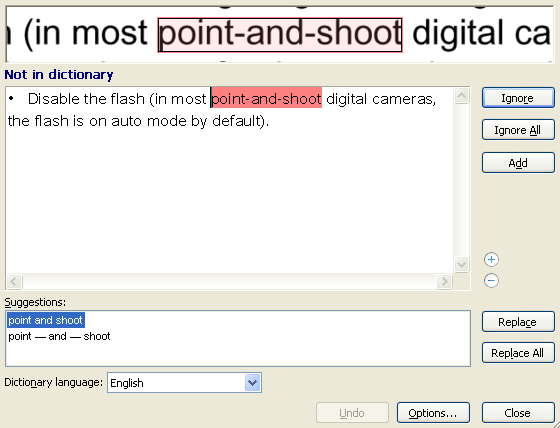
Text Validator コンポーネントは次のように表示されます。

<img src="https://mintcdn.com/abbyy/i-EfCQVmseNiPQcp/images/fine-reader/engine/textvalidator.gif?s=bead22a36b53fc33dbacbee57e482926" alt="TextValidator" width="560" height="428" data-path="images/fine-reader/engine/textvalidator.gif" />

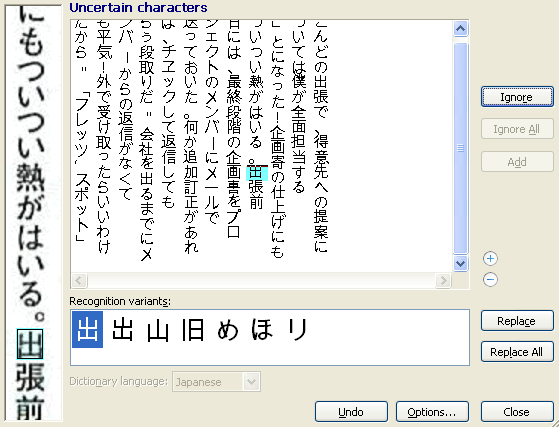
縦書きテキストの場合:

<Accordion title="図を参照">
  <img src="https://mintcdn.com/abbyy/i-EfCQVmseNiPQcp/images/fine-reader/engine/textvalidator_cjk.gif?s=b53541ab9960e40a14f44e569aac2767" alt="TextValidator_CJK" width="559" height="427" data-path="images/fine-reader/engine/textvalidator_cjk.gif" />
</Accordion>

スペルチェックを開始するには、TextValidator オブジェクトの [Spell](/ja/fine-reader/engine/visual-components-reference/textvalidator/spell-method) または [SpellBlock](/ja/fine-reader/engine/visual-components-reference/textvalidator/spellblock-method) メソッドを呼び出します。すでにスペルチェックが実行中の場合は、先に停止する必要があります。停止しないと、これらのメソッドの新しい呼び出しは無視されます。

* [Text Editor](/ja/fine-reader/engine/visual-components-reference/texteditor) の Check Spelling ボタンを使ってスペルチェックを開始することもできます。
* 複雑な文字体系の言語 (中国語、タイ語、アルメニア語など) の一部の文字は、Text Validator で使用されているフォントに対応する文字が含まれていない場合、Text Validator に表示されないことがあります。この場合は、Options ダイアログで別のフォントを指定できます (Text Validator で Settings > Options をクリックし、View タブに移動して、Font used to display plain text ドロップダウン リストでフォントを選択します) 。

スペルチェックに関する情報は、専用の出力インターフェイスを通じて通知されます。これらのインターフェイスは、[ITextValidatorEvents](/ja/fine-reader/engine/visual-components-reference/itextvalidatorevents) (C++ 用) および dispinterface [DITextValidatorEvents](/ja/fine-reader/engine/visual-components-reference/itextvalidatorevents) (Visual Basic 用) です。

Visual Basic ユーザーは、イベント インターフェイスの実装の詳細を気にする必要はありません。この開発プラットフォームには、イベントを簡単に処理するための機能が用意されています。このオブジェクトは、Visual Basic で WithEvents として宣言できます。

C++ ユーザーにとってこれは、IConnectionPointContainer インターフェイスをサポートしていることを意味します。通知イベントを受け取るには、ITextValidatorEvents インターフェイスから派生したオブジェクトを作成し、標準の COM の手段を使って、そのオブジェクトと TextValidator オブジェクトに実装されているイベント ソースとの接続を設定する必要があります。

Text Validator コンポーネントは [Component Synchronizer](/ja/fine-reader/engine/visual-components-reference/supplementary-objects/componentsynchronizer) コンポーネントに接続できます。この場合、Text Validator のすべてのイベントは Synchronizer に接続されている他のコンポーネントに自動的に送信され、アプリケーション全体が同期して動作します。

<div id="properties">
  ## プロパティ
</div>

<table>
  <thead>
    <tr>
      <th>
        <p>
          <strong>名前</strong>
        </p>
      </th>

      <th>
        <p>
          <strong>型</strong>
        </p>
      </th>

      <th>
        <p>
          <strong>説明</strong>
        </p>
      </th>
    </tr>
  </thead>

  <tbody>
    <tr>
      <td>
        <p>
          <strong>AddedWords</strong>

          <a name="addedwords" />
        </p>
      </td>

      <td>
        <p>
          <strong>
            <a href="/ja/fine-reader/engine/visual-components-reference/supplementary-objects/spellwordcollection">
              SpellWordCollection
            </a>
          </strong>

          ,{" "}

          <a href="/ja/fine-reader/engine/guided-tour/advanced-techniques/programming-aspects/working-with-properties#readonly_properties">
            読み取り専用
          </a>
        </p>
      </td>

      <td>
        <p>
          スペルチェック中にユーザーが辞書に追加した単語のコレクションを表します。
        </p>

        <Note>
          スペルチェック中に辞書に単語が追加された場合、ユーザー辞書は{" "}

          <a href="/ja/fine-reader/engine/api-reference/language-related-objects/languagedatabase#dictionaryextensionspath">
            ILanguageDatabase::DictionaryExtensionsPath
          </a>

          {" "}

          プロパティで指定されたフォルダに作成されます。
        </Note>
      </td>
    </tr>

    <tr>
      <td>
        <p>
          <strong>AutoReplacedWords</strong>

          <a name="autoreplacedwords" />
        </p>
      </td>

      <td>
        <p>
          <strong>
            <a href="/ja/fine-reader/engine/visual-components-reference/supplementary-objects/spellreplacementcollection">
              SpellReplacementCollection
            </a>
          </strong>
        </p>
      </td>

      <td>
        <p>
          単語ペアのコレクションを表します。ペアの最初の単語はスペルチェック中に自動的に置換される元の単語で、2番目は置換後の単語です。
        </p>
      </td>
    </tr>

    <tr>
      <td>
        <p>
          <strong>CorrectSpaces</strong>

          <a name="correctspaces" />
        </p>
      </td>

      <td>
        <p>
          <strong>
            <a href="/ja/fine-reader/engine/guided-tour/advanced-techniques/programming-aspects/working-with-properties">
              VARIANT\_BOOL
            </a>
          </strong>
        </p>
      </td>

      <td>
        <p>
          Text Validator がスペルチェック中にスペースを修正するかどうかを指定します。このプロパティの値を TRUE に設定すると、Text Validator は句読点の前後にあるスペースを修正します。
        </p>

        <p>既定では、値は FALSE です。</p>
      </td>
    </tr>

    <tr>
      <td>
        <p>
          <strong>IgnoredWords</strong>

          <a name="ignoredwords" />
        </p>
      </td>

      <td>
        <p>
          <strong>
            <a href="/ja/fine-reader/engine/visual-components-reference/supplementary-objects/spellwordcollection">
              SpellWordCollection
            </a>
          </strong>
        </p>
      </td>

      <td>
        <p>
          スペルチェック中に無視される単語のコレクションを表します。
        </p>
      </td>
    </tr>

    <tr>
      <td>
        <p>
          <strong>IsSpellingInProgress</strong>

          <a name="isspellinginprogress" />
        </p>
      </td>

      <td>
        <p>
          <strong>
            <a href="/ja/fine-reader/engine/guided-tour/advanced-techniques/programming-aspects/working-with-properties">
              VARIANT\_BOOL
            </a>
          </strong>

          , 読み取り専用
        </p>
      </td>

      <td>
        <p>スペルチェックが進行中かどうかを指定します。</p>
      </td>
    </tr>

    <tr>
      <td>
        <p>
          <strong>FRDocument</strong>

          <a name="frdocument" />
        </p>
      </td>

      <td>
        <p>
          <strong>
            <a href="/ja/fine-reader/engine/api-reference/document-related-objects/frdocument">
              FRDocument
            </a>
          </strong>
        </p>
      </td>

      <td>
        <p>Text Validator に接続されたドキュメントを表します。</p>
      </td>
    </tr>

    <tr>
      <td>
        <p>
          <strong>Locked</strong>

          <a name="locked" />
        </p>
      </td>

      <td>
        <p>
          <strong>
            <a href="/ja/fine-reader/engine/guided-tour/advanced-techniques/programming-aspects/working-with-properties">
              VARIANT\_BOOL
            </a>
          </strong>
        </p>
      </td>

      <td>
        <p>Text Validator がロックされているかどうかを指定します。</p>
        <p>このプロパティは、次の状況で役立ちます：</p>

        <ul>
          <li>
            FineReader Engine API (Visual Components からではない) から解析、認識、合成、またはエクスポート操作が呼び出される場合、または
          </li>

          <li>
            アプリケーションが特定のイベント (例：

            <strong>
              {" "}

              <a href="/ja/fine-reader/engine/api-reference/document-related-objects/frdocument">
                FRDocument
              </a>

              {" "}
            </strong>

            オブジェクトから) の通知を受け取り、これらのイベントハンドラーで Visual Components からの Windows メッセージを処理する場合。
          </li>
        </ul>

        <p>
          この場合、解析、認識、合成、またはエクスポートの前にこのプロパティを TRUE に設定し、オペレーション終了後に FALSE に設定することを推奨します。この場合、Text Validator 経由でドキュメントが変更されるのを防げます。
        </p>

        <p>既定では、値は FALSE です。</p>
      </td>
    </tr>

    <tr>
      <td>
        <p>
          <strong>ReplacedWords</strong>

          <a name="replacedwords" />
        </p>
      </td>

      <td>
        <p>
          <strong>
            <a href="/ja/fine-reader/engine/visual-components-reference/supplementary-objects/spellreplacementcollection">
              SpellReplacementCollection
            </a>
          </strong>
        </p>
      </td>

      <td>
        <p>
          単語ペアのコレクションを表します。ペアの最初の単語はスペルチェック中に置換される元の単語で、2番目は置換後の単語です。
        </p>
      </td>
    </tr>

    <tr>
      <td>
        <p>
          <strong>SettingsPath</strong>
        </p>
      </td>

      <td>
        <p>
          <strong>
            <a href="/ja/fine-reader/engine/guided-tour/advanced-techniques/programming-aspects/working-with-properties">
              BSTR
            </a>
          </strong>
        </p>
      </td>

      <td>
        <p>
          Text Validator の設定ファイルを含むフォルダのパスを指定します。他の Visual Components も同じプロパティを持ちます。各 Visual Component は独自の設定フォルダを使用します。
        </p>

        <p>
          このプロパティの値は、ABBYY FineReader Engine がユーザー固有のデータを格納するフォルダのパスと、そのサブフォルダの名前から構成されます。既定では、ユーザー固有のデータのフォルダは{" "}

          <a href="/ja/fine-reader/engine/distribution/distribution-windows/distribution-kit#finereader_engine_data_folder">
            FineReader Engine データフォルダ
          </a>

          です。FineReader Engine の初期化中に変更できます ({" "}

          <strong>
            <a href="/ja/fine-reader/engine/api-reference/functions/initializeengine-function">
              InitializeEngine
            </a>
          </strong>

          {" "}

          関数、または{" "}

          <strong>
            <a href="/ja/fine-reader/engine/api-reference/engine-loaders/iengineloader/initializeengine-method">
              IEngineLoader::InitializeEngine
            </a>
          </strong>

          {" "}

          メソッド経由で)。サブフォルダーのデフォルト名は任意の GUID です。サブフォルダーの名前を変更するには、設計時に Visual Studio でコンポーネントのプロパティに新しい名前を指定します。ランタイムでプロパティの値を指定しようとしても、この値は無視されます。
        </p>

        <p>
          設計時に Visual Studio のフォームにコンポーネントを追加した場合、プロパティの値はデフォルト値で自動的に定義されるか、カスタム値で手動で定義されます。いずれの場合も、値は設計時に定義されます。何らかの理由でプロパティの値が設計時に定義されていない場合 (例: ランタイムでコンポーネントを動的に生成する場合) 、コンポーネントが初期化されるたびに設定を含む新しいフォルダーを作成します。フォルダーの増加を避けるため、コンポーネントの初期化解除後に作成された設定フォルダーを削除する必要があります。この場合、コンポーネントのデフォルト設定のみを使用でき、セッション間で設定を保存することはできません。
        </p>
      </td>
    </tr>

    <tr>
      <td>
        <p>
          <strong>StopAtCompound</strong>

          <a name="stopatcompound" />
        </p>
      </td>

      <td>
        <p>
          <strong>
            <a href="/ja/fine-reader/engine/guided-tour/advanced-techniques/programming-aspects/working-with-properties">
              VARIANT\_BOOL
            </a>
          </strong>
        </p>
      </td>

      <td>
        <p>
          スペルチェック中に複合語で Text Validator が停止するかどうかを指定します。
        </p>

        <p>デフォルトでは、値は FALSE です。</p>
      </td>
    </tr>

    <tr>
      <td>
        <p>
          <strong>StopAtGarbage</strong>

          <a name="stopatgarbage" />
        </p>
      </td>

      <td>
        <p>
          <strong>
            <a href="/ja/fine-reader/engine/guided-tour/advanced-techniques/programming-aspects/working-with-properties">
              VARIANT\_BOOL
            </a>
          </strong>
        </p>
      </td>

      <td>
        <p>
          スペルチェック中にガーベッジで Text Validator が停止するかどうかを指定します。ガーベッジとは意味のない文字の組み合わせです。
        </p>

        <p>デフォルトでは、値は FALSE です。</p>
      </td>
    </tr>

    <tr>
      <td>
        <p>
          <strong>StopAtNonDictionary</strong>

          <a name="stopatnondictionary" />
        </p>
      </td>

      <td>
        <p>
          <strong>
            <a href="/ja/fine-reader/engine/guided-tour/advanced-techniques/programming-aspects/working-with-properties">
              VARIANT\_BOOL
            </a>
          </strong>
        </p>
      </td>

      <td>
        <p>
          スペルチェック中に辞書に存在しない単語で Text Validator が停止するかどうかを指定します。このプロパティと{" "}
          <strong>StopAtUncertain </strong>プロパティを同時に FALSE に設定することはできません。
        </p>

        <p>デフォルトでは、値は TRUE です。</p>
      </td>
    </tr>

    <tr>
      <td>
        <p>
          <strong>StopAtUncertain</strong>

          <a name="stopatuncertain" />
        </p>
      </td>

      <td>
        <p>
          <strong>
            <a href="/ja/fine-reader/engine/guided-tour/advanced-techniques/programming-aspects/working-with-properties">
              VARIANT\_BOOL
            </a>
          </strong>
        </p>
      </td>

      <td>
        <p>
          スペルチェック中に不確実に認識された文字で Text Validator が停止するかどうかを指定します。このプロパティと{" "}
          <strong>StopAtNonDictionary </strong>プロパティを同時に FALSE に設定することはできません。
        </p>

        <p>デフォルトでは、値は TRUE です。</p>
      </td>
    </tr>

    <tr>
      <td>
        <p>
          <strong>SuggestedWords</strong>

          <a name="suggestedwords" />
        </p>
      </td>

      <td>
        <p>
          <strong>
            <a href="/ja/fine-reader/engine/visual-components-reference/supplementary-objects/spellwordcollection">
              SpellWordCollection
            </a>
          </strong>

          ,{" "}

          <a href="/ja/fine-reader/engine/guided-tour/advanced-techniques/programming-aspects/working-with-properties#readonly_properties">
            読み取り専用
          </a>
        </p>
      </td>

      <td>
        <p>
          スペルチェック中に不確実に認識された単語のスペル修正のために提案された単語のコレクションを表します。
        </p>
      </td>
    </tr>

    <tr>
      <td>
        <p>
          <strong>SynthesisParamsForDocument</strong>

          <a name="synthesisparamsfordocument" />
        </p>
      </td>

      <td>
        <p>
          <strong>
            <a href="/ja/fine-reader/engine/api-reference/parameter-objects/preprocessing-analysis-recognition-and-synthesis-parameters/synthesisparamsfordocument">
              SynthesisParamsForDocument
            </a>
          </strong>
        </p>
      </td>

      <td>
        <p>
          ドキュメントのデフォルト合成パラメータを指定します。Text Validator がドキュメント合成を実行する必要がある場合にこれらのパラメータが使用されます (編集操作によりドキュメントの論理構造が正しくなくなる場合に発生する可能性があります) 。
        </p>

        <Note>
          Text Validator が Component Synchronizer に接続されている場合、ドキュメント合成に使用されるパラメータを変更するには{" "}

          <a href="/ja/fine-reader/engine/visual-components-reference/supplementary-objects/componentsynchronizer#processingparams">
            IComponentSynchronizer::ProcessingParams
          </a>

          {" "}

          プロパティを使用します。Text Validator のプロパティ経由でこれらのパラメータを変更すると、エラーが発生する可能性があります。
        </Note>
      </td>
    </tr>

    <tr>
      <td>
        <p>
          <strong>ValidatorError</strong>

          <a name="validatorerror" />
        </p>
      </td>

      <td>
        <p>
          <strong>
            <a href="/ja/fine-reader/engine/visual-components-reference/supplementary-objects/validatorerror">
              ValidatorError
            </a>
          </strong>

          ,{" "}

          <a href="/ja/fine-reader/engine/guided-tour/advanced-techniques/programming-aspects/working-with-properties#readonly_properties">
            読み取り専用
          </a>
        </p>
      </td>

      <td>
        <p>
          不確実な文字または不確実な単語の位置を表します。
        </p>
      </td>
    </tr>

    <tr>
      <td>
        <p>
          <strong>WindowHandle</strong>

          <a name="windowhandle" />
        </p>
      </td>

      <td>
        <p>
          <strong>
            <a href="/ja/fine-reader/engine/guided-tour/advanced-techniques/programming-aspects/working-with-properties">
              \_\_int64
            </a>
          </strong>

          、読み取り専用
        </p>
      </td>

      <td>
        <p>クライアント領域のウィンドウ ハンドルを返します。</p>
      </td>
    </tr>
  </tbody>
</table>

<div id="methods">
  ## メソッド
</div>

| 名前                                                                                                     | 説明                                                                                                                           |
| ------------------------------------------------------------------------------------------------------ | ---------------------------------------------------------------------------------------------------------------------------- |
| [EndSpelling](/ja/fine-reader/engine/visual-components-reference/textvalidator/endspelling-method)     | スペルチェックを停止します。                                                                                                               |
| [Spell](/ja/fine-reader/engine/visual-components-reference/textvalidator/spell-method)                 | 指定した位置からスペルチェックを開始します。                                                                                                       |
| [SpellBlock](/ja/fine-reader/engine/visual-components-reference/textvalidator/spellblock-method)       | 指定したブロックのスペルチェックを行います。                                                                                                       |
| [UpdateOptions](/ja/fine-reader/engine/visual-components-reference/textvalidator/updateoptions-method) | Text Validator の Options ダイアログで指定した設定を更新します。別の Visual Component でオプションが変更された場合は、オプションを現在の状態に更新するために、このメソッドを呼び出す必要があることがあります。 |

<div id="samples">
  ## サンプル
</div>

このコンポーネントは、以下のコードサンプルで使用されています：[VisualComponents](/ja/fine-reader/engine/guided-tour/samples#visualcomponents)。

<div id="see-also">
  ## 関連項目
</div>

[ITextValidatorEvents](/ja/fine-reader/engine/visual-components-reference/itextvalidatorevents)

[IComponentSynchronizer::TextValidator](/ja/fine-reader/engine/visual-components-reference/supplementary-objects/componentsynchronizer#textvalidator)

[グラフィカル ユーザー インターフェイスを備えたアプリケーションの作成](/ja/fine-reader/engine/guided-tour/advanced-techniques/using-gui-elements/creating-an-application-with-gui)
