> ## Documentation Index
> Fetch the complete documentation index at: https://docs.abbyy.com/llms.txt
> Use this file to discover all available pages before exploring further.

# Export ロジック

> Export MetaBot ロジックを使用してファイルを ABBYY FlexiCapture に送信し、対応する Document Definition または Web Verification Station の URL を取得します。

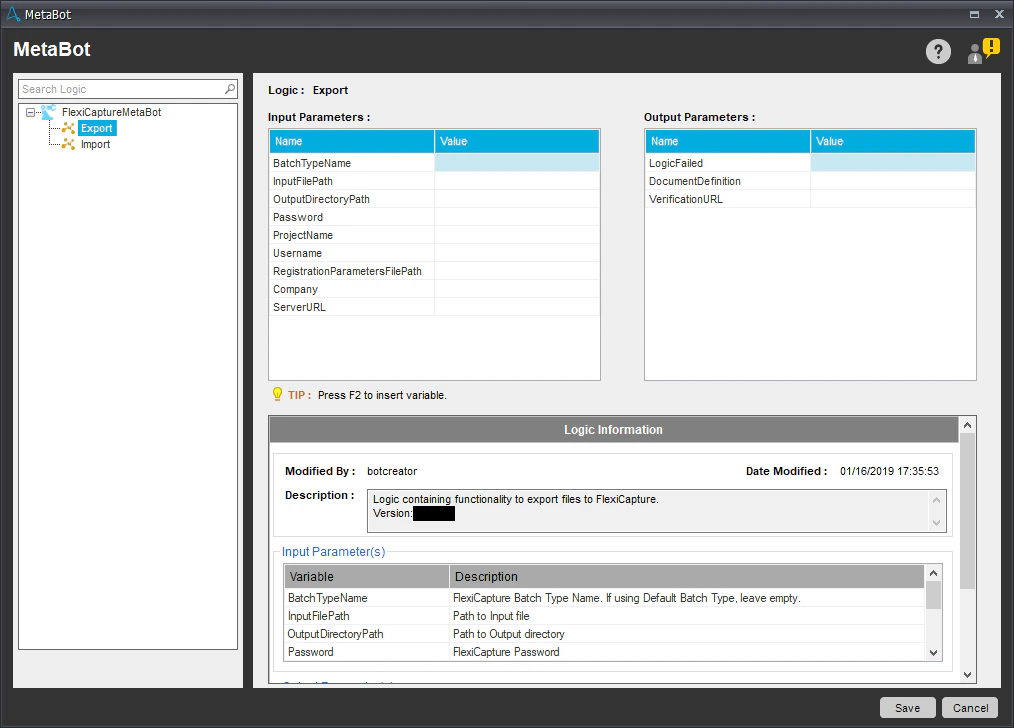
Export ロジックは、ファイルを FC に送信して処理するために使用します。このロジックを実行すると、無人サービスのシナリオでは処理結果が保存され、一致する Document Definition の名前が取得されます。有人サービスのシナリオでは、検証ページへのリンク URL が取得されます。

<Note>Export ロジックは、Import ロジックと連携するために BatchOwner パラメーターを使用します。</Note>

<img src="https://mintcdn.com/abbyy/M5jnw37NmJ-asKkj/images/flexi-capture/connectors/AA2.png?fit=max&auto=format&n=M5jnw37NmJ-asKkj&q=85&s=4191abd866acf49443c0c129ccbb037b" alt="" width="1014" height="728" data-path="images/flexi-capture/connectors/AA2.png" />

入力パラメーター:

<table width="100%">
  <tbody>
    <tr>
      <td>
        <p>
          <strong>名前</strong>
        </p>
      </td>

      <td>
        <p>
          <strong>説明</strong>
        </p>
      </td>
    </tr>

    <tr>
      <td>
        <p>BatchTypeName (optional)</p>
      </td>

      <td>
        <p>FC への接続時に使用するバッチタイプの名前です。デフォルトのバッチタイプを使用するには、空の文字列を指定します。</p>
      </td>
    </tr>

    <tr>
      <td>
        <p>Company (optional)</p>
      </td>

      <td>
        <p>処理に使用する FC テナントの名前です。テナントを使用しない場合は、空の文字列を指定します。</p>
      </td>
    </tr>

    <tr>
      <td>
        <p>InputFilePath</p>
      </td>

      <td>
        <p>処理するファイルのパスです。</p>

        <p>
          <strong>注: </strong> このアクティビティは、1 ファイルに 1 つのドキュメントのみを含むファイルだけをサポートしています (つまり、各ドキュメントは別々のファイルに保存する必要があります) 。
        </p>
      </td>
    </tr>

    <tr>
      <td>
        <p>OutputDirectoryPath</p>
      </td>

      <td>
        <p>処理結果を保存するフォルダーのパスです。</p>
      </td>
    </tr>

    <tr>
      <td>
        <p>Password</p>
      </td>

      <td>
        <p>FC ユーザーのパスワードです。</p>
      </td>
    </tr>

    <tr>
      <td>
        <p>ProjectName</p>
      </td>

      <td>
        <p>FC プロジェクトの名前です。</p>
      </td>
    </tr>

    <tr>
      <td>
        <p>RegistrationParametersFilePath (optional)</p>
      </td>

      <td>
        <p>バッチ登録パラメーターを含む CSV ファイルのパスです。</p>
      </td>
    </tr>

    <tr>
      <td>
        <p>ServerURL</p>
      </td>

      <td>
        <p>FC サーバーのアドレスです。</p>
      </td>
    </tr>

    <tr>
      <td>
        <p>Username</p>
      </td>

      <td>
        <p>FC ユーザーの名前です。</p>
      </td>
    </tr>
  </tbody>
</table>

出力パラメーター:

| **名前**             | **説明**                                                           |
| ------------------ | ---------------------------------------------------------------- |
| VerificationURL    | FC Web Verification Station の検証ページへのリンク URL です。検証が不要な場合は空の文字列です。 |
| LogicFailed        | ロジックの実行中にエラーが発生した場合は *True* です。ロジックが正常に実行された場合は *False* です。      |
| DocumentDefinition | 一致する Document Definition の名前です。                                  |

<Note>Export ロジックのログファイルは次の場所にあります: %Userprofile%\Documents\Automation Anywhere Files\Log\My Tasks\Bot Store\FC-MetaBot\ExporterErrorLog.txt.</Note>
