> ## Documentation Index
> Fetch the complete documentation index at: https://docs.abbyy.com/llms.txt
> Use this file to discover all available pages before exploring further.
# インストール
> FlexiCaptureMetaBot.mbot とサンプルタスクを MetaBots フォルダーおよび Tasks フォルダーにコピーして、Automation Anywhere 用 ABBYY FlexiCapture Connector をインストールします。
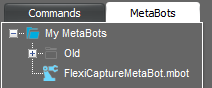
Automation Anywhere 用 ABBYY FlexiCapture Connector は、MetaBot ファイルとサンプルタスクを含む自己解凍型の RAR アーカイブとして配布されています。FlexiCapture MetaBot をインストールするには、**FlexiCaptureMetaBot.mbot** ファイルを次のフォルダーにコピーします: %Userprofile%\Documents\Automation Anywhere Files\Automation Anywhere\My MetaBots。FlexiCapture MetaBot は、Task Editor の利用可能な MetaBots の一覧に表示されます:
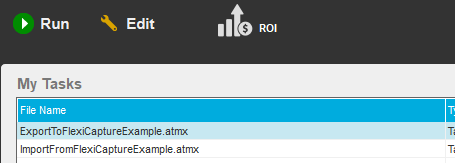
 [サンプルタスク](/ja/flexi-capture/connectors/aa-tasks-examples) をインストールするには、**ExportToFlexiCaptureExample.atmx** ファイルと **ImportFromFlexiCaptureExample.atmx** ファイルを次のフォルダーにコピーします: %Userprofile%\Documents\Automation Anywhere Files\Automation Anywhere\My Tasks。タスクは、Automation Anywhere Enterprise Client のメイン ウィンドウにある **My Tasks** の一覧に表示されます:
 Automation Anywhere Client のインストール時に、ランタイム ファイル フォルダーを **Program Data** フォルダーに配置するよう選択した場合は、このガイド内のすべてのパスで %Userprofile%\Documents を %ProgramData% に置き換えてください。