> ## Documentation Index
> Fetch the complete documentation index at: https://docs.abbyy.com/llms.txt
> Use this file to discover all available pages before exploring further.
# インストール
> Blue Prism に FlexiCapture Connector の Multi-Task Package をインストールします。.bprelease ファイルと VBO をインポートしてから、プロセス、キュー、変数を作成します。
Blue Prism に Multi-Task Package をインストールするには、次の手順を実行します。
1. **ABBYY\_FlexiCapture\_Connector\_for\_BluePrism.exe** ファイルを実行し、保存先フォルダーを選択して、**Extract** をクリックします。
2. **Blue Prism - Robotic Process Automation Software** を開き、**File → Import** をクリックします。
3. **ABBYY FlexiCapture Connector for Blue Prism\Multi-Task Package\Blue Prism Release File** にある **.bprelease** ファイルを選択します。
4. **Next** をクリックします。次のメッセージが表示されます: "The incoming process has been published. Do you want to publish the process in this database after importing?". 各プロセスで **Yes** を選択して **Control** タブで利用できるようにし、その後 **Next** をクリックします。
5. **Blue Prism Limited\Blue Prism Automate\VBO** から次の追加 VBO をインポートするため、上記の手順を繰り返します:
* BPA Object - Utility - Environment.xml
* BPA Object - Utility - File Management.xml
* BPA Object - Utility - General.xml
6. Blue Prism を再起動します。
**.bprelease** ファイルと追加の VBO をインポートすると、次のようになります。
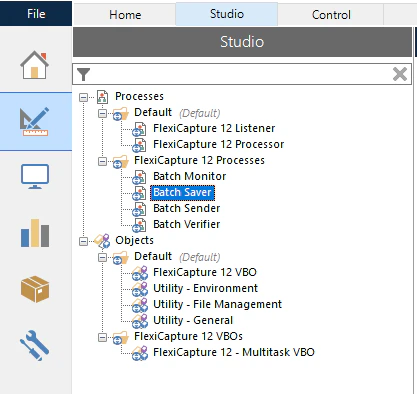
* **Studio** タブでは、プロセス一覧に **FlexiCapture 12 Processes** グループが作成され、その中にサンプルプロセスが含まれます。また、オブジェクト一覧には **FlexiCapture VBOs** グループが作成され、その中に **FlexiCapture 12 – Multitask VBO** が含まれます。追加の VBO は **Objects** 配下の **Default** グループに配置されます。
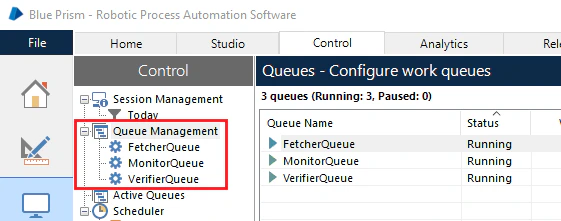
 * **Control** タブでは、プロセスで必要となる **FetcherQueue**、**MonitorQueue**、**VerifierQueue** のキューが **Queue Management** グループに作成されます。
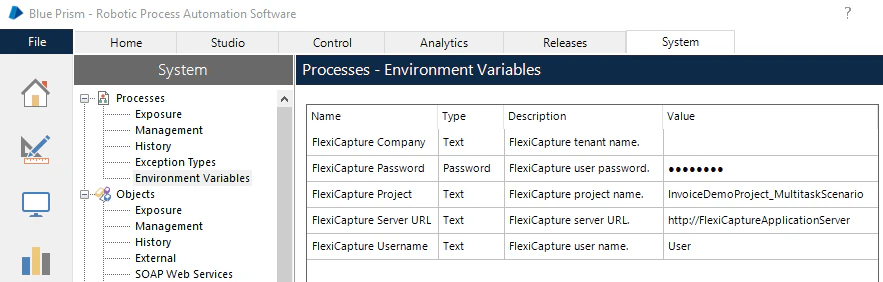
 * **System** タブでは、**Processes** ノードの **Environmental Variables** セクションに **FlexiCapture Password**、**FlexiCapture Project**、**FlexiCapture ServerURL**、**FlexiCapture Username**、**FlexiCapture Company** の各変数が表示されます。これらの変数には、FC への接続に必要な設定が格納されます。これらの設定はプロセスで使用されます。