> ## Documentation Index
> Fetch the complete documentation index at: https://docs.abbyy.com/llms.txt
> Use this file to discover all available pages before exploring further.
# ファイルのワークフローを作成する
> 単一ファイル用に Laserfiche ワークフローを調整するには、Find Entries を Find Entry に置き換え、その後 Laserfiche Client 用の業務プロセスとして公開します。
**Find Entries** を **Find Entry** に置き換え、**For Each Entry** を削除します。
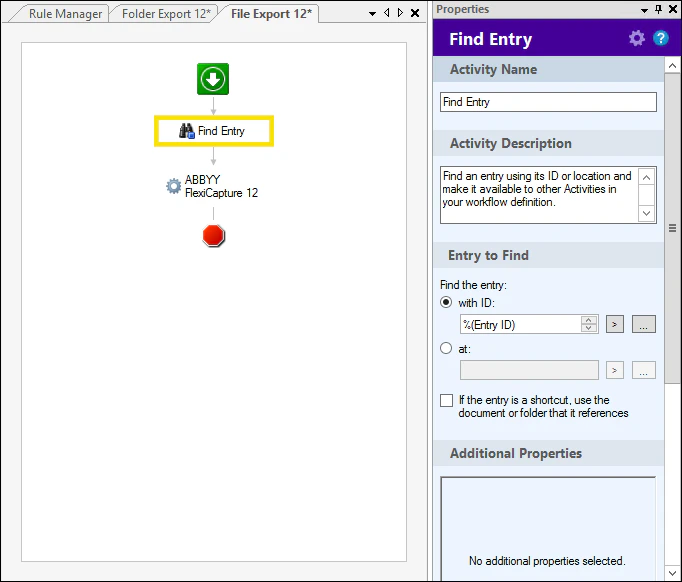 ワークフローの作成が完了したら、それを ***公開*** する必要があります。
 ユーザーが Laserfiche Client から業務プロセスを開始できないようにするには、**Laserfiche Web Client Management** ページでそのユーザーをリポジトリユーザーの一覧に追加する際に、**読み取り専用** のアクセス権を付与してください。**読み書き** のアクセス権を持つユーザーは、業務プロセスを開始できます。
ワークフローの作成が完了し、業務プロセスとして公開されると、Laserfiche Client で開始できるようになります。
ユーザーが Laserfiche Client から業務プロセスを開始できないようにするには、**Laserfiche Web Client Management** ページでそのユーザーをリポジトリユーザーの一覧に追加する際に、**読み取り専用** のアクセス権を付与してください。**読み書き** のアクセス権を持つユーザーは、業務プロセスを開始できます。
ワークフローの作成が完了し、業務プロセスとして公開されると、Laserfiche Client で開始できるようになります。