> ## Documentation Index
> Fetch the complete documentation index at: https://docs.abbyy.com/llms.txt
> Use this file to discover all available pages before exploring further.
# Laserfiche アクティビティのログ
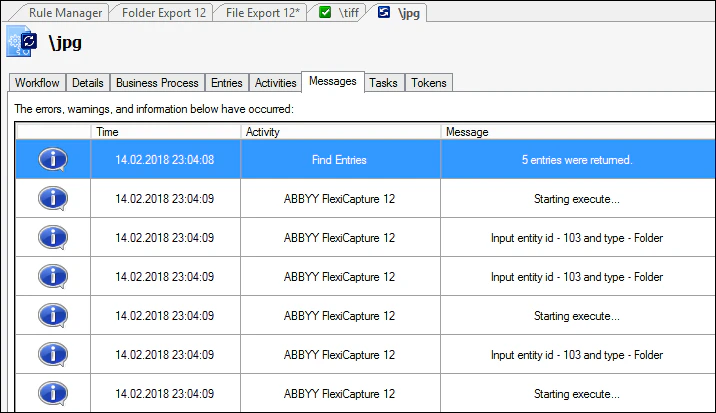
> Laserfiche のエクスポートアクティビティのログは、Workflow Designer のデバッグモードでは Messages タブで、ビジネスプロセスでは activity errors.log ファイルで確認できます。
主要なエクスポートの各段階は、すべてログに記録されます。
* ***Workflow Designer***. ワークフローのデバッグ時には、デザインモードですべてのアクティビティログが表示されます。ログを表示するには、アクティビティの開始後に **Messages** タブをクリックします。
 * ***Business Process in*** ***Laserfiche*** ***Client***. ビジネスプロセスモードでは、ログは表示されません (つまり、Laserfiche Client からアクティビティを開始した場合です) 。このモードでは、処理の実行時に発生したエラーに関する情報のみを取得できます。**activity errors.log** ファイルは、Laserfiche をホストしているコンピューター上の次のフォルダーにあります: C:\Program Files\Laserfiche\Laserfiche Workflow 10.2\Logs\Errors.