> ## Documentation Index
> Fetch the complete documentation index at: https://docs.abbyy.com/llms.txt
> Use this file to discover all available pages before exploring further.
# M-Files のメタデータ構造の設定
> FlexiCapture の field に対応する classes、property definitions、LineItems object types を作成し、M-Files Admin で M-Files のメタデータ構造を設定します。
FC の document definition の field を M-Files の property definition にマッピングするには、まず M-Files サーバー上の M-Files Admin でメタデータ構造を設定する必要があります。
メインドキュメントのメタデータ構造を設定するには、次の手順を実行してください。
1. 組み込みの **Document** object type (またはカスタム object type) で、メインドキュメント (つまり *Invoice*) 用の class を作成します。これは、処理するドキュメントの型を表します。
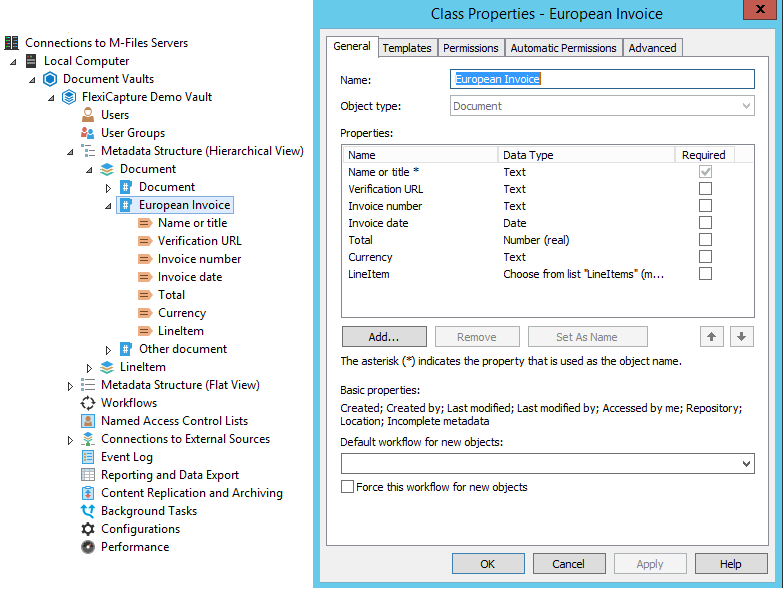 2. class の properties で、メタデータ field を表す property definition を作成して追加します。これらの field のうち 1 つは、ドキュメント名の設定に使用する **Set as name** field である必要があります。
3. 組み込みの Set as name property である "**Name or title**" を使用しない場合は、**General** タブで **Allow searching for objects by this property** オプションを選択してください。
LineItems のメタデータ構造を設定するには、次の手順を実行してください。
1. LineItems の 1 行を表す object type を作成します。この object type を作成すると、同じ名前の property definition も自動的に作成され、この型の object をメインドキュメント object にリンクできるようになります。
**重要!** LineItems 用に作成する object type には、class が 1 つだけ必要です。この class は LineItems データを表すために使用されます。この class には、ABBYY FlexiCapture Document Definition のテーブル column にそれぞれ対応する property definition を追加する必要があります。
2. class の properties で、メタデータ field を表す property definition を作成して追加します。これらの field のうち 1 つは、ドキュメント名の設定に使用する **Set as name** field である必要があります。
3. 組み込みの Set as name property である "**Name or title**" を使用しない場合は、**General** タブで **Allow searching for objects by this property** オプションを選択してください。
LineItems のメタデータ構造を設定するには、次の手順を実行してください。
1. LineItems の 1 行を表す object type を作成します。この object type を作成すると、同じ名前の property definition も自動的に作成され、この型の object をメインドキュメント object にリンクできるようになります。
**重要!** LineItems 用に作成する object type には、class が 1 つだけ必要です。この class は LineItems データを表すために使用されます。この class には、ABBYY FlexiCapture Document Definition のテーブル column にそれぞれ対応する property definition を追加する必要があります。
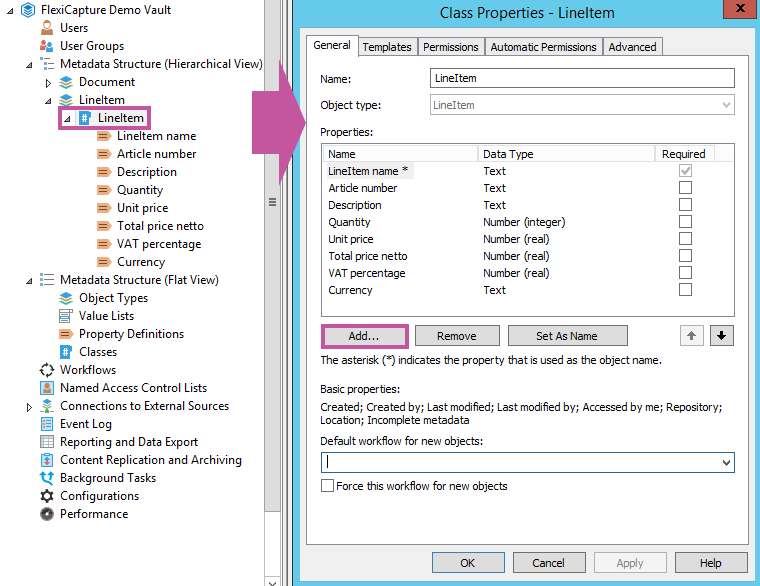 この class の object に名前を付けるには、テンプレート上で常に入力される property definition を選択します。あるいは、自動値を持つ property definition を作成し、それを object の名前として定義することもできます (**Property Definition** ダイアログの **Automatic Values** タブで **Set As Name** を選択します) 。データをよりわかりやすく表現するために、**Automatic** 値の **Simple concatenating of properties** オプションを使用して、LineItems 用に作成した class の必要な property を placeholder に追加することもできます。
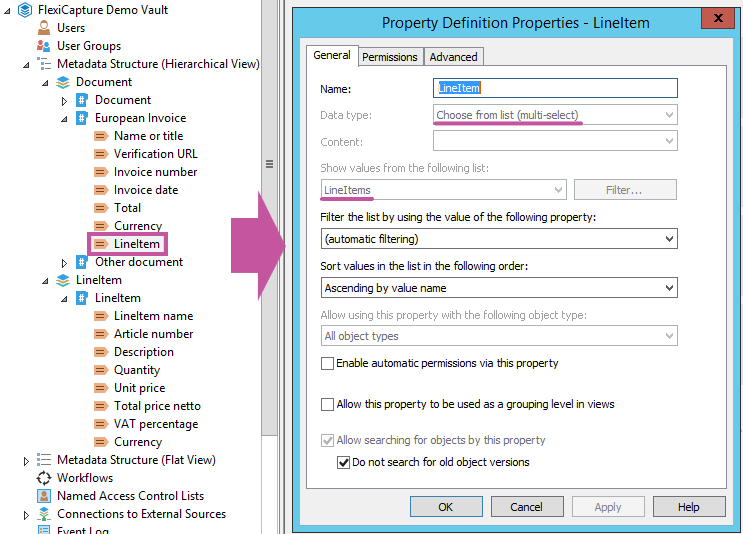
2. メインドキュメント用に作成した class で、**Choose from list (multi-select)** data type の property definition を作成します。これにより、1 つの **Invoice** object を複数の **Line Item** object にリンクできます (この property definition には **LineItem** object type のリストの値が表示される必要があります) 。
**注:** **LineItem** object type を追加したときに自動的に作成された property definition を使用することもできます。
この class の object に名前を付けるには、テンプレート上で常に入力される property definition を選択します。あるいは、自動値を持つ property definition を作成し、それを object の名前として定義することもできます (**Property Definition** ダイアログの **Automatic Values** タブで **Set As Name** を選択します) 。データをよりわかりやすく表現するために、**Automatic** 値の **Simple concatenating of properties** オプションを使用して、LineItems 用に作成した class の必要な property を placeholder に追加することもできます。
2. メインドキュメント用に作成した class で、**Choose from list (multi-select)** data type の property definition を作成します。これにより、1 つの **Invoice** object を複数の **Line Item** object にリンクできます (この property definition には **LineItem** object type のリストの値が表示される必要があります) 。
**注:** **LineItem** object type を追加したときに自動的に作成された property definition を使用することもできます。
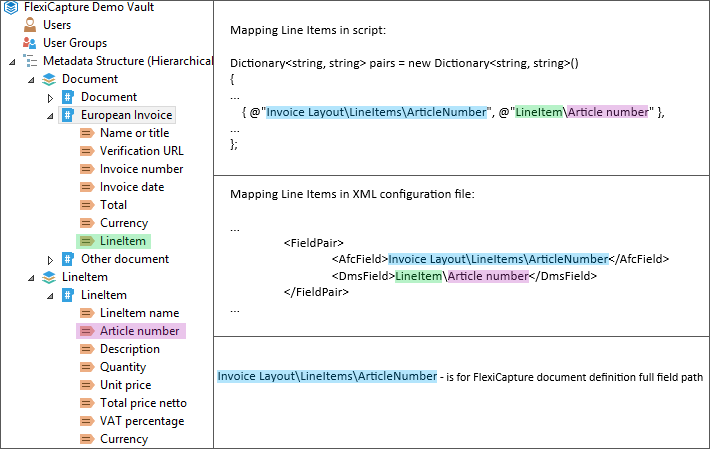
 script または XML file で Line Items をマッピングする場合は、メインドキュメント内の **LineItems** 名の property definition と、Line Items 用 class 内の property definition を次の形式で指定してください。
 FC の document definition の field を M-Files の property definition にマッピングする際は、各 FC document definition field の data type が、対応する M-Files 側の data type と本質的に一致していることを確認してください。推奨される対応関係を次の表に示します。
| **ABBYY FlexiCapture の field data types** | **M-Files の property definition data types** |
| ----------------------------------------- | -------------------------------------------- |
| Address | Text |
| Amount of Money | Number (real) or Text |
| Checkmark | Boolean (yes/no) |
| Code | Text |
| Date | Date |
| Name | Text |
| Number | Number (real), Number (integer), or Text |
| Text | Text or Text (multi-line) |
| Time | Time |
FC の document definition の field を M-Files の property definition にマッピングする際は、各 FC document definition field の data type が、対応する M-Files 側の data type と本質的に一致していることを確認してください。推奨される対応関係を次の表に示します。
| **ABBYY FlexiCapture の field data types** | **M-Files の property definition data types** |
| ----------------------------------------- | -------------------------------------------- |
| Address | Text |
| Amount of Money | Number (real) or Text |
| Checkmark | Boolean (yes/no) |
| Code | Text |
| Date | Date |
| Name | Text |
| Number | Number (real), Number (integer), or Text |
| Text | Text or Text (multi-line) |
| Time | Time |