> ## Documentation Index
> Fetch the complete documentation index at: https://docs.abbyy.com/llms.txt
> Use this file to discover all available pages before exploring further.

# CreateError

> 複数文書ケース用に CreateError Pega アクティビティを設定します。ハンドルでケースを開き、Page-Set-Messages を使用して指定されたエラーメッセージを表示します。

アクティビティの作成の詳細については、[Pega アクティビティの作成](/ja/flexi-capture/connectors/pega/pega-activity-create)を参照してください。

<div id="pages-classes">
  ## ページとクラス
</div>

| **ページ名** | **クラス** |
| -------- | ------- |
| Case     | Work-   |

<div id="parameters">
  ## パラメーター
</div>

| **名前**       | **データ型** | **必須** |
| ------------ | -------- | ------ |
| CaseId       | String   | はい     |
| errorMessage | String   | はい     |

<div id="steps">
  ## 手順
</div>

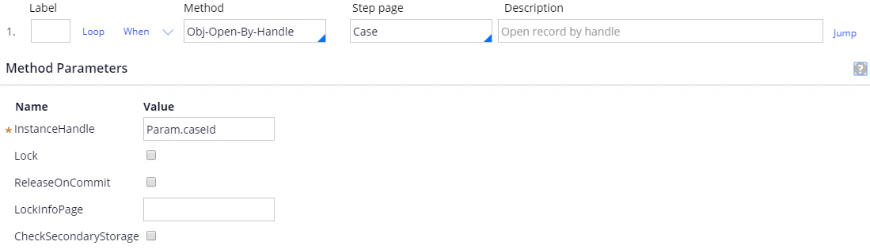
ステップ 1:

**メソッド**: Obj-Open-By-Handle.

**Step page**: Case.

**InstanceHandle**: Param.caseId.
<Frame>
  <img src="https://mintcdn.com/abbyy/Xgx3EG8BZs5YQjIJ/images/flexi-capture/connectors/Pega168.png?fit=max&auto=format&n=Xgx3EG8BZs5YQjIJ&q=85&s=d2374f097195389263acac8185ea4913" alt="Pega の CreateError アクティビティのスクリーンショット。Case の Step page で Obj-Open-By-Handle メソッドを使用し、InstanceHandle が Param.caseId に設定されているステップ 1 を示しています。" width="870" height="249" data-path="images/flexi-capture/connectors/Pega168.png" />
</Frame>

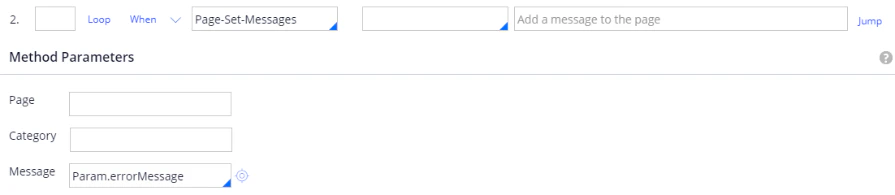
ステップ 2:

**メソッド**: Page-Set-Messages.

**Message**: Param.errorMessage.
<Frame>
  <img src="https://mintcdn.com/abbyy/Xgx3EG8BZs5YQjIJ/images/flexi-capture/connectors/Pega169.png?fit=max&auto=format&n=Xgx3EG8BZs5YQjIJ&q=85&s=daf1706b2e3386a1b71a1e39b15f98c7" alt="Pega の CreateError アクティビティのスクリーンショット。Page-Set-Messages メソッドを使用し、Message パラメーターが Param.errorMessage に設定されているステップ 2 を示しています。" width="895" height="195" data-path="images/flexi-capture/connectors/Pega169.png" />
</Frame>
