> ## Documentation Index
> Fetch the complete documentation index at: https://docs.abbyy.com/llms.txt
> Use this file to discover all available pages before exploring further.
# Pegaで一連のデータ変換を作成する
> Dev Studio を使用して、抽出された field 値を FlexiCapture の JSON 構造からケースのプロパティにコピーする Pega データ変換を作成します。
[データ変換](https://community.pega.com/knowledgebase/articles/data-transforms-models)は、データ構造からケースのプロパティにデータをコピーします。
新しいデータ変換を作成するには:
1. **Dev Studio** で、**Records → Data Model → Data Transform →** **Create** をクリックします。
2. 開いたダイアログで、**Label** フィールドと **Identifier** フィールドに値を入力します。
3. **Additional configuration options** セクションで、**JSON** を選択します。
4. **Apply to** フィールドで、"Rule-Obj-Activity" をケースの完全名に置き換えます。
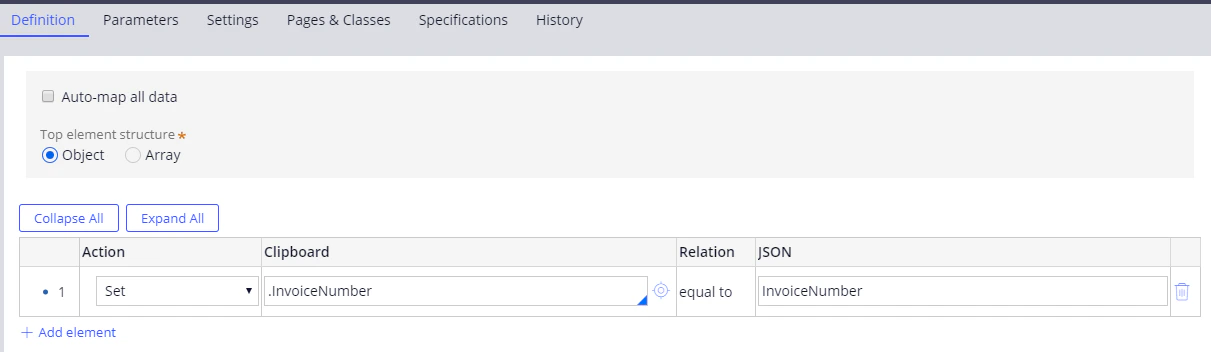
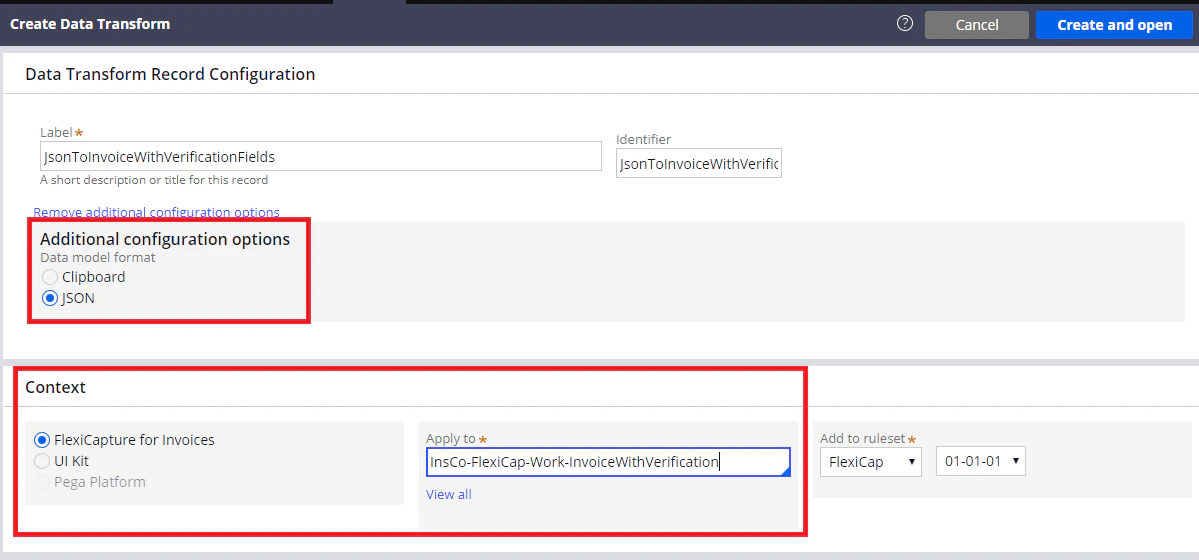 5. **Create and open** をクリックします。開いたダイアログで **Definition** をクリックし、文書処理の完了後に FC から受信するデータにケースのフィールドを対応付けます。