> ## Documentation Index
> Fetch the complete documentation index at: https://docs.abbyy.com/llms.txt
> Use this file to discover all available pages before exploring further.

# ABBYY FlexiCapture を無人サービスとして設定する

> Project Properties で ABBYY FlexiCapture プロジェクトを Unattended ワークフロー スキーマに切り替え、Pega コネクタで使用するために export root path を空にします。

ABBYY FlexiCapture を無人サービスとして設定するには、次の手順に従います。

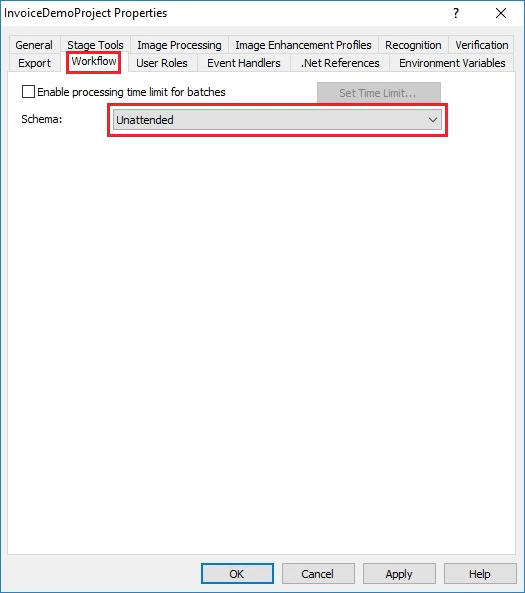
1. Project Setup Station で、**Project → Project Properties...** をクリックし、**Workflow** タブを開きます。

2. **Schema** ドロップダウンリストで、**Unattended** を選択します。
   <Frame>
     <img src="https://mintcdn.com/abbyy/M5jnw37NmJ-asKkj/images/flexi-capture/connectors/AA12.jpg?fit=max&auto=format&n=M5jnw37NmJ-asKkj&q=85&s=986c741b74d8fc8e4d56f06671ee285c" alt="Schema ドロップダウンリストで Unattended が選択されている ABBYY FlexiCapture Project Setup Station の Project Properties の Workflow タブのスクリーンショット。" width="525" height="593" data-path="images/flexi-capture/connectors/AA12.jpg" />
   </Frame>

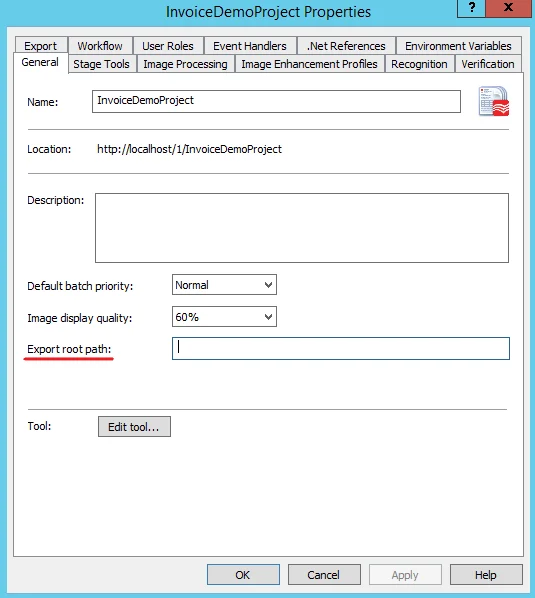
3. **General** タブの **Export root path** が空のままであることを確認します。
   <Frame>
     <img src="https://mintcdn.com/abbyy/Xgx3EG8BZs5YQjIJ/images/flexi-capture/connectors/Pega4.png?fit=max&auto=format&n=Xgx3EG8BZs5YQjIJ&q=85&s=efe4e3c3881f3f4379a3d56a8fb65870" alt="空の Export root path フィールドが強調表示されている ABBYY FlexiCapture Project Setup Station の Project Properties の General タブのスクリーンショット。" width="535" height="598" data-path="images/flexi-capture/connectors/Pega4.png" />
   </Frame>

4. **OK** をクリックします。
