 Step 2:
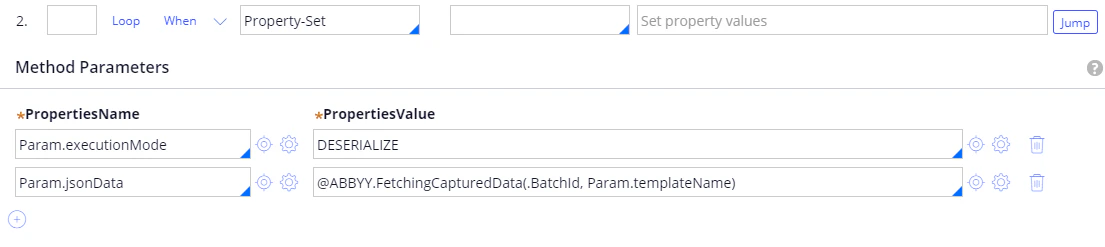
**メソッド**: Property-Set
| **プロパティ名** | **プロパティ値** |
| ------------------- | --------------------------------------------------------- |
| Param.executionMode | DESERIALIZE |
| Param.jsonData | @ABBYY.FetchingCapturedData(.BatchId, Param.templateName) |
詳細については、[FetchingCapturedData](/ja/flexi-capture/connectors/pega/pega-func-multiple-docs#fetchingcaptureddata)を参照してください。
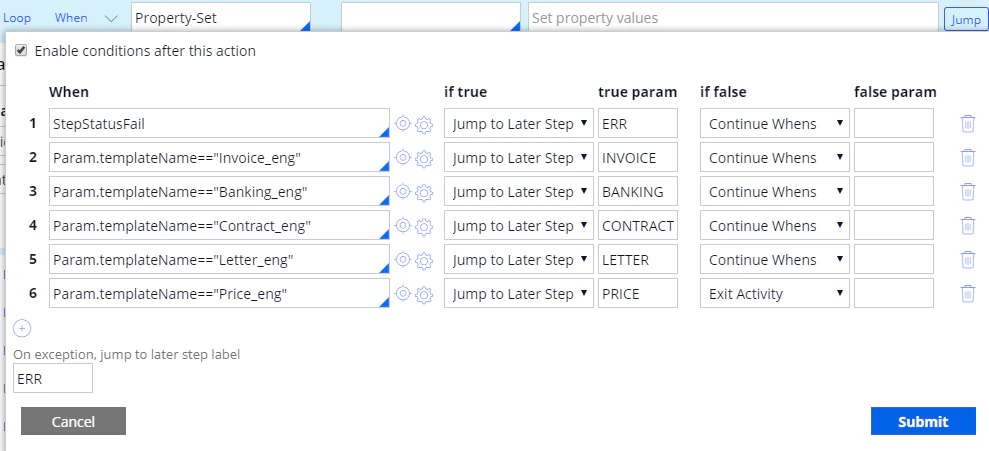
**ジャンプ**:
| **条件** | **true の場合** | **true パラメーター** | **false の場合** | **false パラメーター** |
| ----------------------------------- | ------------ | --------------- | ------------- | ---------------- |
| StepStatusFail | 後続のStepにジャンプ | ERR | When の評価を続行 | |
| Param.templateName=="Invoice\_eng" | 後続のStepにジャンプ | INVOICE | When の評価を続行 | |
| Param.templateName=="Banking\_eng" | 後続のStepにジャンプ | BANKING | When の評価を続行 | |
| Param.templateName=="Contract\_eng" | 後続のStepにジャンプ | CONTRACT | When の評価を続行 | |
| Param.templateName=="Letter\_eng" | 後続のStepにジャンプ | LETTER | When の評価を続行 | |
| Param.templateName=="Price\_eng" | 後続のStepにジャンプ | PRICE | Exit Activity | |
**例外時にジャンプする後続Stepのラベル**: ERR.
Step 2:
**メソッド**: Property-Set
| **プロパティ名** | **プロパティ値** |
| ------------------- | --------------------------------------------------------- |
| Param.executionMode | DESERIALIZE |
| Param.jsonData | @ABBYY.FetchingCapturedData(.BatchId, Param.templateName) |
詳細については、[FetchingCapturedData](/ja/flexi-capture/connectors/pega/pega-func-multiple-docs#fetchingcaptureddata)を参照してください。
**ジャンプ**:
| **条件** | **true の場合** | **true パラメーター** | **false の場合** | **false パラメーター** |
| ----------------------------------- | ------------ | --------------- | ------------- | ---------------- |
| StepStatusFail | 後続のStepにジャンプ | ERR | When の評価を続行 | |
| Param.templateName=="Invoice\_eng" | 後続のStepにジャンプ | INVOICE | When の評価を続行 | |
| Param.templateName=="Banking\_eng" | 後続のStepにジャンプ | BANKING | When の評価を続行 | |
| Param.templateName=="Contract\_eng" | 後続のStepにジャンプ | CONTRACT | When の評価を続行 | |
| Param.templateName=="Letter\_eng" | 後続のStepにジャンプ | LETTER | When の評価を続行 | |
| Param.templateName=="Price\_eng" | 後続のStepにジャンプ | PRICE | Exit Activity | |
**例外時にジャンプする後続Stepのラベル**: ERR.
 Step 3:
**ラベル**: INVOICE.
**メソッド**: Apply-DataTransform
| **Name** | **Value** |
| ----------------- | ------------- |
| DataTransform | jsonToInvoice |
| PassParameterPage | true |
詳細については、[jsonToInvoice](/ja/flexi-capture/connectors/pega/pega-dt-many-docs#jsontoinvoice)を参照してください。
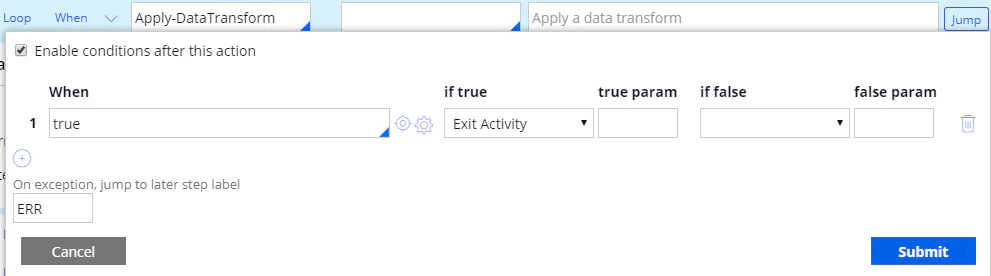
**ジャンプ**:
| **条件** | **true の場合** | **true パラメーター** | **false の場合** | **false パラメーター** |
| ------ | ------------- | --------------- | ------------- | ---------------- |
| true | Exit Activity | | | |
**例外時にジャンプする後続Stepのラベル**: ERR.
Step 3:
**ラベル**: INVOICE.
**メソッド**: Apply-DataTransform
| **Name** | **Value** |
| ----------------- | ------------- |
| DataTransform | jsonToInvoice |
| PassParameterPage | true |
詳細については、[jsonToInvoice](/ja/flexi-capture/connectors/pega/pega-dt-many-docs#jsontoinvoice)を参照してください。
**ジャンプ**:
| **条件** | **true の場合** | **true パラメーター** | **false の場合** | **false パラメーター** |
| ------ | ------------- | --------------- | ------------- | ---------------- |
| true | Exit Activity | | | |
**例外時にジャンプする後続Stepのラベル**: ERR.

 Step 4:
**ラベル**: BANKING.
**メソッド**: Apply-DataTransform
| **Name** | **Value** |
| ----------------- | ------------- |
| DataTransform | jsonToBanking |
| PassParameterPage | true |
詳細については、[jsonToInvoice](/ja/flexi-capture/connectors/pega/pega-dt-many-docs#jsontoinvoice)を参照してください。
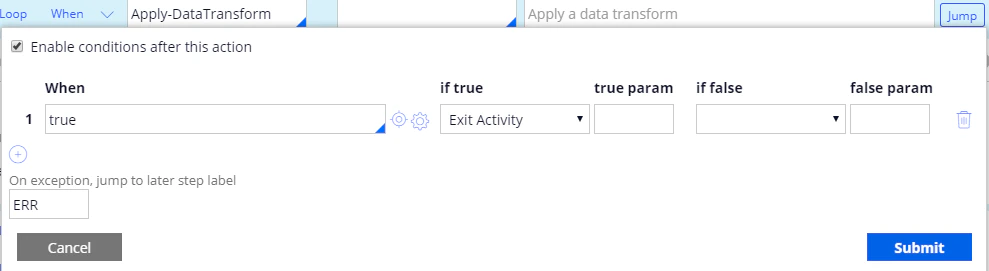
**ジャンプ**:
| **条件** | **true の場合** | **true パラメーター** | **false の場合** | **false パラメーター** |
| ------ | ------------- | --------------- | ------------- | ---------------- |
| true | Exit Activity | | | |
**例外時にジャンプする後続Stepのラベル**: ERR.
Step 4:
**ラベル**: BANKING.
**メソッド**: Apply-DataTransform
| **Name** | **Value** |
| ----------------- | ------------- |
| DataTransform | jsonToBanking |
| PassParameterPage | true |
詳細については、[jsonToInvoice](/ja/flexi-capture/connectors/pega/pega-dt-many-docs#jsontoinvoice)を参照してください。
**ジャンプ**:
| **条件** | **true の場合** | **true パラメーター** | **false の場合** | **false パラメーター** |
| ------ | ------------- | --------------- | ------------- | ---------------- |
| true | Exit Activity | | | |
**例外時にジャンプする後続Stepのラベル**: ERR.

 ステップ 5:
**ラベル**: CONTRACT.
**メソッド**: Apply-DataTransform
| **Name** | **Value** |
| ----------------- | -------------- |
| DataTransform | jsonToContract |
| PassParameterPage | true |
詳細は、[jsonToContract](/ja/flexi-capture/connectors/pega/pega-dt-many-docs#jsontocontract)を参照してください。
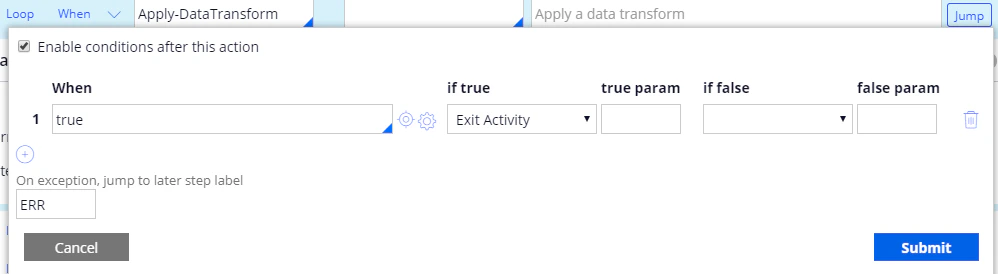
**ジャンプ**:
| **条件** | **if true** | **true param** | **if false** | **false param** |
| ------ | ------------- | -------------- | ------------ | --------------- |
| true | Exit Activity | | | |
**On exception, jump to later step label**: ERR.
ステップ 5:
**ラベル**: CONTRACT.
**メソッド**: Apply-DataTransform
| **Name** | **Value** |
| ----------------- | -------------- |
| DataTransform | jsonToContract |
| PassParameterPage | true |
詳細は、[jsonToContract](/ja/flexi-capture/connectors/pega/pega-dt-many-docs#jsontocontract)を参照してください。
**ジャンプ**:
| **条件** | **if true** | **true param** | **if false** | **false param** |
| ------ | ------------- | -------------- | ------------ | --------------- |
| true | Exit Activity | | | |
**On exception, jump to later step label**: ERR.

 ステップ 6:
**ラベル**: LETTER.
**メソッド**: Apply-DataTransform
| **Name** | **Value** |
| ----------------- | ------------ |
| DataTransform | jsonToLetter |
| PassParameterPage | True |
詳細は、[jsonToLetter](/ja/flexi-capture/connectors/pega/pega-dt-many-docs#jsontoletter)を参照してください。
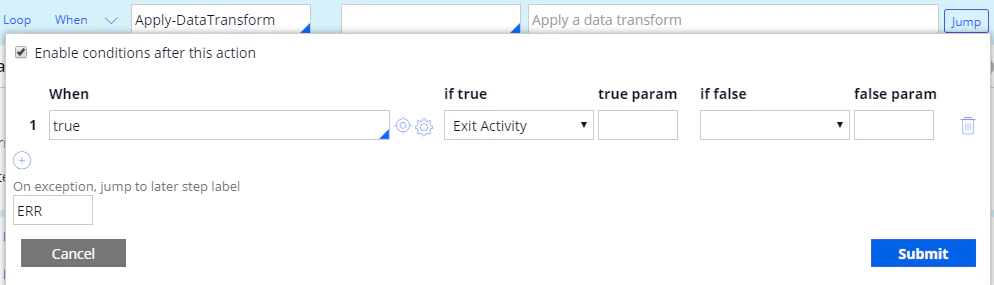
**ジャンプ**:
| **条件** | **if true** | **true param** | **if false** | **false param** |
| ------ | ------------- | -------------- | ------------ | --------------- |
| true | Exit Activity | | | |
**On exception, jump to later step label**: ERR.
ステップ 6:
**ラベル**: LETTER.
**メソッド**: Apply-DataTransform
| **Name** | **Value** |
| ----------------- | ------------ |
| DataTransform | jsonToLetter |
| PassParameterPage | True |
詳細は、[jsonToLetter](/ja/flexi-capture/connectors/pega/pega-dt-many-docs#jsontoletter)を参照してください。
**ジャンプ**:
| **条件** | **if true** | **true param** | **if false** | **false param** |
| ------ | ------------- | -------------- | ------------ | --------------- |
| true | Exit Activity | | | |
**On exception, jump to later step label**: ERR.

 ステップ 7:
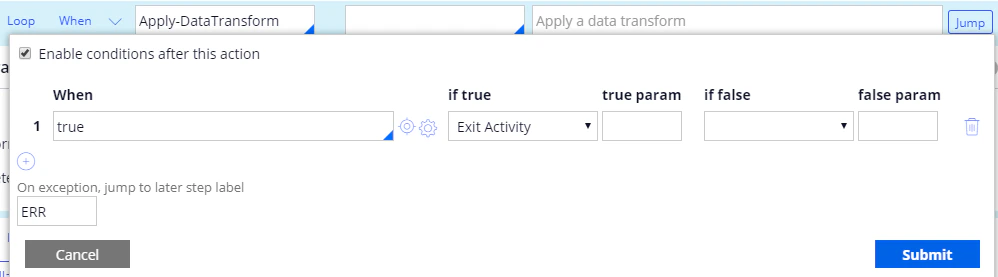
**ラベル**: PRICE.
**メソッド**: Apply-DataTransform
| **Name** | **Value** |
| ----------------- | ----------- |
| DataTransform | jsonToPrice |
| PassParameterPage | True |
詳細は、[jsonToPrice](/ja/flexi-capture/connectors/pega/pega-dt-many-docs#jsontoprice)を参照してください。
**ジャンプ**:
| **条件** | **if true** | **true param** | **if false** | **false param** |
| ------ | ------------- | -------------- | ------------ | --------------- |
| true | Exit Activity | | | |
**On exception, jump to later step label**: ERR.
ステップ 7:
**ラベル**: PRICE.
**メソッド**: Apply-DataTransform
| **Name** | **Value** |
| ----------------- | ----------- |
| DataTransform | jsonToPrice |
| PassParameterPage | True |
詳細は、[jsonToPrice](/ja/flexi-capture/connectors/pega/pega-dt-many-docs#jsontoprice)を参照してください。
**ジャンプ**:
| **条件** | **if true** | **true param** | **if false** | **false param** |
| ------ | ------------- | -------------- | ------------ | --------------- |
| true | Exit Activity | | | |
**On exception, jump to later step label**: ERR.

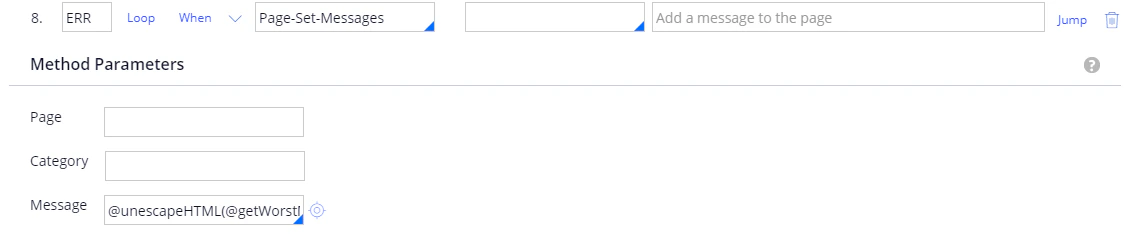
 ステップ 8:
**ラベル**: ERR.
**メソッド**: Page-Set-Messages.
**メッセージ**: @unescapeHTML(@getWorstMessageName(tools)).
詳細は、[unescapeHTML](/ja/flexi-capture/connectors/pega/pega-func-other)を参照してください。
ステップ 8:
**ラベル**: ERR.
**メソッド**: Page-Set-Messages.
**メッセージ**: @unescapeHTML(@getWorstMessageName(tools)).
詳細は、[unescapeHTML](/ja/flexi-capture/connectors/pega/pega-func-other)を参照してください。