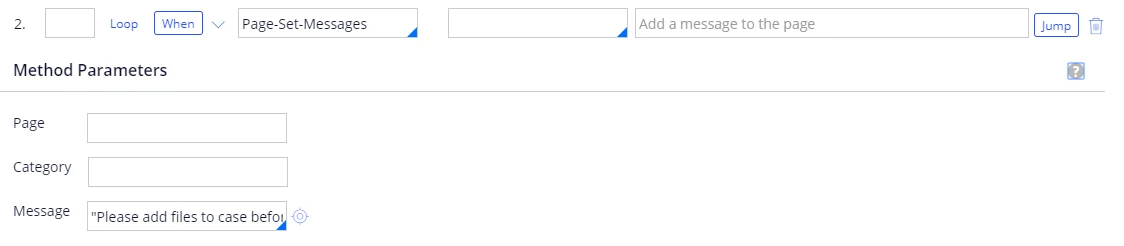
 Step 2:
**メソッド**: Page-Set-Messages
**メッセージ**: "続行する前に、ケースにファイルを追加してください。"
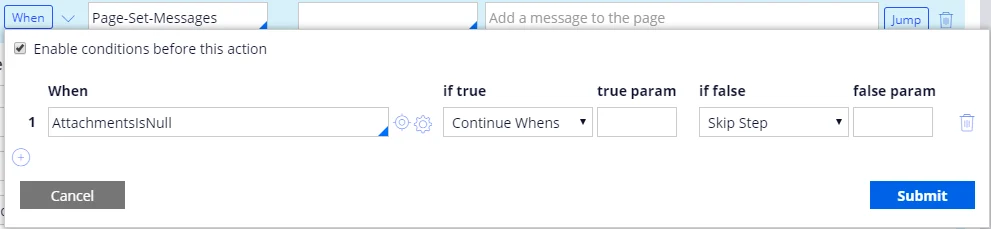
**条件**:
| **条件** | **true の場合** | **true時のパラメーター** | **false の場合** | **false時のパラメーター** |
| ----------------- | ------------ | ---------------- | ------------- | ----------------- |
| AttachmentsIsNull | 継続条件 | | Stepをスキップ | |
Step 2:
**メソッド**: Page-Set-Messages
**メッセージ**: "続行する前に、ケースにファイルを追加してください。"
**条件**:
| **条件** | **true の場合** | **true時のパラメーター** | **false の場合** | **false時のパラメーター** |
| ----------------- | ------------ | ---------------- | ------------- | ----------------- |
| AttachmentsIsNull | 継続条件 | | Stepをスキップ | |
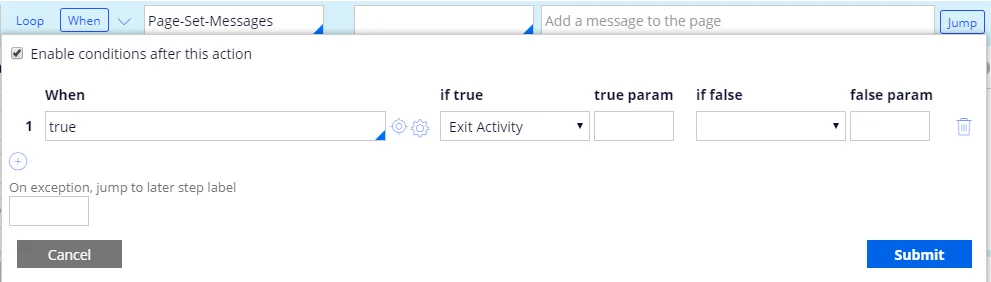
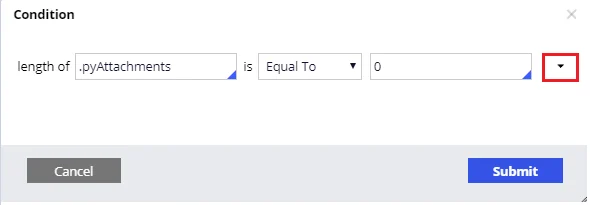 **ジャンプ**:
| **条件** | **true の場合** | **true の場合のパラメーター** | **false のとき** | **false時のパラメーター** |
| ------ | ------------ | ------------------- | ------------- | ----------------- |
| true | アクティビティを終了 | | | |
**ジャンプ**:
| **条件** | **true の場合** | **true の場合のパラメーター** | **false のとき** | **false時のパラメーター** |
| ------ | ------------ | ------------------- | ------------- | ----------------- |
| true | アクティビティを終了 | | | |
 Step 3:
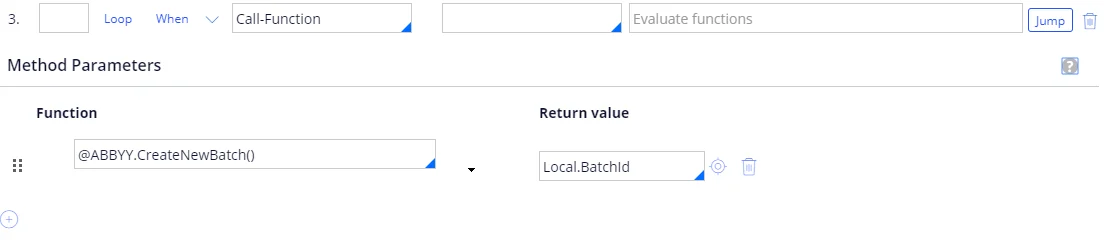
**メソッド**: Call-Function
| **関数** | **戻り値** |
| ----------------------- | ------------- |
| @ABBYY.CreateNewBatch() | Local.BatchId |
詳細については、[CreateNewBatch](/ja/flexi-capture/connectors/pega/pega-func-multiple-docs#createnewbatch)を参照してください。
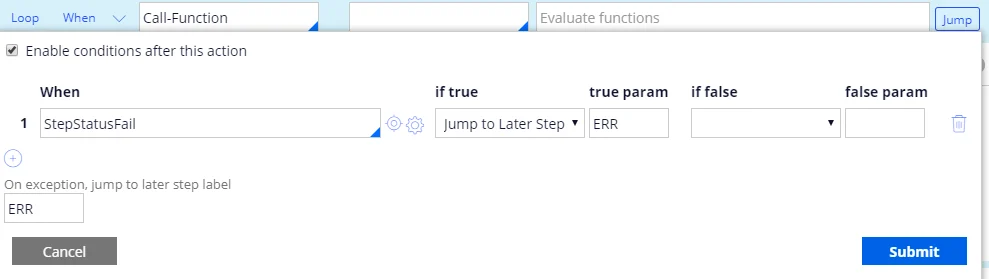
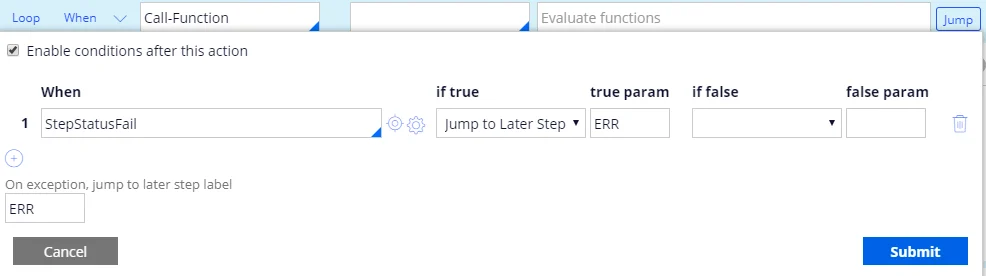
**ジャンプ**:
| **条件** | **true の場合** | **true時のパラメーター** | **false のとき** | **false 時のパラメーター** |
| -------------- | ------------------ | ---------------- | ------------- | ------------------ |
| StepStatusFail | Jump to Later Step | ERR | | |
**例外発生時にジャンプする後続ステップのラベル**: ERR。
Step 3:
**メソッド**: Call-Function
| **関数** | **戻り値** |
| ----------------------- | ------------- |
| @ABBYY.CreateNewBatch() | Local.BatchId |
詳細については、[CreateNewBatch](/ja/flexi-capture/connectors/pega/pega-func-multiple-docs#createnewbatch)を参照してください。
**ジャンプ**:
| **条件** | **true の場合** | **true時のパラメーター** | **false のとき** | **false 時のパラメーター** |
| -------------- | ------------------ | ---------------- | ------------- | ------------------ |
| StepStatusFail | Jump to Later Step | ERR | | |
**例外発生時にジャンプする後続ステップのラベル**: ERR。
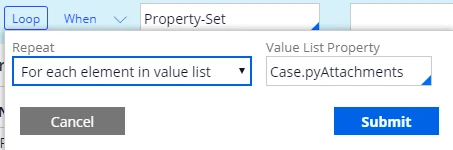
 Step 4:
**メソッド**: Property-Set
| **PropertiesName** | **PropertiesValue** |
| ------------------ | -------------------------------------------- |
| Local.LinkedRefTo | Case.pyAttachments(\
Step 4:
**メソッド**: Property-Set
| **PropertiesName** | **PropertiesValue** |
| ------------------ | -------------------------------------------- |
| Local.LinkedRefTo | Case.pyAttachments(\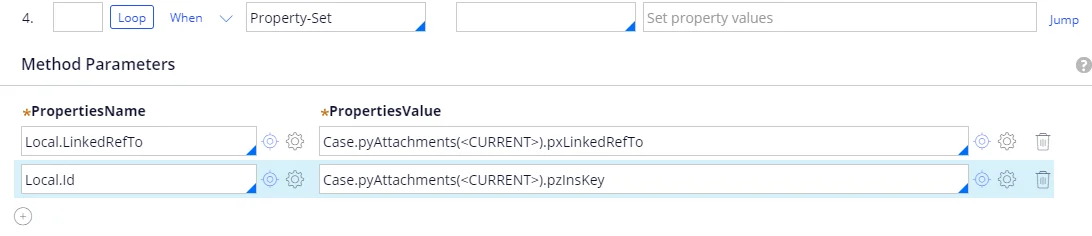
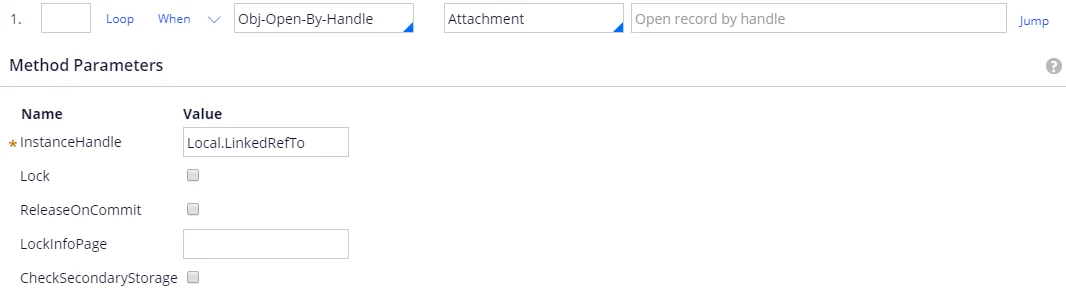
 サブステップ 1:
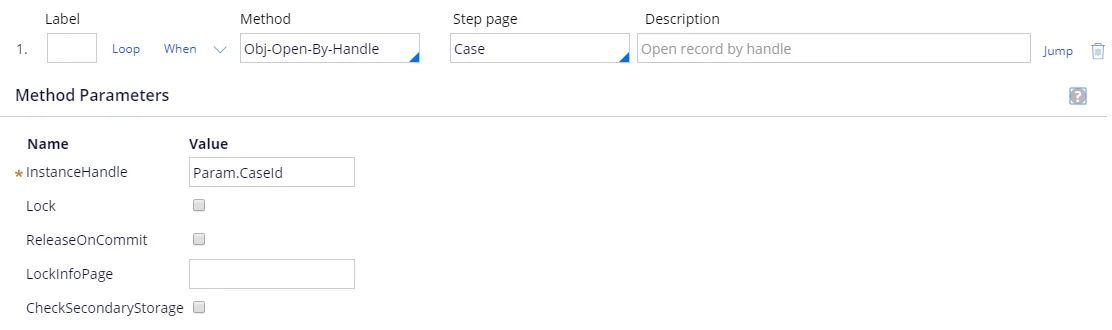
**メソッド**: Obj-Open-By-Handle.
**ステップページ**: Attachment.
**InstanceHandle**: Local.LinkedRefTo.
サブステップ 1:
**メソッド**: Obj-Open-By-Handle.
**ステップページ**: Attachment.
**InstanceHandle**: Local.LinkedRefTo.
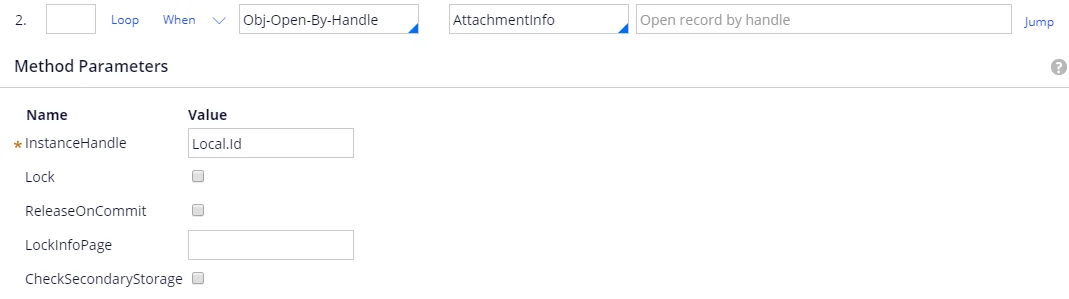
 サブステップ 2:
**メソッド**: Obj-Open-By-Handle.
**ステップページ**: AttachmentInfo.
**InstanceHandle**: Local.Id.
サブステップ 2:
**メソッド**: Obj-Open-By-Handle.
**ステップページ**: AttachmentInfo.
**InstanceHandle**: Local.Id.
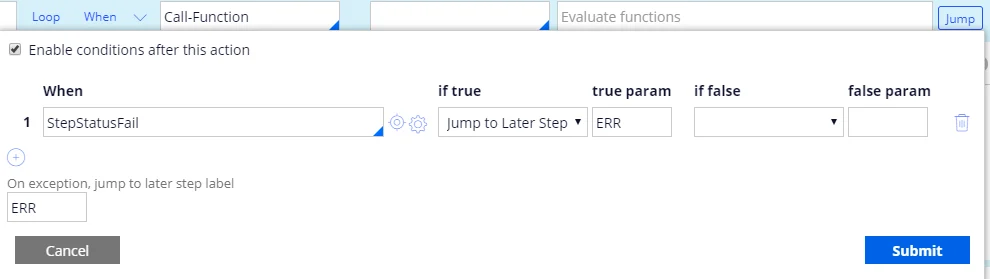
 サブステップ 3:
**メソッド**: Call-Function
| **関数** | **戻り値** |
| ------------------------------------------------------------------------------------------ | ------- |
| @ABBYY.AddDocumentToBatch(Local.BatchId, AttachmentInfo.pyMemo, Attachment.pyAttachStream) | |
詳しくは、[AddDocumentToBatch](/ja/flexi-capture/connectors/pega/pega-func-multiple-docs#adddocumenttobatch)を参照してください。
**ジャンプ**:
| **条件** | **if true** | **true param** | **if false** | **false param** |
| -------------- | ------------------ | -------------- | ------------ | --------------- |
| StepStatusFail | Jump to Later Step | ERR | | |
**例外発生時にジャンプする後続ステップのラベル**: ERR.
サブステップ 3:
**メソッド**: Call-Function
| **関数** | **戻り値** |
| ------------------------------------------------------------------------------------------ | ------- |
| @ABBYY.AddDocumentToBatch(Local.BatchId, AttachmentInfo.pyMemo, Attachment.pyAttachStream) | |
詳しくは、[AddDocumentToBatch](/ja/flexi-capture/connectors/pega/pega-func-multiple-docs#adddocumenttobatch)を参照してください。
**ジャンプ**:
| **条件** | **if true** | **true param** | **if false** | **false param** |
| -------------- | ------------------ | -------------- | ------------ | --------------- |
| StepStatusFail | Jump to Later Step | ERR | | |
**例外発生時にジャンプする後続ステップのラベル**: ERR.

 ステップ 5:
**メソッド**: Call-Function
| **関数** | **戻り値** |
| ---------------------------------------- | ------- |
| @ABBYY.RunBatchProcessing(Local.BatchId) | |
詳しくは、[RunBatchProcessing](/ja/flexi-capture/connectors/pega/pega-func-multiple-docs#runbatchprocessing)を参照してください。
**ジャンプ**:
| **条件** | **if true** | **true param** | **if false** | **false param** |
| -------------- | ------------------ | -------------- | ------------ | --------------- |
| StepStatusFail | Jump to Later Step | ERR | | |
**例外発生時にジャンプする後続ステップのラベル**: ERR.
ステップ 5:
**メソッド**: Call-Function
| **関数** | **戻り値** |
| ---------------------------------------- | ------- |
| @ABBYY.RunBatchProcessing(Local.BatchId) | |
詳しくは、[RunBatchProcessing](/ja/flexi-capture/connectors/pega/pega-func-multiple-docs#runbatchprocessing)を参照してください。
**ジャンプ**:
| **条件** | **if true** | **true param** | **if false** | **false param** |
| -------------- | ------------------ | -------------- | ------------ | --------------- |
| StepStatusFail | Jump to Later Step | ERR | | |
**例外発生時にジャンプする後続ステップのラベル**: ERR.

 ステップ 6:
**メソッド**: Call-Function
| **関数** | **戻り値** |
| ------------------------------------------------------------------------- | ---------------- |
| @ABBYY.WaitFirstVerificationOrProcessedForMultiFileInvoice(Local.BatchId) | .VerificationUrl |
詳しくは、[WaitFirstVerificationOrProcessedForMultiFileInvoice](/ja/flexi-capture/connectors/pega/pega-func-multiple-docs#waitfirstverificationorprocessedformultifileinvoice)を参照してください。
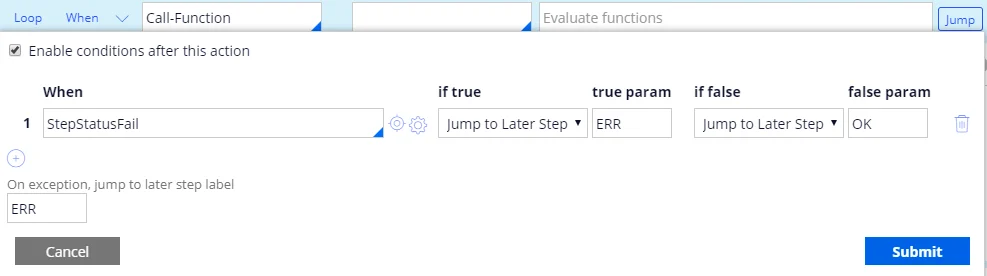
**ジャンプ**:
| **When** | **true の場合** | **true パラメーター** | **false の場合** | **false パラメーター** |
| -------------- | ------------------ | --------------- | ------------------ | ---------------- |
| StepStatusFail | Jump to Later Step | ERR | Jump to Later Step | OK |
**例外発生時にジャンプする後続ステップのラベル**: ERR。
ステップ 6:
**メソッド**: Call-Function
| **関数** | **戻り値** |
| ------------------------------------------------------------------------- | ---------------- |
| @ABBYY.WaitFirstVerificationOrProcessedForMultiFileInvoice(Local.BatchId) | .VerificationUrl |
詳しくは、[WaitFirstVerificationOrProcessedForMultiFileInvoice](/ja/flexi-capture/connectors/pega/pega-func-multiple-docs#waitfirstverificationorprocessedformultifileinvoice)を参照してください。
**ジャンプ**:
| **When** | **true の場合** | **true パラメーター** | **false の場合** | **false パラメーター** |
| -------------- | ------------------ | --------------- | ------------------ | ---------------- |
| StepStatusFail | Jump to Later Step | ERR | Jump to Later Step | OK |
**例外発生時にジャンプする後続ステップのラベル**: ERR。

 ステップ 7:
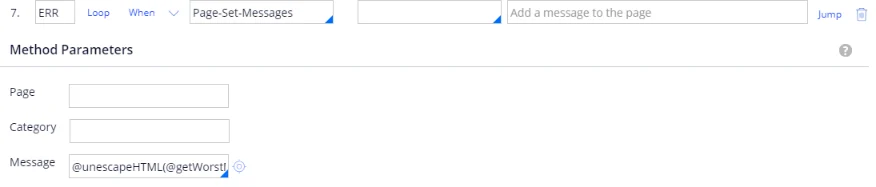
**Label**: ERR。
**Method**: Page-Set-Messages。
**Message**: @unescapeHTML(@getWorstMessageName(tools))。
詳細は、[unescapeHTML](/ja/flexi-capture/connectors/pega/pega-func-other)を参照してください。
ステップ 7:
**Label**: ERR。
**Method**: Page-Set-Messages。
**Message**: @unescapeHTML(@getWorstMessageName(tools))。
詳細は、[unescapeHTML](/ja/flexi-capture/connectors/pega/pega-func-other)を参照してください。
 ステップ 8:
**Label**: OK。
**Method**: Property-Set。
| **PropertiesName** | **PropertiesValue** |
| ------------------ | ------------------- |
| .BatchId | Local.BatchId |
ステップ 8:
**Label**: OK。
**Method**: Property-Set。
| **PropertiesName** | **PropertiesValue** |
| ------------------ | ------------------- |
| .BatchId | Local.BatchId |
