> ## Documentation Index
> Fetch the complete documentation index at: https://docs.abbyy.com/llms.txt
> Use this file to discover all available pages before exploring further.
# UiPath Activity パッケージ
> UiPath の ABBYY FlexiCapture Multi-Task アクティビティに関するリファレンス: FlexiCapture Project Scope、バッチの作成、バッチステージの取得、バッチ結果の取得。
**Abbyy.UiPath.FlexiCapture.MultiTaskActivities.nupkg** アクティビティ パッケージには、FC 12 を使用するために必要なすべての機能が用意されています。ABBYY FlexiCapture で使用できる次のアクティビティが含まれています。
* [FlexiCapture Project Scope](#flexicaptureprojectscope)
* [バッチの作成](#createbatch)
* [バッチステージの取得](#getbatchstage)
* [バッチ検証 URL の取得](#getbatchverificationurls)
* [バッチ結果の取得](#fetchbatchresults)
## FlexiCapture Project Scope
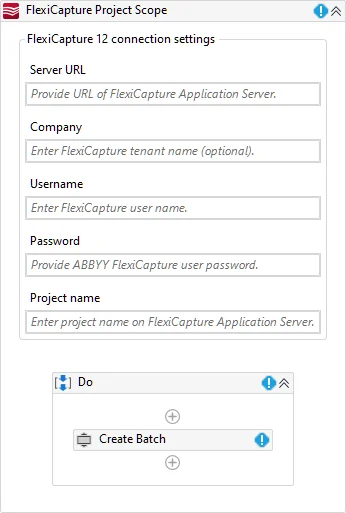
このアクティビティは、FC 12 の接続設定を使用して、パッケージ内の他のアクティビティを初期化するために使われます。これらのアクティビティは、FC の接続設定を参照できるよう、子アクティビティ領域に配置されます。
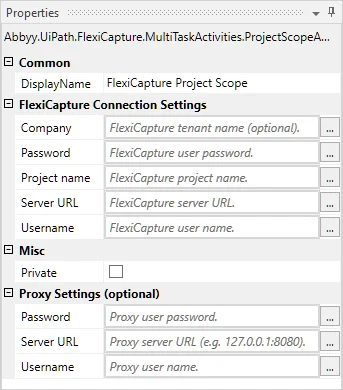 以下は、子アクティビティに継承されるアクティビティ パラメーターの一覧です。
| **カテゴリ** | **表示名** | **型** | **説明** |
| ----------------- | ------------ | ------------ | --------------------- |
| FlexiCapture 接続設定 | Server URL | Uri | サーバー アドレス (テナントを含まない) |
| FlexiCapture 接続設定 | Company | String | サーバーのテナント名 (任意) |
| FlexiCapture 接続設定 | Username | String | ユーザー名 |
| FlexiCapture 接続設定 | Password | SecureString | ユーザー パスワード |
| FlexiCapture 接続設定 | Project name | String | プロジェクト名 |
| プロキシ設定 | Server URL | Uri | プロキシサーバーのアドレス |
| プロキシ設定 | Username | String | ユーザー名 |
| プロキシ設定 | Password | SecureString | ユーザー パスワード |
FlexiCapture Project Scope デザイナーでは、接続設定と子アクティビティを管理できます。
以下は、子アクティビティに継承されるアクティビティ パラメーターの一覧です。
| **カテゴリ** | **表示名** | **型** | **説明** |
| ----------------- | ------------ | ------------ | --------------------- |
| FlexiCapture 接続設定 | Server URL | Uri | サーバー アドレス (テナントを含まない) |
| FlexiCapture 接続設定 | Company | String | サーバーのテナント名 (任意) |
| FlexiCapture 接続設定 | Username | String | ユーザー名 |
| FlexiCapture 接続設定 | Password | SecureString | ユーザー パスワード |
| FlexiCapture 接続設定 | Project name | String | プロジェクト名 |
| プロキシ設定 | Server URL | Uri | プロキシサーバーのアドレス |
| プロキシ設定 | Username | String | ユーザー名 |
| プロキシ設定 | Password | SecureString | ユーザー パスワード |
FlexiCapture Project Scope デザイナーでは、接続設定と子アクティビティを管理できます。
 プロキシを使用する場合:
1. 次の変数を作成します:
* **Uri** 型で **ProxyAddress** という名前の変数を作成し、次の値を設定します:
**New UriBuilder ("[http://proxyserver:8080\").Uri\*\*。\*\*\"http://proxyserver:8080](http://proxyserver:8080\"\).Uri**。**\"http://proxyserver:8080)"** の代わりに、プロキシサーバーのアドレスとポートを指定します。
* **NetworkCredential** 型で **ProxyCredential** という名前の変数を作成し、次の値を設定します:
**New System.Net.NetworkCredential("proxyuser", "proxypass")**。**"proxyuser"** と **"proxypass"** の代わりに、カンマ区切りでプロキシの認証情報を指定します。プロキシで Basic 認証を使用する場合は、この変数を作成します。
プロキシを使用する場合:
1. 次の変数を作成します:
* **Uri** 型で **ProxyAddress** という名前の変数を作成し、次の値を設定します:
**New UriBuilder ("[http://proxyserver:8080\").Uri\*\*。\*\*\"http://proxyserver:8080](http://proxyserver:8080\"\).Uri**。**\"http://proxyserver:8080)"** の代わりに、プロキシサーバーのアドレスとポートを指定します。
* **NetworkCredential** 型で **ProxyCredential** という名前の変数を作成し、次の値を設定します:
**New System.Net.NetworkCredential("proxyuser", "proxypass")**。**"proxyuser"** と **"proxypass"** の代わりに、カンマ区切りでプロキシの認証情報を指定します。プロキシで Basic 認証を使用する場合は、この変数を作成します。
 2. 手順 1 で作成した変数を使用して、プロキシ接続設定を FlexiCapture Project Scope アクティビティに渡します (**FlexiCapture Project Scope → プロキシ設定** をクリック) 。プロキシで必要な認証の種類に応じて、次の操作を行います。
* 透過プロキシを使用する場合は、**Server URL** field に **ProxyAddress** 変数の値としてプロキシサーバーのアドレスとポートを指定し、**Username** field と **Password** field は空のままにします。
* プロキシで NTLM 認証を使用する場合は、**Server URL** field に **ProxyAddress** 変数の値としてプロキシサーバーのアドレスとポートを指定し、**Username** field と **Password** field は空のままにします。UiPath プロセスの実行に使用されている認証情報が使われます。
* プロキシで Basic 認証を使用する場合は、**Server URL** field に **ProxyAddress** 変数の値としてプロキシサーバーのアドレスとポートを指定します。**Username** field と **Password** field には、**ProxyCredential** 変数の対応するプロパティの値としてプロキシの認証情報を指定します。
2. 手順 1 で作成した変数を使用して、プロキシ接続設定を FlexiCapture Project Scope アクティビティに渡します (**FlexiCapture Project Scope → プロキシ設定** をクリック) 。プロキシで必要な認証の種類に応じて、次の操作を行います。
* 透過プロキシを使用する場合は、**Server URL** field に **ProxyAddress** 変数の値としてプロキシサーバーのアドレスとポートを指定し、**Username** field と **Password** field は空のままにします。
* プロキシで NTLM 認証を使用する場合は、**Server URL** field に **ProxyAddress** 変数の値としてプロキシサーバーのアドレスとポートを指定し、**Username** field と **Password** field は空のままにします。UiPath プロセスの実行に使用されている認証情報が使われます。
* プロキシで Basic 認証を使用する場合は、**Server URL** field に **ProxyAddress** 変数の値としてプロキシサーバーのアドレスとポートを指定します。**Username** field と **Password** field には、**ProxyCredential** 変数の対応するプロパティの値としてプロキシの認証情報を指定します。
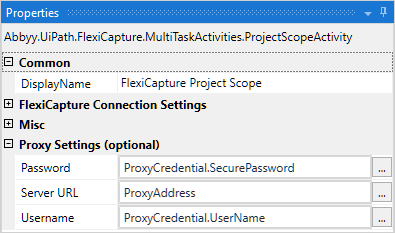 これらのプロキシサーバー設定は、この Project Scope のすべての子アクティビティに継承されます。
## バッチの作成
このアクティビティは、ファイルを FC 12 に送信して処理するために使用します。ABBYY FlexiCapture は、このアクティビティで送信されたすべてのドキュメントに対して、一意の識別子を持つバッチを作成します。この識別子は **バッチ ID** 出力引数として返されます。
これらのプロキシサーバー設定は、この Project Scope のすべての子アクティビティに継承されます。
## バッチの作成
このアクティビティは、ファイルを FC 12 に送信して処理するために使用します。ABBYY FlexiCapture は、このアクティビティで送信されたすべてのドキュメントに対して、一意の識別子を持つバッチを作成します。この識別子は **バッチ ID** 出力引数として返されます。
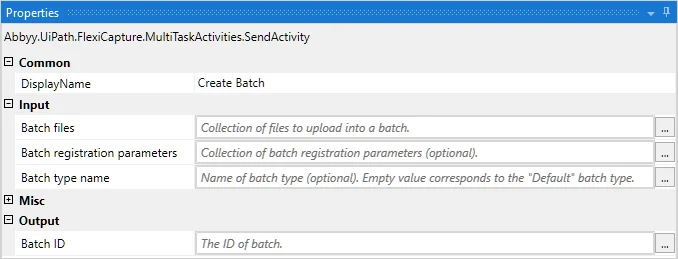 アクティビティのパラメーター:
| **カテゴリ** | **表示名** | **型** | **説明** |
| -------- | ----------- | -------------------------------------------- | ---------------------------------------------------------------- |
| Input | バッチタイプ名 | String | 作成するバッチのバッチタイプ名 (任意) |
| Input | バッチ登録パラメーター | IEnumerable\> | 作成するバッチの登録パラメーターのコレクションです。形式は次のとおりです: 登録パラメーター名 — 登録パラメーター値 (任意) |
| Input | バッチファイル | IEnumerable\> | 作成するバッチの入力ファイルのコレクションです。形式は次のとおりです: ファイル名 — バイト コンテンツ |
| Output | バッチ ID | Int32 | 作成されたバッチの ID |
## バッチステージの取得
このアクティビティは、現在のバッチステージに関する情報を取得するために使用します。バッチの状態を表す値は、たとえば、現在のステージごとにバッチをグループ化して処理するために使用できます。
アクティビティのパラメーター:
| **カテゴリ** | **表示名** | **型** | **説明** |
| -------- | ----------- | -------------------------------------------- | ---------------------------------------------------------------- |
| Input | バッチタイプ名 | String | 作成するバッチのバッチタイプ名 (任意) |
| Input | バッチ登録パラメーター | IEnumerable\> | 作成するバッチの登録パラメーターのコレクションです。形式は次のとおりです: 登録パラメーター名 — 登録パラメーター値 (任意) |
| Input | バッチファイル | IEnumerable\> | 作成するバッチの入力ファイルのコレクションです。形式は次のとおりです: ファイル名 — バイト コンテンツ |
| Output | バッチ ID | Int32 | 作成されたバッチの ID |
## バッチステージの取得
このアクティビティは、現在のバッチステージに関する情報を取得するために使用します。バッチの状態を表す値は、たとえば、現在のステージごとにバッチをグループ化して処理するために使用できます。
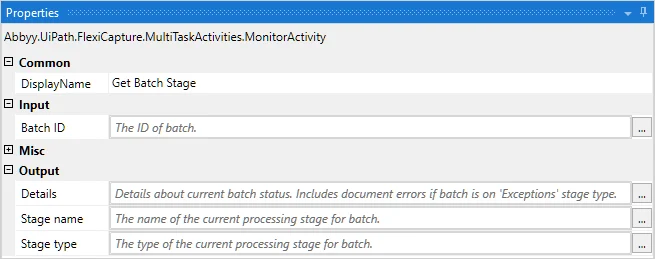 アクティビティのパラメーター:
| **カテゴリ** | **表示名** | **型** | **説明** |
| -------- | -------- | ------ | -------------------------------------------------------------------- |
| Input | バッチ ID | Int32 | バッチ ID |
| Output | ステージ タイプ | Enum | [処理ステージ](/ja/flexi-capture/api/structures/t-processing-stage-type)の型 |
| Output | ステージ名 | String | 処理ステージ名 |
| Output | 詳細 | String | バッチの状態に関する追加情報 |
## バッチ検証 URL の取得
このアクティビティは、バッチ検証用の FC Web Verification Station へのリンク一式を取得するために使用します (バッチ ID を使用) 。
アクティビティのパラメーター:
| **カテゴリ** | **表示名** | **型** | **説明** |
| -------- | -------- | ------ | -------------------------------------------------------------------- |
| Input | バッチ ID | Int32 | バッチ ID |
| Output | ステージ タイプ | Enum | [処理ステージ](/ja/flexi-capture/api/structures/t-processing-stage-type)の型 |
| Output | ステージ名 | String | 処理ステージ名 |
| Output | 詳細 | String | バッチの状態に関する追加情報 |
## バッチ検証 URL の取得
このアクティビティは、バッチ検証用の FC Web Verification Station へのリンク一式を取得するために使用します (バッチ ID を使用) 。
![UiPath Studio の [バッチ検証 URL の取得] アクティビティのプロパティ パネルのスクリーンショット。バッチ ID の入力と、FlexiCapture Web Verification Station の検証タスクへのリンクを返す 検証 URL の出力が表示されています。](https://mintcdn.com/abbyy/jk6a9TGm7KRcVxRI/images/flexi-capture/connectors/UiCon_24.png?fit=max&auto=format&n=jk6a9TGm7KRcVxRI&q=85&s=a5b7ae8728adda730fc320ef871cf424) アクティビティのパラメータ:
| **カテゴリ** | **表示名** | **型** | **説明** |
| -------- | ------- | ------------------ | --------------- |
| Input | バッチ ID | Int32 | バッチ ID |
| Output | 検証 URL | IEnumberable\ | バッチ検証用 URL のセット |
## バッチ結果の取得
このアクティビティは、バッチの処理結果を取得するために使用します。
アクティビティのパラメータ:
| **カテゴリ** | **表示名** | **型** | **説明** |
| -------- | ------- | ------------------ | --------------- |
| Input | バッチ ID | Int32 | バッチ ID |
| Output | 検証 URL | IEnumberable\ | バッチ検証用 URL のセット |
## バッチ結果の取得
このアクティビティは、バッチの処理結果を取得するために使用します。
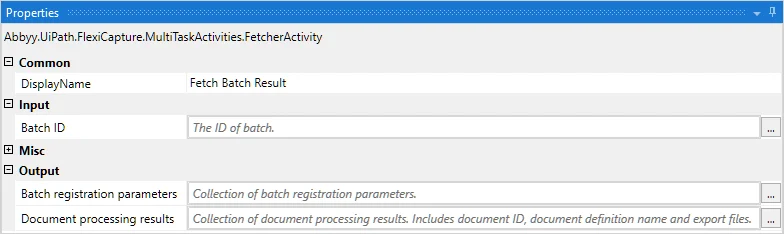 アクティビティのパラメーター:
| **カテゴリ** | **名前** | **表示名** | **型** | **説明** |
| -------- | --------------------------- | ----------- | ------------------------------------------ | -------------- |
| 入力 | BatchId | バッチ ID | Int32 | バッチ ID |
| 出力 | BatchRegistrationParameters | バッチ登録パラメーター | IEnumerable\> | バッチ登録パラメーターの一覧 |
| 出力 | DocumentProcessingResults | 文書処理結果 | IEnumerable\ | バッチの文書処理結果の一覧 |
*DocumentProcessingResult* クラスのプロパティ:
| **名前** | **型** | **説明** |
| ------------------ | ------------------------------------------- | ---------------------------- |
| DocumentId | Int32 | ドキュメント ID |
| DocumentDefinition | String | 一致した Document Definition の名前 |
| Files | IEnumerable\> | エクスポートファイル |
アクティビティのパラメーター:
| **カテゴリ** | **名前** | **表示名** | **型** | **説明** |
| -------- | --------------------------- | ----------- | ------------------------------------------ | -------------- |
| 入力 | BatchId | バッチ ID | Int32 | バッチ ID |
| 出力 | BatchRegistrationParameters | バッチ登録パラメーター | IEnumerable\> | バッチ登録パラメーターの一覧 |
| 出力 | DocumentProcessingResults | 文書処理結果 | IEnumerable\ | バッチの文書処理結果の一覧 |
*DocumentProcessingResult* クラスのプロパティ:
| **名前** | **型** | **説明** |
| ------------------ | ------------------------------------------- | ---------------------------- |
| DocumentId | Int32 | ドキュメント ID |
| DocumentDefinition | String | 一致した Document Definition の名前 |
| Files | IEnumerable\> | エクスポートファイル |