> ## Documentation Index
> Fetch the complete documentation index at: https://docs.abbyy.com/llms.txt
> Use this file to discover all available pages before exploring further.
# トラブルシューティング
> Abbyy.FlexiCapture.WebApi.Client.dll ライブラリでログ記録を有効にし、ログを ABBYY テクニカル サポートに送信して、WinActor UsageExample シナリオのトラブルシューティングを行います。
**UsageExample** シナリオの実行時にエラーが発生し、WinActor OR-5200 のログにそのエラーの記録がない場合は、スクリプトを使用して **Abbyy.FlexiCapture.WebApi.Client.dll** ライブラリのログ記録を有効にします。
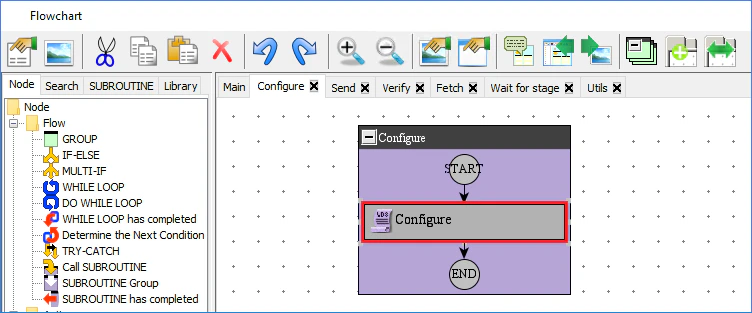
1. **Flowchart** ウィンドウのワークスペースで **Configure** ユーザーライブラリをダブルクリックします。
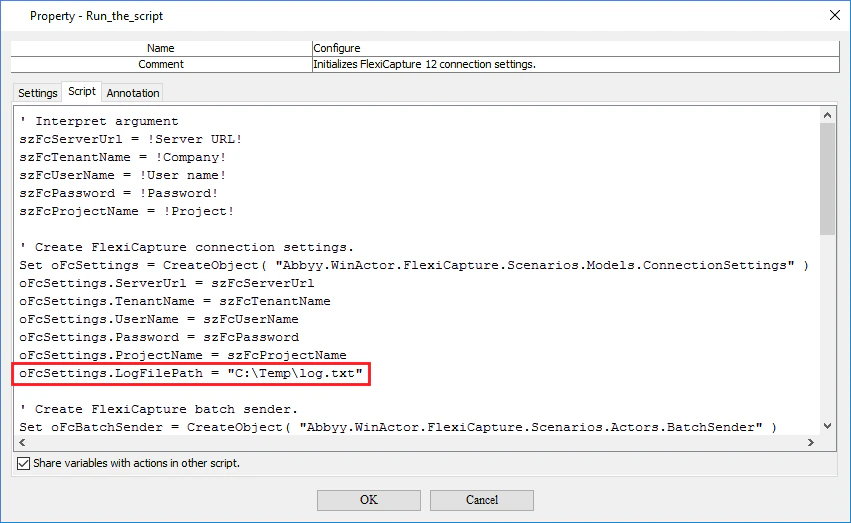
 2. **Property - Run the script** ウィンドウで **Script** タブをクリックし、スクリプトの "Create FlexiCapture connection settings" セクションに次の文字列を追加します。
```
oFcSettings.LogFilePath = "C:\Temp\log.txt"
```
2. **Property - Run the script** ウィンドウで **Script** タブをクリックし、スクリプトの "Create FlexiCapture connection settings" セクションに次の文字列を追加します。
```
oFcSettings.LogFilePath = "C:\Temp\log.txt"
```
 3. **OK** をクリックして変更を保存します。
4. **Run** をクリックしてシナリオを実行します。シナリオを実行すると、ログ ファイルが次の場所に作成されます: C:\Temp\log.txt。必要に応じて、ログ ファイルの保存場所を変更できます。
5. ログ ファイルを [ABBYY テクニカル サポート](https://www.abbyy.com/en-us/support/contacts) に送信します。
3. **OK** をクリックして変更を保存します。
4. **Run** をクリックしてシナリオを実行します。シナリオを実行すると、ログ ファイルが次の場所に作成されます: C:\Temp\log.txt。必要に応じて、ログ ファイルの保存場所を変更できます。
5. ログ ファイルを [ABBYY テクニカル サポート](https://www.abbyy.com/en-us/support/contacts) に送信します。