> ## Documentation Index
> Fetch the complete documentation index at: https://docs.abbyy.com/llms.txt
> Use this file to discover all available pages before exploring further.
# 利用シナリオ
> WinActor Office Robot が、検証の有無に応じて ABBYY FlexiCapture をサービスとして使用し、ドキュメントを処理して結果をデータファイルとしてダウンロードする方法を紹介します。
ABBYY FlexiCapture Connector for WinActor は、一般に次のシナリオで利用できます。
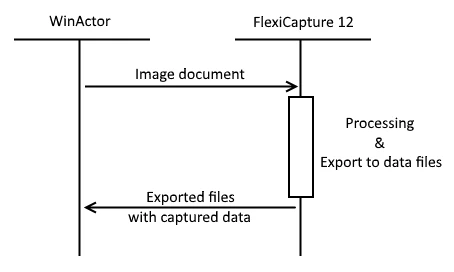
1. **サービスとしての ABBYY FlexiCapture**: WinActor Office Robot は、処理対象のドキュメントを FC に送信します。処理が完了すると、WinActor Office Robot は処理結果を XML、CSV、XLS、TXT、または DBF 形式のデータファイルとしてダウンロードします。出力形式は、該当する FC プロジェクトのエクスポートプロファイルで指定します。
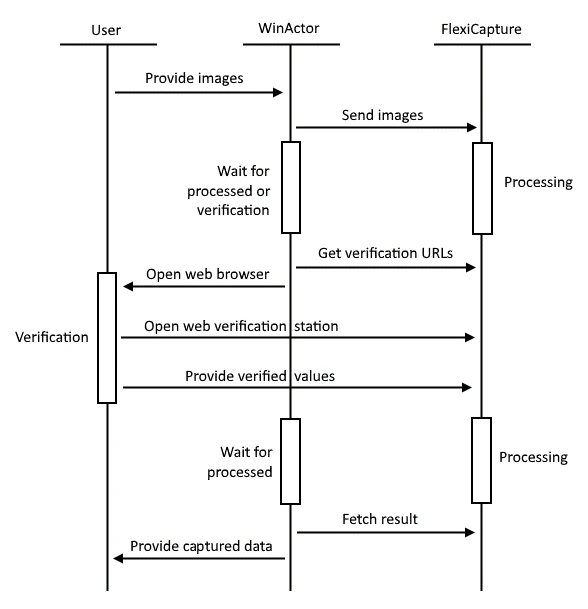
 2. **検証を伴うサービスとしての ABBYY FlexiCapture**: WinActor Office Robot は、処理対象のドキュメントを FC に送信します。ドキュメントの検証が必要な場合、WinActor Office Robot は FC Web Verification Station の検証 URL を受け取ります。その後、ユーザーがドキュメントを検証し、タスクを完了します。処理が完了すると、WinActor Office Robot は処理結果を XML、CSV、XLS、TXT、または DBF 形式のデータファイルとしてダウンロードします。