> ## Documentation Index
> Fetch the complete documentation index at: https://docs.abbyy.com/llms.txt
> Use this file to discover all available pages before exploring further.
# 検索領域に関する情報を返すデバッグ用関数
> SearchArea、ExcludedRects、PageSearchArea 関数を使用して、FlexiLayout Studio で要素の検索領域に関するデバッグ情報を出力します。
次の表に示す関数は、Advanced pre-search relations セクションでのみ使用できます。
これらの関数はデバッグ出力に使用できます。検索領域を制限する命令を指定した後に print コマンドを実行すると、その結果を確認できます。
| **Function** | **説明** |
| ----------------------------------------------- | ------------------------------------ |
| FuzzyRect SearchArea() | 生成された検索領域 (ファジーな矩形) 。読み取り専用。 |
| RectArray ExcludedRects() | 検索領域から除外された矩形の配列。読み取り専用。 |
| PageArea PageSearchAreaLocal( Int PageNumber ) | 指定したページと交差する検索領域を、そのページのローカル座標で返します。 |
| PageArea PageSearchAreaGlobal( Int PageNumber ) | 指定したページと交差する検索領域を、グローバル座標で返します。 |
## 例: 要素の検索領域を出力する
**Advanced pre-search relations** セクションで、選択した要素に次のコードを入力します。
```text theme={null}
Print: Str(SearchArea);
```
またはそれと同等のコード
```text theme={null}
Print: Str(SearchArea ());
```
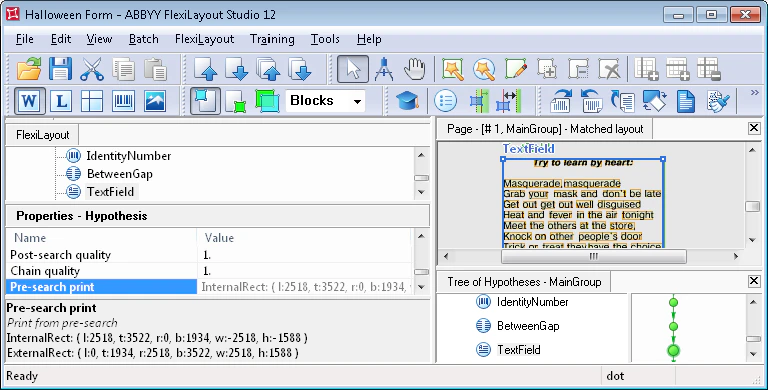
Str 関数は、結果を印刷に必要な `string` 形式に変換します。結果 (選択した要素 `InternalRect` および `ExternalRect` のファジーな矩形の座標とサイズに関する情報) は、**Properties** ウィンドウに表示されます。結果を確認するには、仮説ツリーで該当する要素を選択し、**Properties** ウィンドウの Pre-search print 行にマウスポインターを合わせます。値全体が Pre-search print 行に収まらないことがありますが、**Properties** ウィンドウの下にある Pre-search print ペインには、完全な印刷結果が表示されます。
関数 `ExcludedRects` の結果を印刷する場合 (`Print: Str(ExcludedRects());`) は、結果を確認するために **Properties** ウィンドウで Pre-search print 行を選択します。