> ## Documentation Index
> Fetch the complete documentation index at: https://docs.abbyy.com/llms.txt
> Use this file to discover all available pages before exploring further.

# FlexiCapture 12 Release 4 Update 9 リリースノート

> ABBYY FlexiCapture 12 Release 4 Update 9：Windows バイナリのコード署名証明書の更新、クライアントシークレットを使用しない Microsoft OAuth2 処理、ICAAS のドキュメントアセンブリ上限の引き上げ、docs.abbyy.com へのドキュメント移行、Web verification・エクスポート・データベースアップグレードに関する修正、および Microsoft Defender SmartScreen の警告と Windows Server 2025 でブロックされるインストーラーファイルについての重要なインストール時の注意事項。

export const ArtifactItem = ({label, downloadHref, checksumHref}) => {
  const downloadIsPlaceholder = typeof downloadHref === "string" && downloadHref.startsWith("TODO_");
  const checksumIsPlaceholder = typeof checksumHref === "string" && checksumHref.startsWith("TODO_");
  const downloadDisabled = !downloadHref || downloadHref === "#" || downloadIsPlaceholder;
  const checksumDisabled = !checksumHref || checksumHref === "#" || checksumIsPlaceholder;
  const hasChecksum = typeof checksumHref === "string" && checksumHref.trim() !== "" && checksumHref !== "#";
  const downloadIcon = <svg viewBox="0 0 20 20" aria-hidden="true" className="h-3.5 w-3.5 shrink-0">
      <path d="M10 3v9m0 0 3.5-3.5M10 12 6.5 8.5M4 14.5V17h12v-2.5" fill="none" stroke="currentColor" strokeWidth="1.7" strokeLinecap="round" strokeLinejoin="round" />
    </svg>;
  const checksumIcon = <svg viewBox="0 0 20 20" aria-hidden="true" className="h-3.5 w-3.5 shrink-0">
      <path d="M7 4.5 5.8 15.5M14.2 4.5 13 15.5M4 8h12M3.5 12h12" fill="none" stroke="currentColor" strokeWidth="1.7" strokeLinecap="round" />
    </svg>;
  const actionClasses = "inline-flex h-7 items-center gap-1.5 rounded-md border px-2 text-xs font-medium transition-colors focus:outline-none focus:ring-2 focus:ring-[#ff2038]/35";
  const activeClasses = "border-transparent bg-zinc-950/[0.04] text-zinc-800 hover:border-[#ff2038]/45 hover:bg-[#ff2038]/10 hover:text-[#ff2038] dark:bg-white/10 dark:text-zinc-100 dark:hover:border-[#ff2038]/60 dark:hover:bg-[#ff2038]/25 dark:hover:text-white";
  const disabledClasses = "cursor-not-allowed border-transparent bg-zinc-950/[0.03] text-zinc-400 dark:bg-white/[0.06] dark:text-zinc-500";
  const downloadAction = downloadDisabled ? <span className={`${actionClasses} ${disabledClasses}`} aria-disabled="true" title="Download URL placeholder">
      {downloadIcon}
      Download
    </span> : <a className={`${actionClasses} ${activeClasses}`} href={downloadHref} target="_blank" rel="noopener noreferrer">
      {downloadIcon}
      Download
    </a>;
  const checksumAction = checksumDisabled ? <span className={`${actionClasses} ${disabledClasses}`} aria-disabled="true" title="Checksum URL placeholder">
      {checksumIcon}
      SHA
    </span> : <a className={`${actionClasses} ${activeClasses}`} href={checksumHref} target="_blank" rel="noopener noreferrer" aria-label={`${label} checksum`} title={`${label} checksum`}>
      {checksumIcon}
      SHA
    </a>;
  return <div className="flex min-h-10 items-center justify-between gap-2 rounded-md border border-zinc-950/10 bg-white px-2.5 py-1.5 shadow-sm dark:border-white/10 dark:bg-white/[0.04]">
      <span className="min-w-0 truncate text-sm font-medium text-zinc-950 dark:text-white">{label}</span>
      <span className="flex shrink-0 items-center gap-1.5">
        {downloadAction}
        {hasChecksum ? checksumAction : null}
      </span>
    </div>;
};

このリリースは FlexiCapture 12 Release 4 Update 8 をベースとしており、当該リリースおよびそれ以前のパッチで行われたすべての改善と修正が含まれています。

ご質問やサポートが必要な場合は、[カスタマーサポート](https://support.abbyy.com/)までお問い合わせください。

<h2 id="download">
  ダウンロード
</h2>

FlexiCapture 12 Release 4 Update 9、ビルド 12.0.4.1209。

<div className="not-prose grid gap-6 sm:grid-cols-2">
  <div className="flex flex-col">
    <h4 className="m-0 text-base font-semibold text-zinc-950 dark:text-white">Distributed パッケージ</h4>
    <p className="mt-1 mb-0 text-sm text-zinc-600 dark:text-zinc-400">エンタープライズ向けのクライアント/サーバー構成での展開に対応した完全パッケージです。FlexiCapture サーバーに加え、すべての処理ステーションと検証ステーションが含まれます。</p>

    <div className="mt-auto space-y-2 pt-4">
      <ArtifactItem label="ISO" downloadHref="https://downloads.abbyy.com/FC/FC12R4U9/ABBYY_FlexiCapture12_Distributed_R4U9_12.0.4.1209.iso?secure=PHCpVKBdzJcmpZBPZhQcxw==" />
    </div>
  </div>

  <div className="flex flex-col">
    <h4 className="m-0 text-base font-semibold text-zinc-950 dark:text-white">Developer's パッケージ</h4>
    <p className="mt-1 mb-0 text-sm text-zinc-600 dark:text-zinc-400">Project Setup Station、FlexiLayout Studio、FCAdminTool、License Manager をインストールし、クラウド向け FlexiCapture プロジェクトの開発を行えるようにします。</p>

    <div className="mt-auto space-y-2 pt-4">
      <ArtifactItem label="x64 EXE" downloadHref="https://downloads.abbyy.com/FC/FC12R4U9/ABBYY_FlexiCapture12_Developers_x64_R4U9_12.0.4.1209.exe?secure=wxyv0lE1iR3VD88aEd4soA==" />
    </div>
  </div>
</div>

<h2 id="features">
  機能
</h2>

* FlexiCapture の Windows バイナリのコード署名証明書を更新しました。(664295、664297)

* ICAAS のドキュメントアセンブリの上限を 30 ページから 100 ページに引き上げました。(666848、667822)

* Microsoft OAuth2 処理でクライアントシークレットが不要になりました。

* すべての FlexiCapture コンポーネントの Web ヘルプリンクを docs.abbyy.com に変更しました。

<h2 id="improvements">
  改善点
</h2>

* FlexiCapture の Windows バイナリのコード署名証明書を更新しました。

* Microsoft OAuth2 処理におけるクライアントシークレットへの依存を廃止しました。

* ICAAS Function Apps のランタイム環境を .NET 10 Isolated にアップグレードしました。

* FlexiCapture のドキュメントを docs.abbyy.com に移行しました。

<Note>
  IMAP または GraphMail を使用する Image import profiles では、本リリース後に再度サインインする必要があります。この初回のみのログインにより、トークンの更新が問題なく行われ、ログインを繰り返し求められることなくインポートを継続できます。
</Note>

<h2 id="fixes">
  修正
</h2>

* データベースのアップグレード後に `dbo.User_GetAvailable` で発生していた照合順序の競合を修正しました。(667101, 668220)

* **Send to Stage** の実行後、Web Verification ステーションで例外キューのタスクにアクセスできなくなる問題を修正しました。(672932)

* **Prefer PDF text layer if available** オプションが認識処理時に適用されない問題を修正しました。(574484, 656210)

* シニア検証オペレーターが Batches にフィルタを適用した際に発生していた `Access denied` エラーを修正しました。(656997, 657148, 679273)

* エクスポート中に発生していた `500 Sharing Violation` エラーを修正しました。(627018, 655856, 667234, 676906, 630499)

* CJK IME エディターを使用して Web Verification ステーションで編集を行う際に、以前の全角数字が意図せず表示される問題を修正しました。(677555)

<h2 id="important-installation-notes">
  インストールに関する重要な注意事項
</h2>

<h3 id="microsoft-defender-smartscreen-may-prevent-the-flexicapture-installer-from-starting">
  Microsoft Defender SmartScreen により FlexiCapture インストーラーの起動がブロックされる場合がある
</h3>

FlexiCapture のインストーラーを実行すると、Windows に `Windows protected your PC` および `Microsoft Defender SmartScreen prevented an unrecognized app from starting.` と表示されることがあります。

本リリースのインストーラーは、更新された ABBYY のコード署名証明書で署名されています。SmartScreen は、新しく署名されたファイルの信頼度をダウンロード数の多さに基づいて判断するため、発行されたばかりの署名は、評価が蓄積されるまで「認識されないもの」として警告の対象になります。評価が蓄積されるにつれて、この警告は表示されなくなります。

**回避策:** 署名を確認したうえで、インストーラーを実行してください。

<Steps>
  <Step title="ファイルが正規のものであることを確認する">
    インストーラーを右クリックして **Properties** を選択し、**Digital Signatures** タブを開きます。署名者として ABBYY が表示されていることを確認します。
  </Step>

  <Step title="インストーラーを実行する">
    警告画面で **More info** を選択し、続いて **Run anyway** を選択します。
  </Step>
</Steps>

ウイルス対策ソフトウェアがインストーラーを実際にブロックまたは隔離する場合は、これとは別の問題です。[カスタマーサポート](https://support.abbyy.com/)までご報告ください。

<h3 id="the-installer-can-stop-on-windows-server-2025-when-it-deploys-distributed-components">
  分散コンポーネントの展開時に Windows Server 2025 でインストーラーが停止する場合がある
</h3>

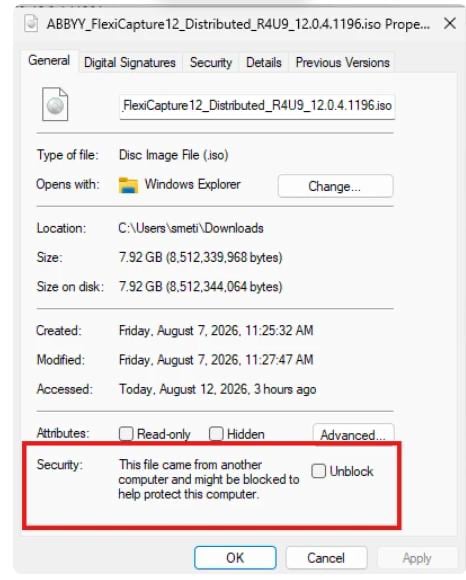
Windows では、インターネットからダウンロードしたファイルは信頼できないファイルとしてマークされます。Windows Server 2025 では、これが原因で分散コンポーネントの展開時にインストーラーが停止し、インストール ウィザードが先に進まなくなることがあります。

**回避策:** ダウンロードしたファイルを実行する前に、ブロックを解除してください。

<Steps>
  <Step title="ファイルのプロパティを開く">
    ダウンロードしたファイルを右クリックし、**Properties** を選択します。
  </Step>

  <Step title="ファイルのブロックを解除する">
    **General** タブで **Unblock** チェックボックスをオンにし、**Apply** を選択します。

    <Frame>
      <img src="https://mintcdn.com/abbyy/q64GYYKhd7uCGFcc/images/flexi-capture/release-notes/unblock-installer.png?fit=max&auto=format&n=q64GYYKhd7uCGFcc&q=85&s=28ee6be1328fd376fda034312a25adcf" alt="Screenshot of the Windows file Properties dialog box for the FlexiCapture Distributed ISO, with the Security section and the Unblock checkbox highlighted on the General tab." width="466" height="580" data-path="images/flexi-capture/release-notes/unblock-installer.png" />
    </Frame>
  </Step>
</Steps>

アーカイブをダウンロードした場合は、展開前にアーカイブのブロックを解除しておくと、展開されたすべてのファイルのブロックが解除されます。これでインストールは正常に完了します。