> ## Documentation Index
> Fetch the complete documentation index at: https://docs.abbyy.com/llms.txt
> Use this file to discover all available pages before exploring further.
# Licensing Server の問題
> ABBYY FlexiCapture Licensing Service のトラブルシューティング。診断のための手動起動や、ポート 3020 で発生する「RPC Service is not available」エラーの修正方法を説明します。
ABBYY FlexiCapture Licensing Service は、サーバーの実行に必要なライセンスを発行・追跡します。まず、サービスが実行中であることを確認してください。
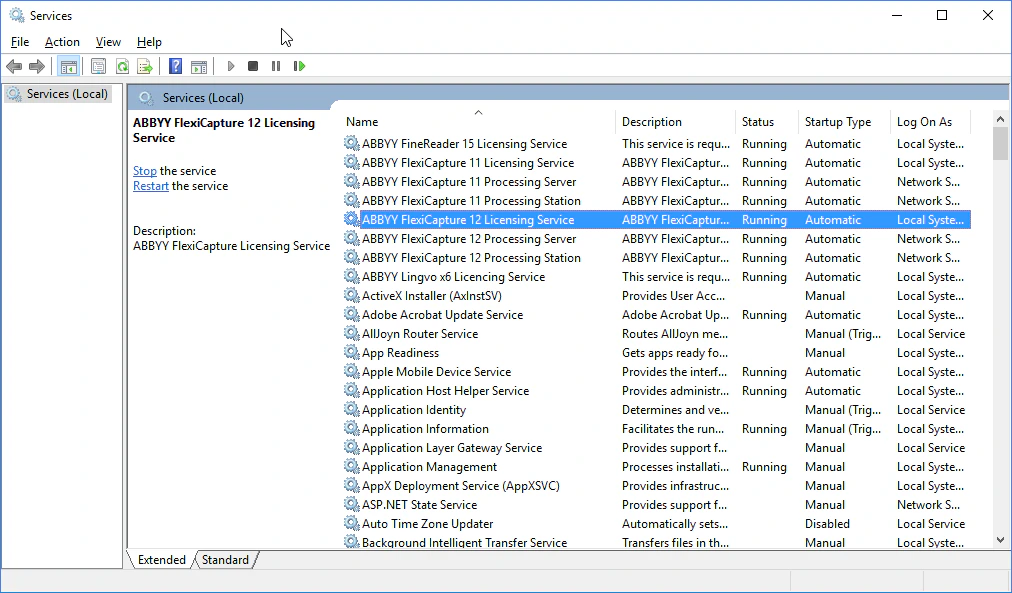 サービスが起動しない場合は、詳細な診断情報を確認するために手動で起動してください。
```text theme={null}
"C:\Program Files (x86)\Common Files\ABBYY\FlexiCapture\12.0\Licensing\LicensingService.exe" /standalone
```
診断情報と `C:\ProgramData\ABBYY\FlexiCapture\12.0\Licenses` のログ ファイルをコピーします。問題の説明を添えて、両方を ABBYY テクニカル サポートに送信してください。
サービスが起動しない場合は、詳細な診断情報を確認するために手動で起動してください。
```text theme={null}
"C:\Program Files (x86)\Common Files\ABBYY\FlexiCapture\12.0\Licensing\LicensingService.exe" /standalone
```
診断情報と `C:\ProgramData\ABBYY\FlexiCapture\12.0\Licenses` のログ ファイルをコピーします。問題の説明を添えて、両方を ABBYY テクニカル サポートに送信してください。
## `RPC Service is not available` エラー
このメッセージは、プログラムが Licensing Server に接続できない場合に表示されます。ファイアウォールでポート `3020` がブロックされておらず、他のアプリケーションが使用していないことを確認してください。Common Internet File System がこのポートを使用している場合があります。
別のアプリケーションがポート `3020` を使用している場合は、Licensing Server のポートを変更してください。
`LicensingSettings.xml` を開きます。既定では `C:\Program Files (x86)\Common Files\ABBYY\FlexiCapture\12.0\Licensing` にあります。
`EndPointName="3020"` を見つけ、引用符内のポート番号を別のものに変更します。
サービスを再起動すると、新しいポートが有効になります。
これには、Processing Server、Processing Stations、Verification Stations、Project Setup Station が含まれます。
各コンピューターで `LicensingSettings.xml` を開き、`EndPointName` を見つけて、選択したポートに設定します。