> ## Documentation Index
> Fetch the complete documentation index at: https://docs.abbyy.com/llms.txt
> Use this file to discover all available pages before exploring further.
# Automation Anywhere コネクタをインストールする
> Control Room で ABBYY Vantage Connector for Automation Anywhere の JARパッケージをインストールし、ボットを実行するために Automation Anywhere Bot Agent をインストールします。
ABBYY Vantage Connector for Automation Anywhere は、ボットのワークフロー内で Automation Anywhere 側で実行される一連のアクションです。これらのアクションは、JARパッケージおよびサンプルボットの ZIP パッケージとして提供されます。
## コネクタを JAR パッケージとしてインストールする
コネクタのインストールには管理者権限が必要です。
`ABBYYVantageConnectorForAutomationAnywhere..zip` アーカイブを開き、その内容を任意の場所に展開します。
Automation Anywhere Control Room を開きます。
Control Room の左側のパネルで **Manage** メニューを開き、**Packages** をクリックします。次に、検索ボックスの下にある **Add package** をクリックします。
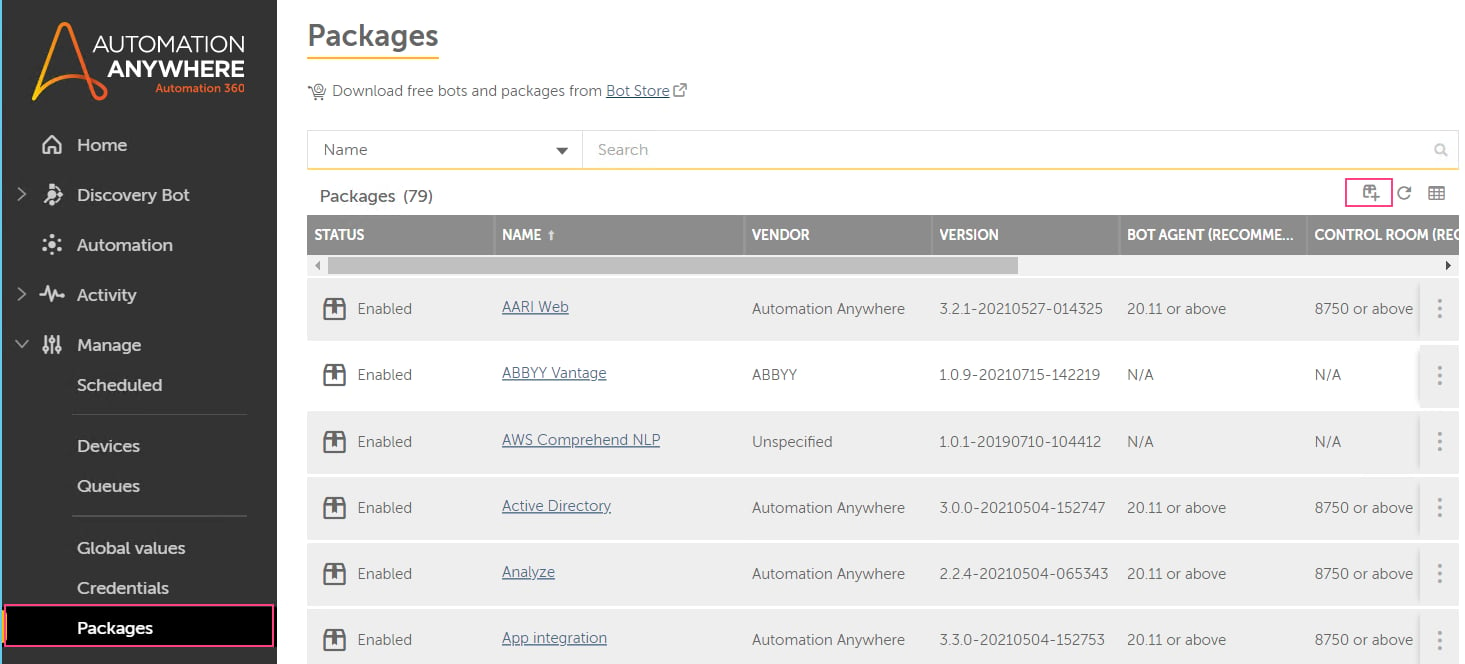 配布キットから `abbyy-vantage-connector-for-automation-anywhere..jar` パッケージを選択し、インストールを確定します。
パッケージは、パッケージ一覧と Bot エディタの **操作** パレットに表示されます。
配布キットから `abbyy-vantage-connector-for-automation-anywhere..jar` パッケージを選択し、インストールを確定します。
パッケージは、パッケージ一覧と Bot エディタの **操作** パレットに表示されます。
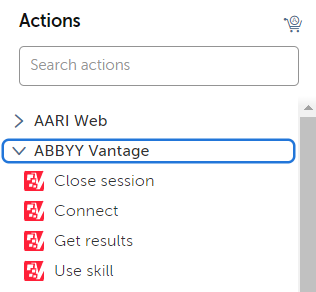 Automation Anywhere Community Edition を使用している場合は、コネクタに付属するサンプル Task Bot をインポートします。この Bot には ABBYY Vantage Connector パッケージが含まれているため、インポート後は用意されているすべてのアクションを利用できます。
Automation 360 を使用している場合は、このサンプル Bot を使ってコネクタを設定することもできます。詳細については、[Automation Anywhere サンプルボット](/ja/vantage/connectors/aa/sample-bot)を参照してください。
Automation Anywhere Community Edition を使用している場合は、コネクタに付属するサンプル Task Bot をインポートします。この Bot には ABBYY Vantage Connector パッケージが含まれているため、インポート後は用意されているすべてのアクションを利用できます。
Automation 360 を使用している場合は、このサンプル Bot を使ってコネクタを設定することもできます。詳細については、[Automation Anywhere サンプルボット](/ja/vantage/connectors/aa/sample-bot)を参照してください。
## Bot Agentをインストールする
デバイスでボットを実行するには、Automation Anywhere Bot Agentをインストールします。
左側のナビゲーションパネル下部にある**Device Settings**を開きます。
**Bot Agent**をダウンロードしてインストールします。
デバイスの認証情報を設定します。
## 次のステップ
付属の[Automation Anywhere サンプルボット](/ja/vantage/connectors/aa/sample-bot)をセットアップして実行します。