> ## Documentation Index
> Fetch the complete documentation index at: https://docs.abbyy.com/llms.txt
> Use this file to discover all available pages before exploring further.
# StartTransaction アクション
> StartTransaction アクションは、Blue Prism コネクタで ABBYY Vantage Skill を使用してドキュメントを処理するトランザクションを作成し、トランザクション識別子を返します。
**StartTransaction** アクションは、ABBYY Vantage Skill を使用してドキュメントを処理するトランザクションを作成します。
## アクション パラメーター
| パラメーター | 方向 | データ型 | 説明 |
| ------------------------------------- | -- | ------------ | -------------------------------------------------------------- |
| **skill** | 入力 | `Text` | ABBYY Vantage Skill 名または Skill 識別子。 |
| **transactionRegistrationParameters** | 入力 | `Collection` | 任意。新しいトランザクションの登録パラメーターのコレクション。 |
| **inputFiles** | 入力 | `Collection` | 新しいトランザクションの入力ファイルのコレクション。単一のファイルを追加するには、コレクションに 1 つの要素を設定します。 |
| **transactionId** | 出力 | `Text` | トランザクション識別子。 |
**transactionRegistrationParameters** コレクションには、次の fields が含まれます。
| fields | データ型 | 説明 |
| --------- | ------ | ------------ |
| **Key** | `Text` | 登録パラメーターのキー。 |
| **Value** | `Text` | 登録パラメーターの値。 |
**inputFiles** コレクションには、次の fields が含まれます。
| fields | データ型 | 説明 |
| ------------------------------ | ------------ | ------------------------------------- |
| **FilePath** | `Text` | 入力ファイルへのパス。このフィールドに空の行がないことを確認してください。 |
| **Index** | `Number` | 任意。トランザクションの入力ファイル順を示すインデックス。 |
| **FileRegistrationParameters** | `Collection` | 任意。ファイル登録パラメーターのコレクション。 |
**FileRegistrationParameters** コレクションには、次の fields が含まれます。
| fields | データ型 | 説明 |
| --------- | ------ | ---------------- |
| **Key** | `Text` | ファイル登録パラメーターのキー。 |
| **Value** | `Text` | ファイル登録パラメーターの値。 |
## 入力ファイルと登録パラメーター用のコレクションを準備する
**inputFiles** パラメーターと **transactionRegistrationParameters** パラメーターにデータを渡す前に、各コレクションの構造が有効になるように設定します。
Blue Prism Process Studio でプロセスを開きます。
レイアウトにコレクションを追加します。
**Collection Properties** を開きます。
**StartTransaction** アクションの **inputFiles** パラメーター用に、コレクションの fields をインポートします。
1. **Import** をクリックします。
2. **Business Object: ABBYY Vantage Skills** を選択します。
3. **Action: StartTransaction** を選択します。
4. **Parameter: inputFiles (input)** を選択します。
5. **OK** をクリックします。これで、このコレクションを **StartTransaction** アクションの **inputFiles** 入力パラメーターに指定できるようになります。
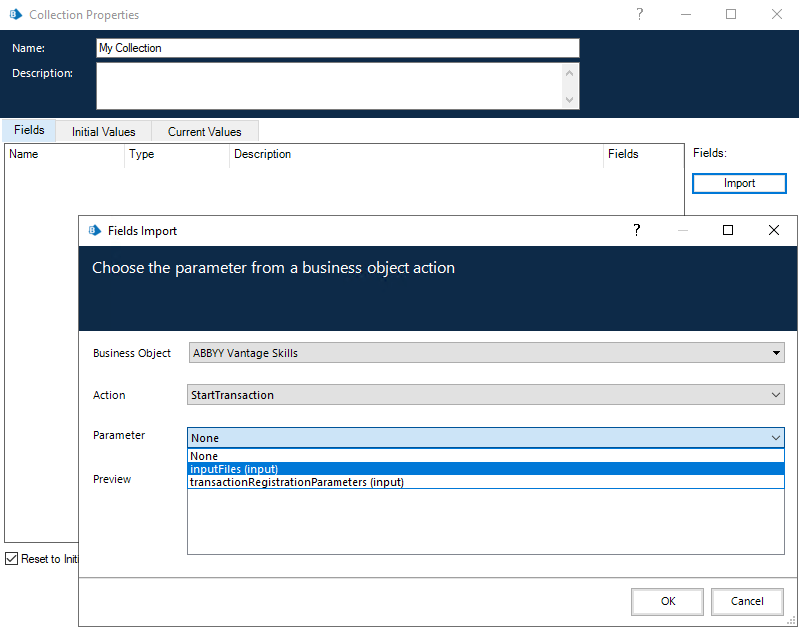 **StartTransaction** アクションを呼び出す前に、コレクションに値を設定してください。
**transactionRegistrationParameters** コレクションを作成するには、同じ手順を繰り返しますが、コレクションの fields をインポートする際に **transactionRegistrationParameters (input)** パラメーターを選択します。また、**transactionRegistrationParameters (input)** パラメーターを使用して **FileRegistrationParameters** コレクションを作成することもできます。
**StartTransaction** アクションを呼び出す前に、コレクションに値を設定してください。
**transactionRegistrationParameters** コレクションを作成するには、同じ手順を繰り返しますが、コレクションの fields をインポートする際に **transactionRegistrationParameters (input)** パラメーターを選択します。また、**transactionRegistrationParameters (input)** パラメーターを使用して **FileRegistrationParameters** コレクションを作成することもできます。
## 関連トピック
* [GetSkills アクション](/ja/vantage/connectors/blue-prism/actions/get-skills)
* [GetTransactionResult アクション](/ja/vantage/connectors/blue-prism/actions/get-transaction-result)
* [SaveTransactionResult アクション](/ja/vantage/connectors/blue-prism/actions/save-transaction-result)