> ## Documentation Index
> Fetch the complete documentation index at: https://docs.abbyy.com/llms.txt
> Use this file to discover all available pages before exploring further.
# Use Skill アクティビティ
> Use Skill アクティビティは、入力ファイルから ABBYY Vantage のトランザクションを作成し、後続の UiPath コネクタ アクティビティで使用する Transaction Id を返します。
**Use Skill** は通常、UiPath ワークフローで最初に使用する Vantage アクティビティです。ドキュメントを Vantage Skill に送信し、**Transaction Id** を返します。処理は Vantage 内で非同期に実行されるため、処理が完了したら **Get Results** アクティビティに Transaction Id を渡して結果を取得します。
## アクティビティのプロパティ
| Group | Property | Type | Description |
| ------------------- | ----------------------------------- | --------------------------------------- | ---------------------------------------------------------------------------------------------------------------------------------------------------------------------------------------------- |
| Connection Settings | Skill Name | `String` | Vantage の Skill 名です。 |
| Input | Input Files | `IReadOnlyDictionary` | `String` はファイル名、`InputFile` は入力ファイルを表すクラスである Dictionary コレクションです。ファイルをディクショナリに追加する前に、`String` パラメーターには重複しない値が渡されるようにする必要があります。`String` パラメーターに同じ名前を渡すファイルを、Input Files ディクショナリに複数追加することはできません。 |
| Input | Transaction Registration Parameters | `IReadOnlyDictionary` | 各パラメーターのキーと値を渡すための、トランザクション登録パラメーターの Dictionary コレクションです。 |
| Output | Transaction Id | `Guid` | 作成されたトランザクションの識別子です。この ID は、トランザクションのステータスと処理結果を取得するために、後で **Get Results** アクティビティの入力プロパティ **Transaction Id** として使用されます。 |
### InputFile
| Name | Type | Description |
| --------------------------------------- | ------------------------------------ | --------------------------------------------------------------------------------------------------------------------------------- |
| fileStream | `Stream` | ABBYY Vantage に渡すファイルの内容です。このプロパティの値として、ローカルディスク上のファイルのストリームを渡すことができます (例: `System.IO.File.OpenRead("D:\images\Invoice1.pdf")`) 。 |
| index *(optional)* | `Integer` | トランザクション内のファイルのインデックス番号です。 |
| fileRegistrationParameters *(optional)* | `IReadOnlyDictionary` | 各パラメーターのキーと値を渡すための、ファイル登録パラメーターの Dictionary コレクションです。 |
Use Skill アクティビティは、設定済みの Vantage Scope アクティビティ内でのみ使用できます。
アクティビティを設定する際は、コネクタが Skill の一覧を取得できるよう、Vantage Scope アクティビティで **Password** または **Client Secret** プロパティを設定します (認証フローに応じて異なります) 。ワークフローの設定が完了したら、**Secure Password** または **Secure Client Secret** プロパティに切り替えてください。詳細は [Vantage Scope アクティビティ](/ja/vantage/connectors/uipath/activities/vantage-scope) を参照してください。
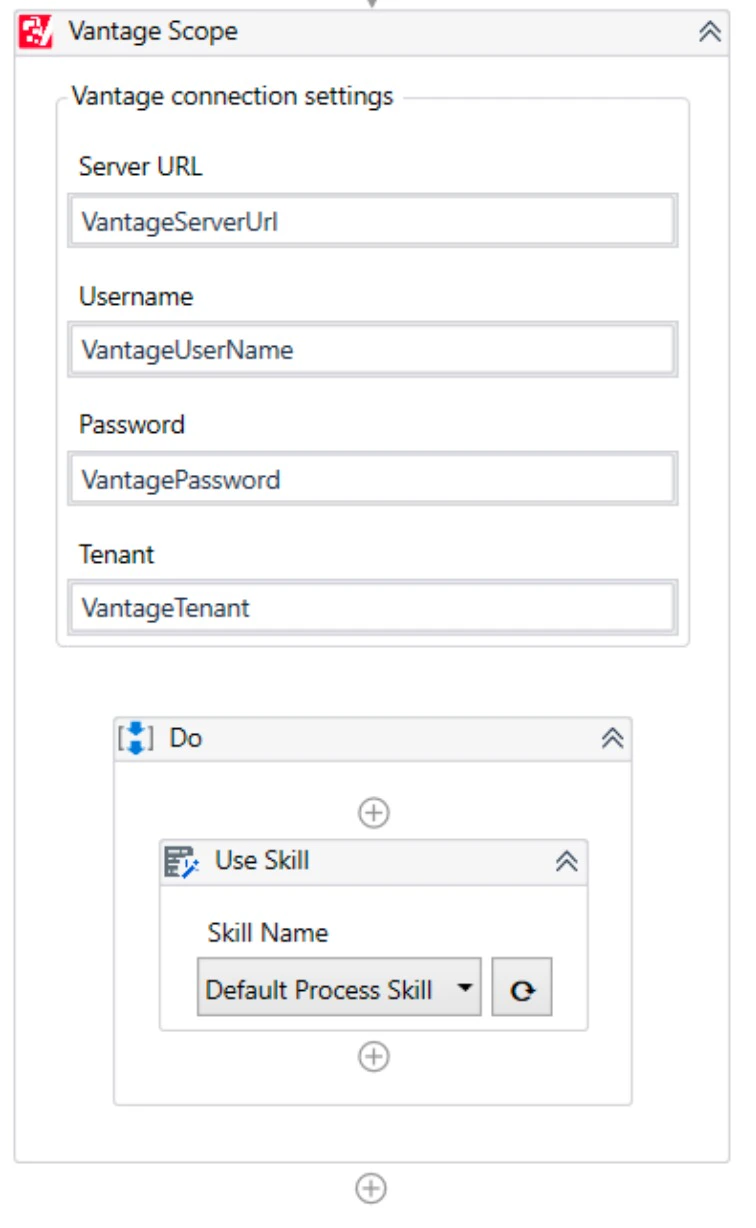 **Skill Name** の下にあるドロップダウンリストの右側のボタンをクリックして、Skill の一覧をロードします。次に、**Skill Name** のドロップダウンリストを展開し、文書処理に使用する Skill を選択します。
文書処理を高速化するため、大きなファイルは 30 MB 以下にすることをお勧めします。
**Skill Name** パラメーターでは、UiPath の `String` 変数を使用できます。ドロップダウンリストから Skill を選択すると、新しい値がその変数に書き込まれます。式や他の変数への参照はサポートされていません。
**Skill Name** の下にあるドロップダウンリストの右側のボタンをクリックして、Skill の一覧をロードします。次に、**Skill Name** のドロップダウンリストを展開し、文書処理に使用する Skill を選択します。
文書処理を高速化するため、大きなファイルは 30 MB 以下にすることをお勧めします。
**Skill Name** パラメーターでは、UiPath の `String` 変数を使用できます。ドロップダウンリストから Skill を選択すると、新しい値がその変数に書き込まれます。式や他の変数への参照はサポートされていません。
## 関連トピック
ABBYY Vantage の接続設定を、配下の Vantage アクティビティに渡します。
ABBYY Vantage から処理結果を取得します。
抽出した field 値を UiPath 変数に保存します。