> ## Documentation Index
> Fetch the complete documentation index at: https://docs.abbyy.com/llms.txt
> Use this file to discover all available pages before exploring further.

# Vantage Scope アクティビティ

> Vantage Scope アクティビティは、ABBYY Vantage の接続設定、プロキシ設定、および公開 API クライアント設定を、ネストされた UiPath コネクタ アクティビティに渡します。

**Vantage Scope** は、他のすべての UiPath コネクタ アクティビティを配置する必要があるコンテナーです。Use Skill、Get Results、および Map Fields は、いずれも Scope 内にネストして実行されます。Scope には、ネストされたアクティビティで共有する資格情報、プロキシ設定、および公開 API クライアント設定が保持されるため、接続の詳細はワークフローごとに一度だけ設定すれば済みます。

<Warning>
  Vantage Scope アクティビティでは、Resource Owner Password Credentials Flow と Client Credentials Flow を使用して認証を構成できます。Vantage で外部 ID プロバイダーを設定した場合、使用できる認証フローは Client Credentials Flow のみです。
</Warning>

詳細については、以下を参照してください。

<CardGroup cols={3}>
  <Card title="外部 ID プロバイダー" icon="user-shield" href="/ja/vantage/documentation/tenant-admin/tenant-management/external-identity-provider">
    Vantage テナント用に、OAuth 2.0 または SAML 2.0 の ID プロバイダーを介した SSO を設定します。
  </Card>

  <Card title="公開 API クライアント" icon="key" href="/ja/vantage/documentation/tenant-admin/tenant-management/configure-client">
    Vantage API で認証するための公開 API クライアントを作成して設定します。
  </Card>

  <Card title="認証" icon="shield-check" href="/ja/vantage/developer/authentication/authentication">
    OAuth 2.0 フローを選択し、アクセス トークンを取得します。
  </Card>
</CardGroup>

<div id="activity-properties">
  ## アクティビティ プロパティ
</div>

<div id="connection-settings">
  ### 接続設定
</div>

| Property                 | Type                                  | Description                                                                                                                                                                                   |
| ------------------------ | ------------------------------------- | --------------------------------------------------------------------------------------------------------------------------------------------------------------------------------------------- |
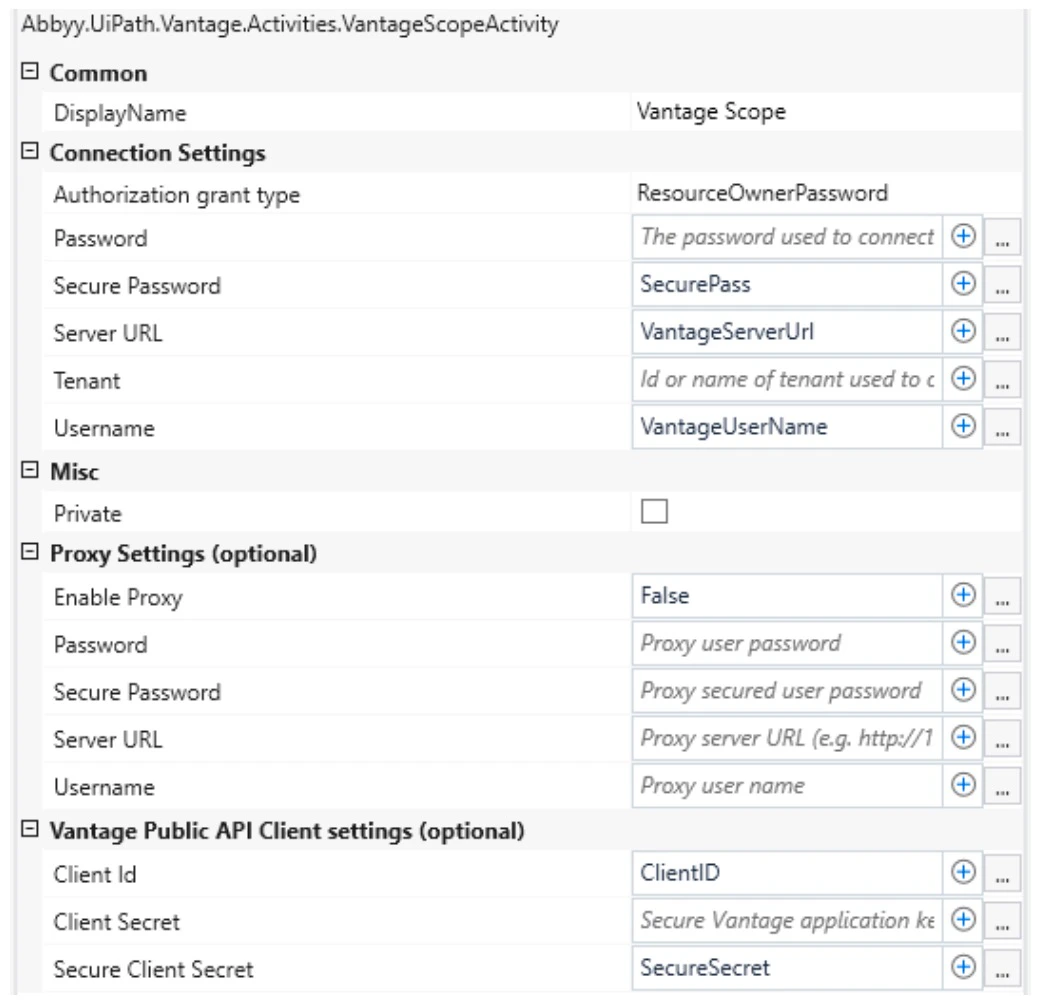
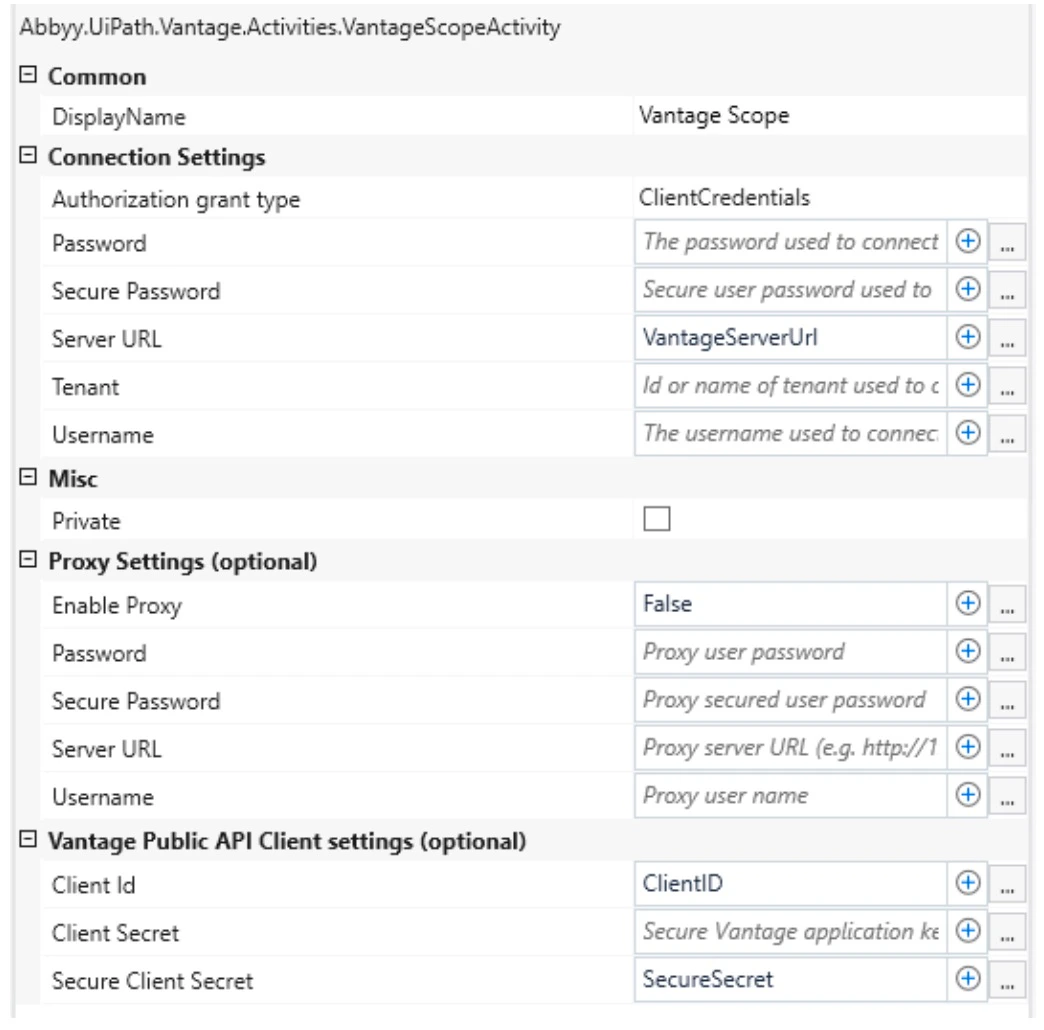
| Authorization grant type | `IEnumerable<AuthorizationGrantType>` | 認可に使用する grant type です: `ResourceOwnerPassword` または `ClientCredentials`。                                                                                                                       |
| Password                 | `String`                              | ABBYY Vantage への接続に使用するパスワードです。                                                                                                                                                               |
| Secure Password          | `SecureString`                        | ABBYY Vantage への接続に使用するセキュア パスワードです。                                                                                                                                                          |
| Server URL               | `String`                              | ABBYY Vantage サーバーのアドレスです。                                                                                                                                                                    |
| Tenant                   | `String`                              | ABBYY Vantage テナント名またはテナント identifier です。このプロパティが必要なのは、ABBYY Vantage サーバーへの接続に使用する資格情報のユーザーが、そのサーバー上の複数 (2 つ以上) のテナントに登録されている場合のみです。テナント名は、ブラウザーでパスワードを入力する際に表示される Vantage のサインイン ページで確認できます。 |
| Username                 | `String`                              | ABBYY Vantage への接続に使用するユーザーのメールアドレスです。                                                                                                                                                        |

<div id="proxy-settings-optional">
  ### プロキシ設定 (任意)
</div>

| プロパティ           | 型              | 説明                                           |
| --------------- | -------------- | -------------------------------------------- |
| Enable Proxy    | `Boolean`      | HTTPリクエストの送信にプロキシサーバーを使用できるようにします。           |
| Server URL      | `String`       | プロキシサーバーのアドレス (例: `http://127.0.0.1:8080`) 。 |
| Username        | `String`       | プロキシサーバーへの接続に使用するユーザー名。                      |
| パスワード           | `String`       | プロキシサーバーへの接続に使用するパスワード。                      |
| Secure Password | `SecureString` | プロキシサーバーへの接続に使用する、セキュリティで保護されたパスワード。         |

<div id="public-api-client-settings-optional">
  ### 公開 API クライアント設定 (任意)
</div>

| Property             | Type           | Description                                |
| -------------------- | -------------- | ------------------------------------------ |
| Client Id            | `String`       | Vantage アプリケーション識別子です。                     |
| Client Secret        | `String`       | 保護された Vantage アプリケーション キーです。               |
| Secure Client Secret | `SecureString` | セキュア文字列として格納された保護済み Vantage アプリケーション キーです。 |

<div id="manage-credentials">
  ### 資格情報を管理する
</div>

Vantage ユーザーのパスワード、プロキシ パスワード、およびクライアント設定の Client Secret は、Scope Activity で、文字列パラメーターまたは対応する `SecureString` 型のパラメーターのいずれかに設定できます。

`String` 型のパスワードは XAML プロジェクト ファイルにプレーン テキストで保存されるため、安全ではありません。`String` パスワードの使用は、skills の一覧を取得するために **Use Skill** アクティビティおよび **Map Fields** アクティビティを設定する場合、または UiPath process をデバッグする場合にのみ推奨されます。process の設定が完了したら、次のようにしてください。

* Resource Owner Password Credentials Flow を使用する場合は、Vantage Scope アクティビティから **Password** プロパティを削除し、**Secure Password** プロパティを設定します。
* Client Credentials Flow を使用する場合は、Vantage Scope アクティビティから **Client Secret** プロパティを削除し、**Secure Client Secret** プロパティを設定します。

資格情報を [UiPath Orchestrator assets](https://docs.uipath.com/orchestrator/docs/about-assets) に保存することを推奨します。**Get Credential** アクティビティを使用して Orchestrator からパスワードを取得し、変数を介して Vantage Scope アクティビティに渡します。

<Warning>
  接続設定、プロキシ設定、およびクライアント設定では、同じ種類のパスワードを使用する必要があります。
</Warning>

<div id="configure-the-vantage-public-api-client">
  ### Vantage 公開 API クライアントを設定する
</div>

ABBYY Vantage でクライアントを作成する際は、使用する grant type に応じて、クライアント設定の **OAuth 2.0 Flows Settings** セクションで次の項目を設定してください。

| 認可フロー                                    | 有効にする OAuth 2.0 クライアント設定                                                                                                        |
| ---------------------------------------- | ------------------------------------------------------------------------------------------------------------------------------- |
| Resource Owner Password Credentials Flow | **Allow Resource Owner Password Credentials Flow**                                                                              |
| Client Credentials Flow                  | **Allow issuing refresh tokens to refresh access tokens**、**Allow client credentials flow**、および **Manage Roles** で選択した必要な roles |

<Warning>
  **Manage Roles** で skills に関連付けられた roles を 1 つ以上選択する場合は、それらの roles に対して許可する skills も選択してください。
</Warning>

ABBYY Vantage の roles の詳細については、[ロールベースアクセス制御 (RBAC) ](/ja/vantage/documentation/tenant-admin/tenant-management/role-based-access) を参照してください。

<div id="fill-in-the-activity-fields">
  ### アクティビティ fields に入力する
</div>

<Note>
  Vantage 公開 API クライアント設定 のすべてのプロパティが空の場合、既定の ABBYY Vantage client が使用されます。
</Note>

<Tabs>
  <Tab title="Resource Owner Password Credentials Flow">
    この flow で入力する fields:

    <Frame>
      <img src="https://mintcdn.com/abbyy/Km9nwnkPeY8_wARd/images/vantage/developer/connectors/uipath/scope-ropc.jpg?fit=max&auto=format&n=Km9nwnkPeY8_wARd&q=85&s=22e34d947174db96d438b1fa57c1cac5" alt="Resource Owner Password Credentials Flow の Vantage Scope アクティビティ fields" width="1038" height="1006" data-path="images/vantage/developer/connectors/uipath/scope-ropc.jpg" />
    </Frame>
  </Tab>

  <Tab title="Client Credentials Flow">
    この flow で入力する fields:

    <Frame>
      <img src="https://mintcdn.com/abbyy/Km9nwnkPeY8_wARd/images/vantage/developer/connectors/uipath/scope-cc.jpg?fit=max&auto=format&n=Km9nwnkPeY8_wARd&q=85&s=7bd045b77f4c7f3629a27e86cf32ee6b" alt="Client Credentials Flow の Vantage Scope アクティビティ fields" width="1044" height="1030" data-path="images/vantage/developer/connectors/uipath/scope-cc.jpg" />
    </Frame>
  </Tab>
</Tabs>

<div id="configure-proxy-settings">
  ## プロキシ設定を行う
</div>

実行時に、コネクタのリクエストがプロキシサーバーを経由するよう設定できます。サポートされているプロキシ認証の種類は、Basic、NTLM、IP 認証、透過型プロキシです。

プロキシを使用するには、**Vantage Scope** アクティビティを選択します。**プロキシ設定 (任意)** プロパティグループで、**Enable Proxy** プロパティの値を `"true"` に設定し、次に **Server URL** プロパティにプロキシサーバーのアドレスを指定します。

<Tabs>
  <Tab title="Basic 認証">
    **Username** プロパティと **Password / Secure Password** プロパティに、プロキシ接続の認証情報を指定します。
  </Tab>

  <Tab title="NTLM 認証">
    **Username** フィールドと **Password** フィールドは省略可能です。**Username** フィールドと **Password** フィールドが空の場合は、UiPath プロセスの実行ユーザーの認証情報が使用されます。
  </Tab>
</Tabs>

<div id="related-topics">
  ## 関連トピック
</div>

<CardGroup cols={3}>
  <Card title="Use Skill アクティビティ" icon="play" href="/ja/vantage/connectors/uipath/activities/use-skill">
    Skill を使用してドキュメントを処理するための Vantage トランザクションを作成します。
  </Card>

  <Card title="Get Results アクティビティ" icon="circle-down" href="/ja/vantage/connectors/uipath/activities/get-results">
    ABBYY Vantage から処理結果を取得します。
  </Card>

  <Card title="Map Fields アクティビティ" icon="arrow-right-arrow-left" href="/ja/vantage/connectors/uipath/activities/map-fields">
    抽出した field 値を UiPath 変数に保存します。
  </Card>
</CardGroup>