> ## Documentation Index
> Fetch the complete documentation index at: https://docs.abbyy.com/llms.txt
> Use this file to discover all available pages before exploring further.
# Process Skill のセットアップ
> プリセットワークフローを選択するか、アクティビティからカスタムワークフローを作成して Process skill を構築し、その後で各アクティビティを設定します。
Process skill は、documents処理および分類の各アクティビティに加え、必要な追加アクティビティを組み合わせて、documentsのインポート/エクスポート、ルール検証、手動確認への送付を行う指向性のあるフローです。
Process skill で使用されるすべての Document skill は、同じ Technology Core バージョンを使用する**必要があります**。
以下の図では、アクティビティが方向を示す矢印で接続されています。
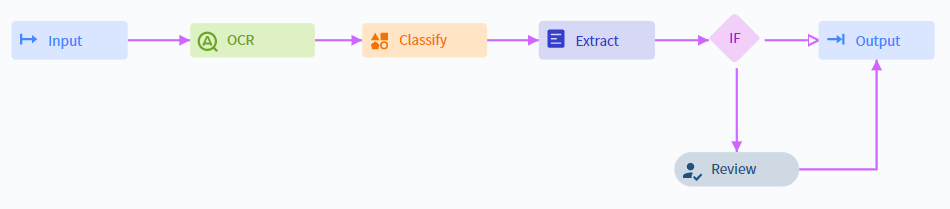
## セットアップ
手動でカスタムワークフローを作成するか、プリセットワークフローのいずれかを選択できます。
ワークフロー内の各アクティビティに必要な Parameter を設定します。
Skill を公開して利用可能にします。
トランザクションを起動するための **Try** オプションは、Process skill では利用できません。
## プリセットのワークフロー
プリセットのワークフローは、Skill Designer の **Actions** ペインで確認できます。Vantage では、以下のプリセットが提供されています。
### 単一タイプ向けのシンプルな Document Skill ワークフロー
単一タイプのdocumentsを処理するためのものです。documentsを取り込み、field を抽出し、結果をアップロードします。
### 分類後に複数の Document skills
1 つのワークフローでさまざまな文書タイプを処理します。documentsを取り込み、分類し、各タイプを適切な Document skill に振り分けて、結果をアップロードします。
### 手動確認を伴う、分類後の複数のDocument skills
上記と同様ですが、ワークフローデザイナーが定義した特定のビジネスルールを満たさないdocumentsのみを確認する **手動確認** ステップが追加されています。
## ワークフローを変更する
### アクティビティを追加する
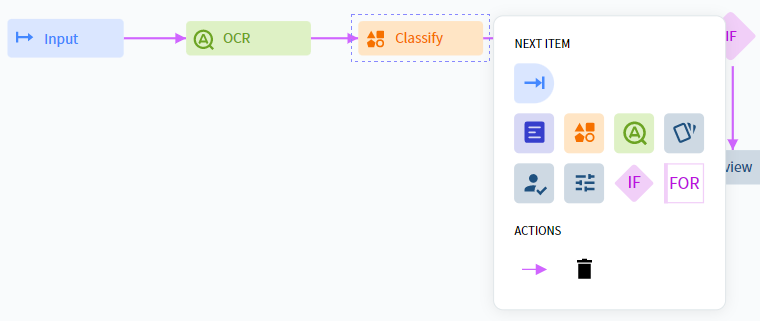
アクティビティを追加する位置の直前にあるブロックをクリックします。
右側に表示されるメニューで、アクティビティを選択します。
方向矢印を使って、新しいアクティビティを既存のブロックに接続します。
### アクティビティを削除する
ブロックをクリックして選択します。
表示されたメニューで、**Delete** をクリックします。
必要に応じて、矢印を使って残りのブロックを接続し直します。
## カスタムワークフローを作成する
**Activities** ペインでアクティビティを選択し、Skill Designer ウィンドウにドラッグします。
ブロックをクリックし、表示されたメニューから必要なアクティビティを選択します。メニューを閉じるには、ブロックをもう一度クリックします。
すべての処理ステップを追加したら、各アクティビティをクリックし、右側の **Actions** ペインで設定します。
## 利用可能なアクティビティ
カスタムの Process skill ワークフローでは、次のアクティビティを使用できます:
* [Input](/ja/vantage/documentation/skill-designer/process/input-activity/input-activity)
* [Output](/ja/vantage/documentation/skill-designer/process/output-activity/output-activity)
* [Classify](/ja/vantage/documentation/skill-designer/process/classify-activity)
* [Extract](/ja/vantage/documentation/skill-designer/process/extract-activity)
* [OCR](/ja/vantage/documentation/skill-designer/process/ocr-activity)
* [Assemble](/ja/vantage/documentation/skill-designer/process/assemble-activity)
* [Review](/ja/vantage/documentation/skill-designer/process/manual-review)
* [Custom](/ja/vantage/documentation/skill-designer/process/custom-activity/custom-activity)
* [Condition](/ja/vantage/documentation/skill-designer/process/condition-activity/condition-activity)
* [For Each Document](/ja/vantage/documentation/skill-designer/process/for-each)
多くのアクティビティは、トランザクション内のすべてのdocumentsに一度にアクセスできます。Skill ベースのアクティビティ (**Classify**、**Extract**、**OCR**) は、各documentsを個別に処理します。**Classify** アクティビティで割り当てられたクラスに **Extract** アクティビティ内の Document skills をマッピングすることで、ワークフローを暗黙的に分岐できます。**For Each Document** を使用すると、**Custom** または **Condition** アクティビティをdocumentsごとに適用できます。
## 関連トピック
* [Process skill](/ja/vantage/documentation/skill-designer/process/process-skill)
* [Input アクティビティ](/ja/vantage/documentation/skill-designer/process/input-activity/input-activity)
* [Output アクティビティ](/ja/vantage/documentation/skill-designer/process/output-activity/output-activity)
* [Classify アクティビティ](/ja/vantage/documentation/skill-designer/process/classify-activity)
* [Extract アクティビティ](/ja/vantage/documentation/skill-designer/process/extract-activity)
* [Skill Catalog](/ja/vantage/documentation/skill-catalog/skill-catalog)