> ## Documentation Index
> Fetch the complete documentation index at: https://docs.abbyy.com/llms.txt
> Use this file to discover all available pages before exploring further.
# Install the Automation Anywhere connector
> Install the ABBYY Vantage Connector for Automation Anywhere JAR package in the Control Room, and install the Automation Anywhere Bot Agent to run your bots.
The ABBYY Vantage Connector for Automation Anywhere is a set of actions that run on the Automation Anywhere side within your bot workflow. The actions are delivered as a JAR package and a sample bot ZIP package.
## Install the connector as a JAR package
Installing the connector requires administrator privileges.
Run the `ABBYYVantageConnectorForAutomationAnywhere..zip` archive and unpack its contents to any location.
Open your Automation Anywhere Control Room.
On the left panel of the Control Room, open the **Manage** menu and click **Packages**. Click **Add package** under the search box.
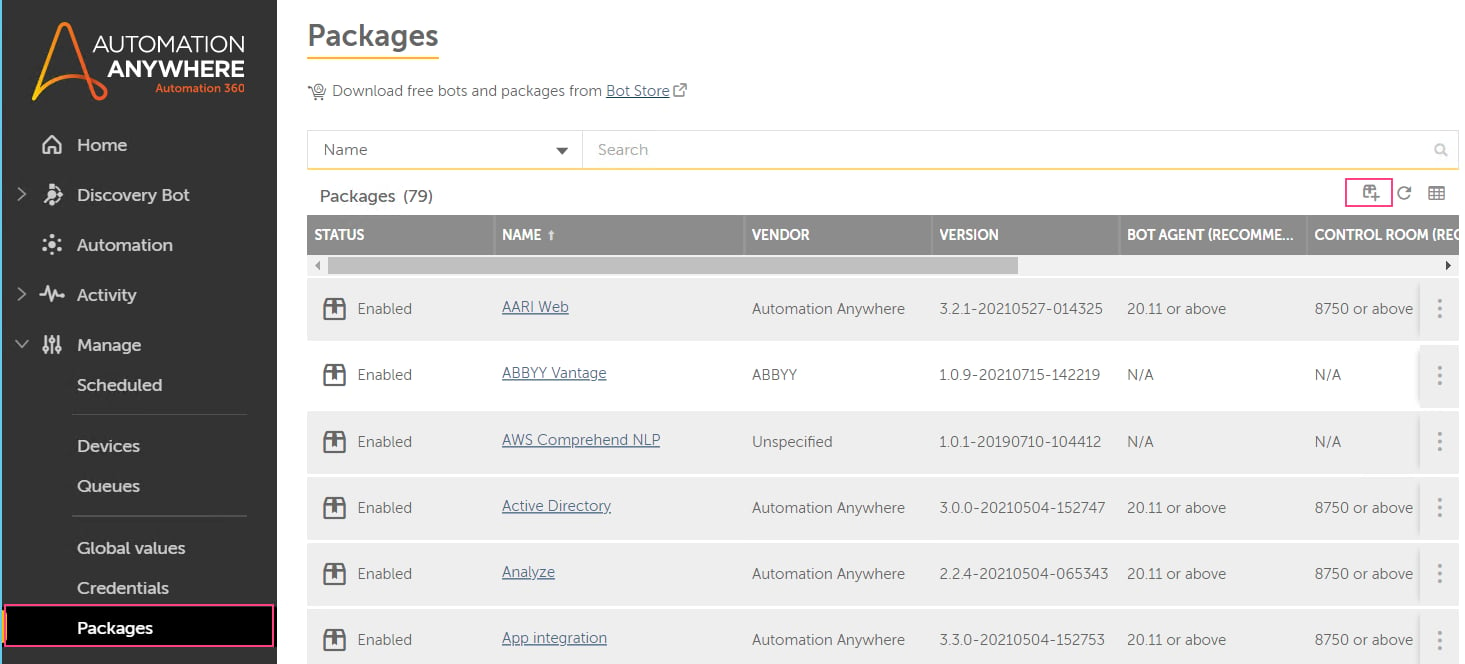 Choose the `abbyy-vantage-connector-for-automation-anywhere..jar` package from the Distribution Kit and confirm the installation.
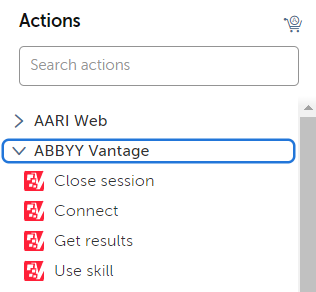
The package appears in the list of packages and in the **Actions** palette in the Bot editor.
Choose the `abbyy-vantage-connector-for-automation-anywhere..jar` package from the Distribution Kit and confirm the installation.
The package appears in the list of packages and in the **Actions** palette in the Bot editor.
 If you use Automation Anywhere Community Edition, import the sample Task Bot that ships with the connector. This bot includes the ABBYY Vantage Connector package, so all the provided actions become available after you import the bot.
If you use Automation 360, the sample bot also helps you configure the connector. For more information, see [Automation Anywhere sample bot](/vantage/connectors/aa/sample-bot).
## Install the Bot Agent
To run your bots on a device, install the Automation Anywhere Bot Agent.
Navigate to **Device Settings** at the bottom of the left navigation panel.
Download and install the **Bot Agent**.
Set the device credentials.
## Next steps
Set up and run the bundled [Automation Anywhere sample bot](/vantage/connectors/aa/sample-bot).
If you use Automation Anywhere Community Edition, import the sample Task Bot that ships with the connector. This bot includes the ABBYY Vantage Connector package, so all the provided actions become available after you import the bot.
If you use Automation 360, the sample bot also helps you configure the connector. For more information, see [Automation Anywhere sample bot](/vantage/connectors/aa/sample-bot).
## Install the Bot Agent
To run your bots on a device, install the Automation Anywhere Bot Agent.
Navigate to **Device Settings** at the bottom of the left navigation panel.
Download and install the **Bot Agent**.
Set the device credentials.
## Next steps
Set up and run the bundled [Automation Anywhere sample bot](/vantage/connectors/aa/sample-bot).